
Inspiring
December 15, 2022
Answered

Export to PDF changes position of glyphs

  • December 15, 2022
  • 1 reply
  • 785 views

Dear all,

I have a urgent, showstopping issue with my upcoming publication.

Many glyphs get misplaced during the PDF exporting phase from InDesign, while they look good in every previous step. Here are the details. 

I have created the musical score in the notational software Dorico. Look at how the notehead, the stem, and the flag of the note are well placed and they look like a single object:
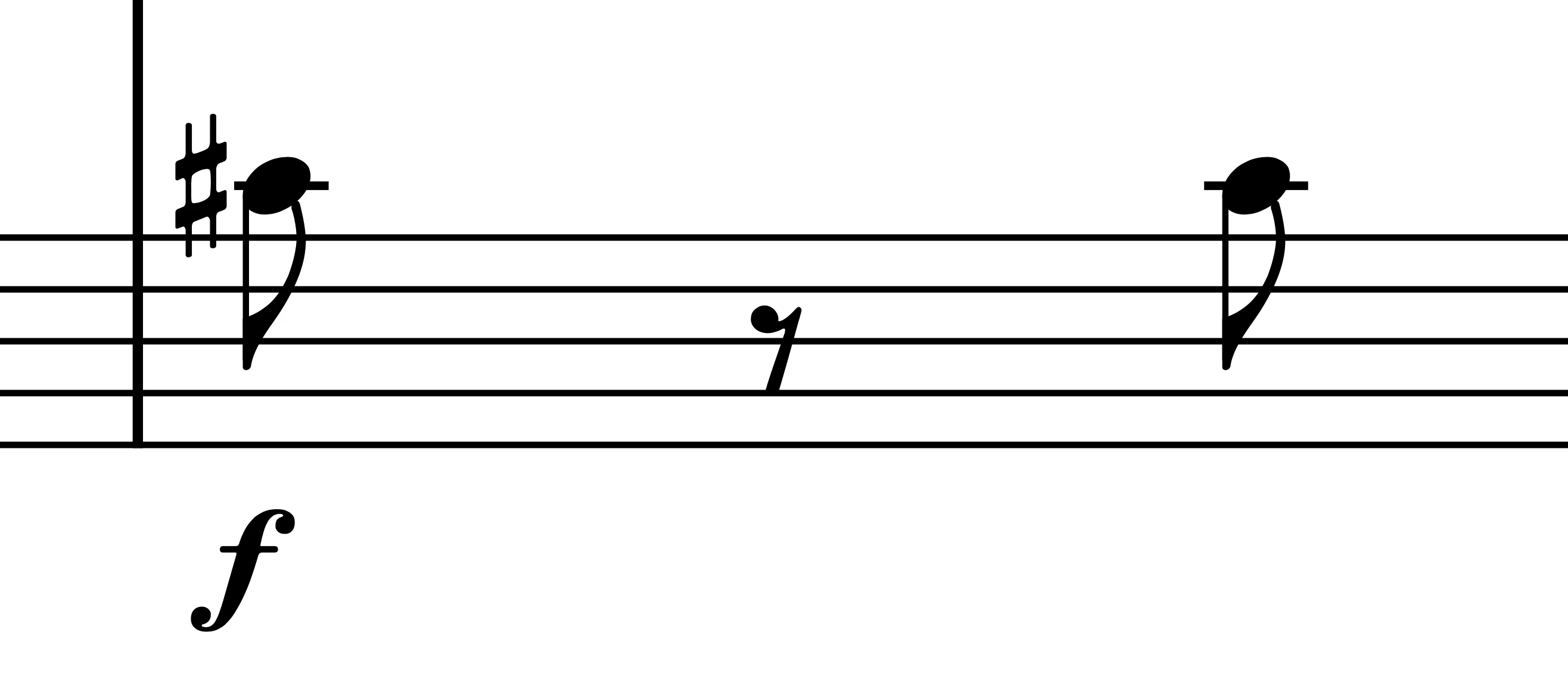
This is just an example, but the 30-pages long score is full of this, as you can imagine. 

In Dorico they look like the above picture, and they look the same in the PDF exported via Dorico and opened in Preview or Acrobat. They even look perfect when placed in the InDesign document. 

When I use the Export feature to generate the print-ready PDFs from InDesign (this applies to any preset I have tried, both PDF-X/3:2003 which the printer requires, and the Press Quality for digital download), the result is this:
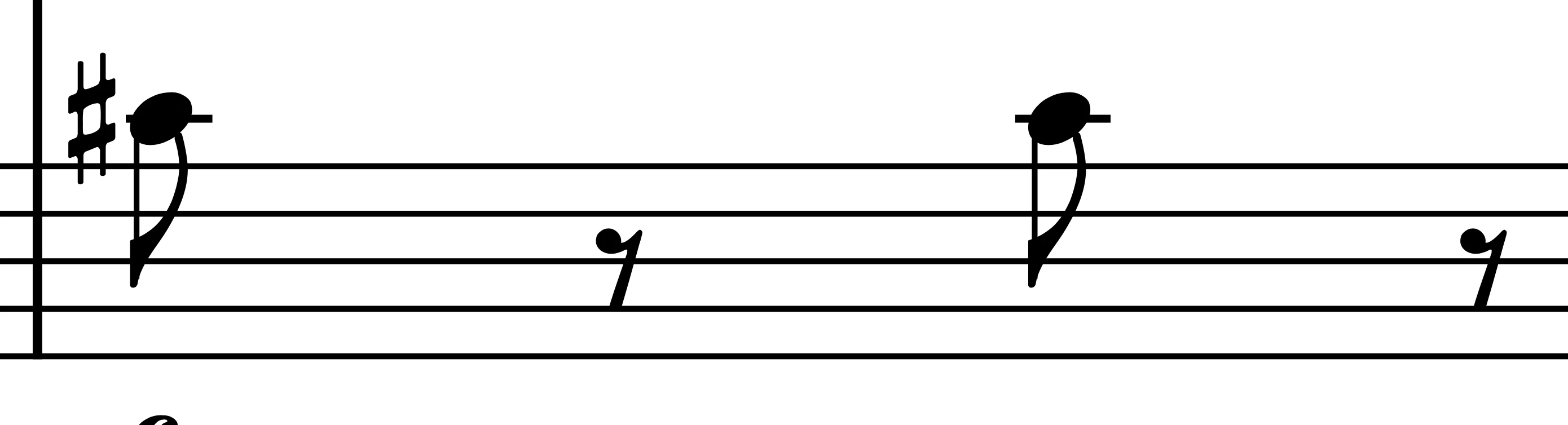
Look how now, the stem (the vertical line) doesn't align with the flag and the notehead. 


I cannot send these files like this to the printer, nor can I publish these online in this state.

I have cross-posted on the Dorico private forum for the developers to see if this tells them anything. 

Please, help me find what is going on. 

As stated, this is a show-stopping issue, and I need to send this to the printer plus publish it online ASAP.


Thank you


ADDENDUM:

Worked with Adobe Support via chat, with a less than pleasing computer sharing experience. 

They couldn't find what was wrong. Knowing that I had successfully managed this same workflow less than a month ago, I tried to resort to the Apple-way and placed SVGs instead of the PDF—the SVG being exported from AI 2023—. It worked ... the issue is gone. Still, I would like to know what could it be, since the Dorico PDF renders well on every screen and app I've tried, before failing during Adobe PDF export. 

This topic has been closed for replies.
Correct answer Brad @ Roaring Mouse

I did some tests in both v17 and v18, where I took PDFs exported from ID then opened and rendered each page in Photoshop at 1200 ppi, and compared that (Difference) to a render of the same page from your original PDF, and yes, the problem was reproducible.

The weird thing is affects the Bravura font objects the most, but the misalignment was different depending on where you are on the page.  Why, no idea.

Of note: It ALSO happens if you place your PDF into Illustrator then make a new PDF of that file, so it's not solely an InDesign issue.

I test-exported each page in your PDF to EPS format (yah, I know). Weirdly, those rendered in Photoshop as a perfect match to your PDF, but if I then placed those EPS into a new ID document and make a new PDF, the font was misaligned again.


But this may help you now:

I know it's not what you'd like to do, but if you run the Convert Fonts to Outline preflight action on your original PDFs, this eliminates the issue. You don't have much text outside of the notes anyway so I doubt it matters if it's outline or not.

1 reply

Steve Werner
Community Expert
Community Expert
December 16, 2022

I don't know I can explain it but I have some questions:


1. You said, "Knowing that I had successfully managed this same workflow less than a month ago"...does that mean that this very same workflow (Dorico PDF placed in ID > export to PDF in ID) worked before? What changed?


2. What version of InDesign are you using?


3. What operating system do you run?


4. Can you upload the Dorico PDF so others could work with it?


Inspiring
December 16, 2022
quote

1. You said, "Knowing that I had successfully managed this same workflow less than a month ago"...does that mean that this very same workflow (Dorico PDF placed in ID > export to PDF in ID) worked before? What changed?

That's what I was trying to diagnose. I work as a music engraver for sheet music publishers so this workflow is what I do every day. What changes is the source of the PDF: Finale, Sibelius, Dorico, Musescore, ... What changed from the last time I inserted a Dorico PDF is the version of Dorico itself (4.2 to 4.3) but looking at the PDF export engine it is always Qt 5.15.10. Since this issue doesn't apply to every note on every page, it was noticed during the final proof-reading phase before sending the material off to the printer!! 


I use InDesign 18.0 —curious I do not see an update available to 18.1 on my CC app. Is it normal? 

I work on macOS 12.6.1 — cannot upgrade to Ventura because my machine has been kicked out from Apple's walled garden

I am attaching an extract of that PDF, including the page that shows the issue. It contains piece "No. 1 in La minore", and the issue is shown in the line on page 3 that starts with bar 39, more precisely in the bottom staff. Please notice how that point, in Acrobat, looks good, in InDesign looks good and then it looks bad after PDF Export. 

Let me know what you find.

Brad @ Roaring Mouse
Community Expert
Brad @ Roaring MouseCommunity ExpertCorrect answer
Community Expert
December 16, 2022

I did some tests in both v17 and v18, where I took PDFs exported from ID then opened and rendered each page in Photoshop at 1200 ppi, and compared that (Difference) to a render of the same page from your original PDF, and yes, the problem was reproducible.

The weird thing is affects the Bravura font objects the most, but the misalignment was different depending on where you are on the page.  Why, no idea.

Of note: It ALSO happens if you place your PDF into Illustrator then make a new PDF of that file, so it's not solely an InDesign issue.

I test-exported each page in your PDF to EPS format (yah, I know). Weirdly, those rendered in Photoshop as a perfect match to your PDF, but if I then placed those EPS into a new ID document and make a new PDF, the font was misaligned again.


But this may help you now:

I know it's not what you'd like to do, but if you run the Convert Fonts to Outline preflight action on your original PDFs, this eliminates the issue. You don't have much text outside of the notes anyway so I doubt it matters if it's outline or not.