
Known Participant
September 28, 2020
Answered

Exported PDF color looks different than the working INDD doc

  • September 28, 2020
  • 2 replies
  • 5564 views

Color Conversion set to No Color Conv.  High Quality Press or Smallest file size both export the color different than the setting in the working INDD doc.  The result is just duller, more peach than pink.  The left side of the attached screenshot is the INDD the right side is the High Quality Press PDF.  


What am i missing here?  
This topic has been closed for replies.
Correct answer rob day

My client uses Preview to review the doc and we are not sendimgn to the printer


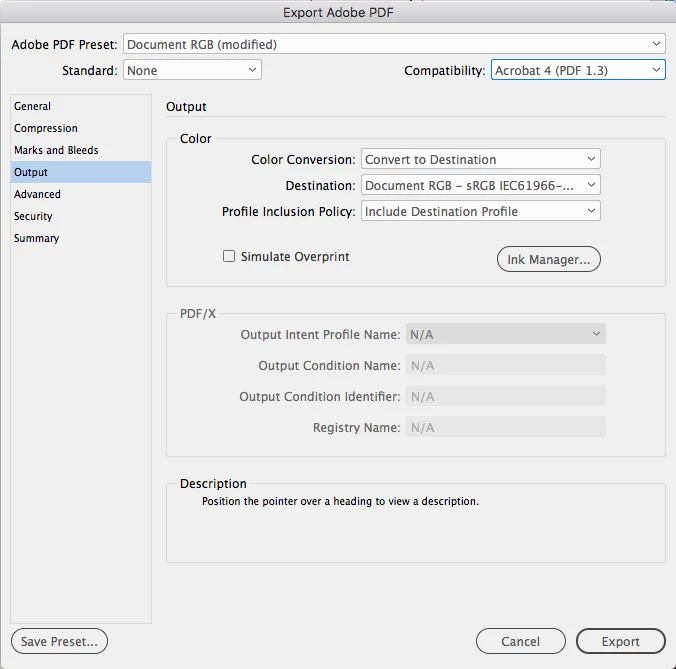
If your PDF is just for review in either Preview or a browser, set your Output tab to convert all color to sRGB and flatten transparency:


2 replies

Community Expert
September 30, 2020

Hi WeAreLumens,

you said: "Color Conversion set to No Color Conv. "

What do you hope to achieve with that "setting"?


Regards,
Uwe Laubender

( ACP )

SerraSemiAuthor
Known Participant
September 30, 2020

I am asking for help with a color discrepancy - the appearance of color to be consistent between the indd doc and the exported pdf.  I explained in detail above in the original post and additional conversations. If you think this setting is the issue please elaborte.  

rob day
Community Expert
Community Expert
October 1, 2020

If you Export with No Color Conversion, the exported PDF can contain a mix of objects with different color modes, all of which may or may not have color profiles embedded. If there are objects with no embedded profiles there’s no way of knowing how a PDF reader will handle the colors’ previews.


When you set the conversion to a uniform color space and include a profile, you have a better chance of lower end PDF viewers, like browsers, correctly displaying the color.


Also if you work in InDesign with Overprint Preview turned on and want an equivalent CMYK preview in the PDF reader, check Simulate Overprint.

Jens Trost
Inspiring
September 29, 2020

- Are your color management setting within Acrobat the same as in InDesign and the same as within your document?
- Did you enabled overprint preview both in InDesign and Acrobat? (sorry, have to ask ;))
- Did you embed profiles?

- Try exporting a PDF/X4 to make sure the document get shown with the correct output intent.

SerraSemiAuthor
Known Participant
September 30, 2020

Thank you for the reply.

And please ask anything that will help.  

My client uses Preview to review the doc and we are not sendimgn to the printer.  It will be reviewed online mostly (so exported smallest file size), with an option to download and print for those who want to (the high quality print version i attached screenshots of) Both have the same color issue.  So since we can't control what people do with their printers that doc is less of a concern.  The screen view is the main issue.  Also- when each page is exported to PNG the color looks correct.  so it's somethign to do with the PDF export. 

rob day
Community Expert
rob dayCommunity ExpertCorrect answer
Community Expert
September 30, 2020

My client uses Preview to review the doc and we are not sendimgn to the printer


If your PDF is just for review in either Preview or a browser, set your Output tab to convert all color to sRGB and flatten transparency: