Participant
November 8, 2024
Answered

Exporter une page en PDF

  • November 8, 2024
  • 3 replies
  • 675 views

Bonjour,

Je vous sollicite pour une aide sur Indesign.

J'ai un document de plusieurs pages et je voudrais exporter en PDF seulement une page.

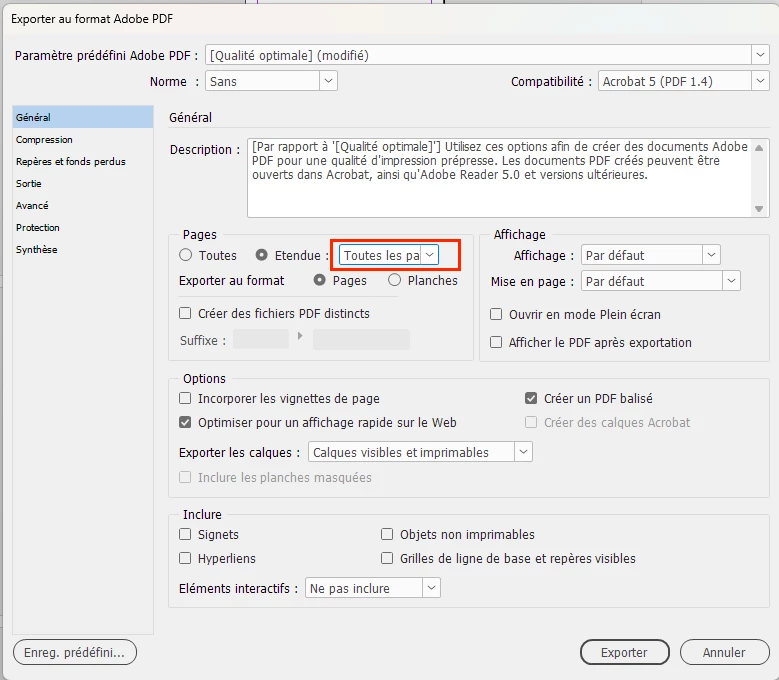
Dans exporter, le menu déroulant à côté d'"étendue" me propose uniquement "toutes les pages" (cf : image)

Avez-vous une solution ?

Merci beaucoup par avance

estelle

This topic has been closed for replies.
Correct answer jmlevy

Comme le dit @Abhishek Rao il faut saisir le numéro de page souhaité dans le champ qui affiche « toutes les pages ».

3 replies

jmlevy
Community Expert
jmlevyCommunity ExpertCorrect answer
Community Expert
November 8, 2024

Comme le dit @Abhishek Rao il faut saisir le numéro de page souhaité dans le champ qui affiche « toutes les pages ».

Participant
November 8, 2024

Merci beaucoup pour vos réponses.

Abhishek Rao
Community Manager
Community Manager
November 8, 2024

Hi @Planis-Cdhat,


Thank you for reaching out! I understand that you're trying to export only one page from your multi-page document to PDF, but the drop-down menu in the export window only shows the option for "all pages."

  1. Could you please share the version of InDesign you are using?
  2. Could you also provide the details of your operating system (Windows or macOS)?

To export only one specific page from your document to PDF, please follow these steps:

  1. Go to File > Export.
  2. In the Export Adobe PDF window (as shown in your image), locate the "Pages" section.
  3. Instead of using the drop-down menu, manually enter the page number you wish to export in the "Range" box. For example, type 3 if you want to export only page 3.
  4. Proceed by clicking "Export" to create the PDF.

This method should allow you to export a specific page without including the entire document.


Let me know if you need any more assistance!


Best,
Abhishek