
Inspiring
March 10, 2023
Answered

Exporting a facing page spread to single pages for printing

  • March 10, 2023
  • 2 replies
  • 988 views

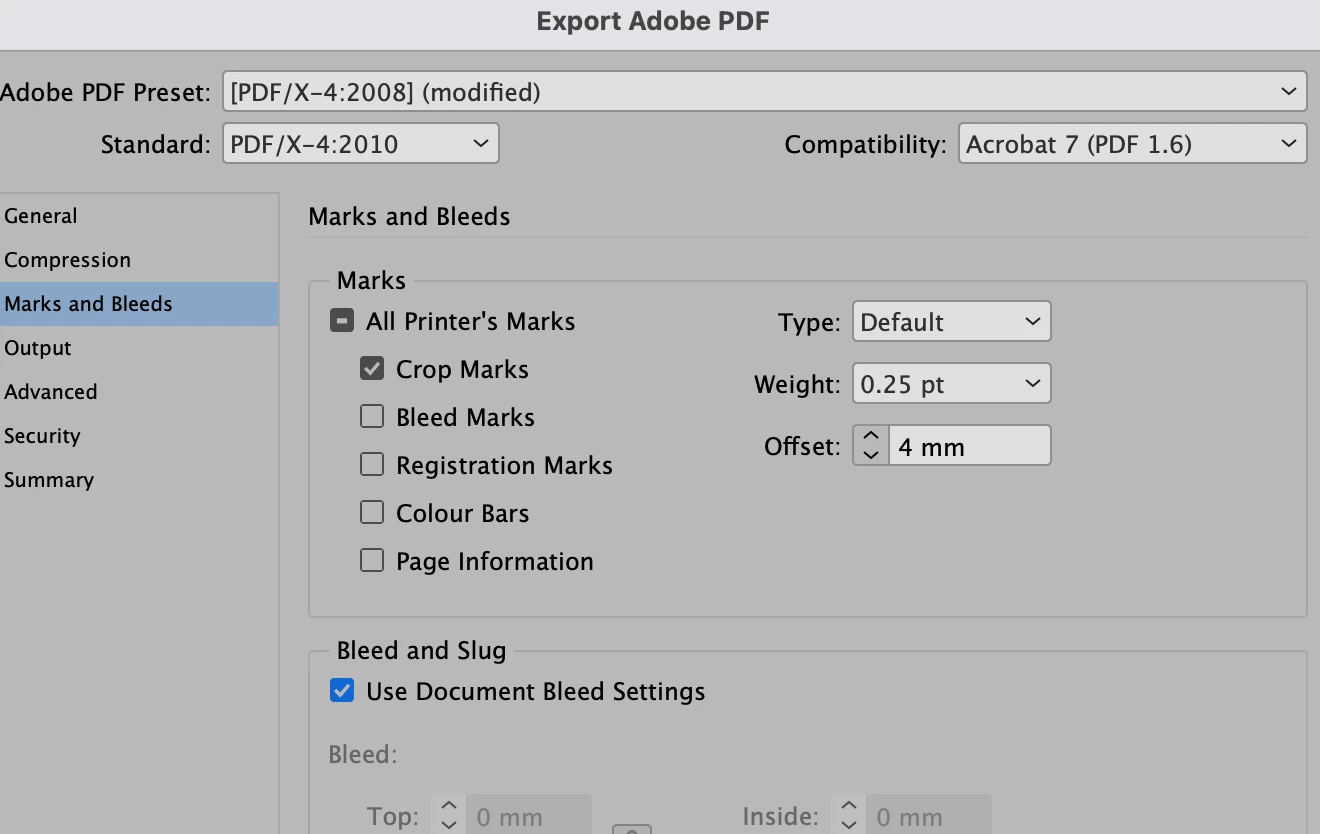
I have my book set up with facing pages. My printer wants to get it in single pages. How do I do this and what problems will I have? I need to include a 1/8  inch bleed and crop marks.  
This topic has been closed for replies.
Correct answer Derek Cross

Export to (say) PDF/X-4, select Pages (not Spreads) and under the Compression tab tick Crop Marks and Use Document Bleed Settings.

2 replies

Derek Cross
Community Expert
Derek CrossCommunity ExpertCorrect answer
Community Expert
March 10, 2023

Export to (say) PDF/X-4, select Pages (not Spreads) and under the Compression tab tick Crop Marks and Use Document Bleed Settings.

Inspiring
March 21, 2023

Thanks for all the help. Each answer was helpful and guided me down the correct path. The book is now at the printer, and we are waiting for a proof to check before it is printed. The last reply by Derek Cross was extremely helpful as it was a printout that I could follow. I'll mark that as correct. Thanks again for all the help. 

Legend
March 10, 2023

How will the final project be bound? In most cases, inside bleed is not required. (exceptions are wire-bound or loose pages).


Inspiring
March 10, 2023

It's a 210 page hard cover book, case bound.