Participant
September 16, 2020
Answered

Exporting a PDF with both PSD and AI files

  • September 16, 2020
  • 3 replies
  • 2467 views

Hello,


I've created a document with InDesign and it has both PSD files and AI files.


The first problem is that the AI files sort of load differently than the PSD files when exported, and more importantly I'm trying to reduce the size of the PDF without losing too much quality, but the result is that the PSD files look horrible and the AI files look perfect, but the file is still very large.

Is that because those files are vector so they will never lose quality hence I will not be able to make the PDF smaller unless I convert the AI files into JPEG files?


While I'm here, I also wanted to ask for tips for exporting PDFs with about 10-15 images and keep the quality as high as possible but the PDF size under 2MB


Hope that makes sense!
Thanks

Eleonora
This topic has been closed for replies.
Correct answer Luke Jennings3

Is that because those files are vector so they will never lose quality?

Yes

Hence I will not be able to make the PDF smaller unless I convert the AI files into JPEG files?

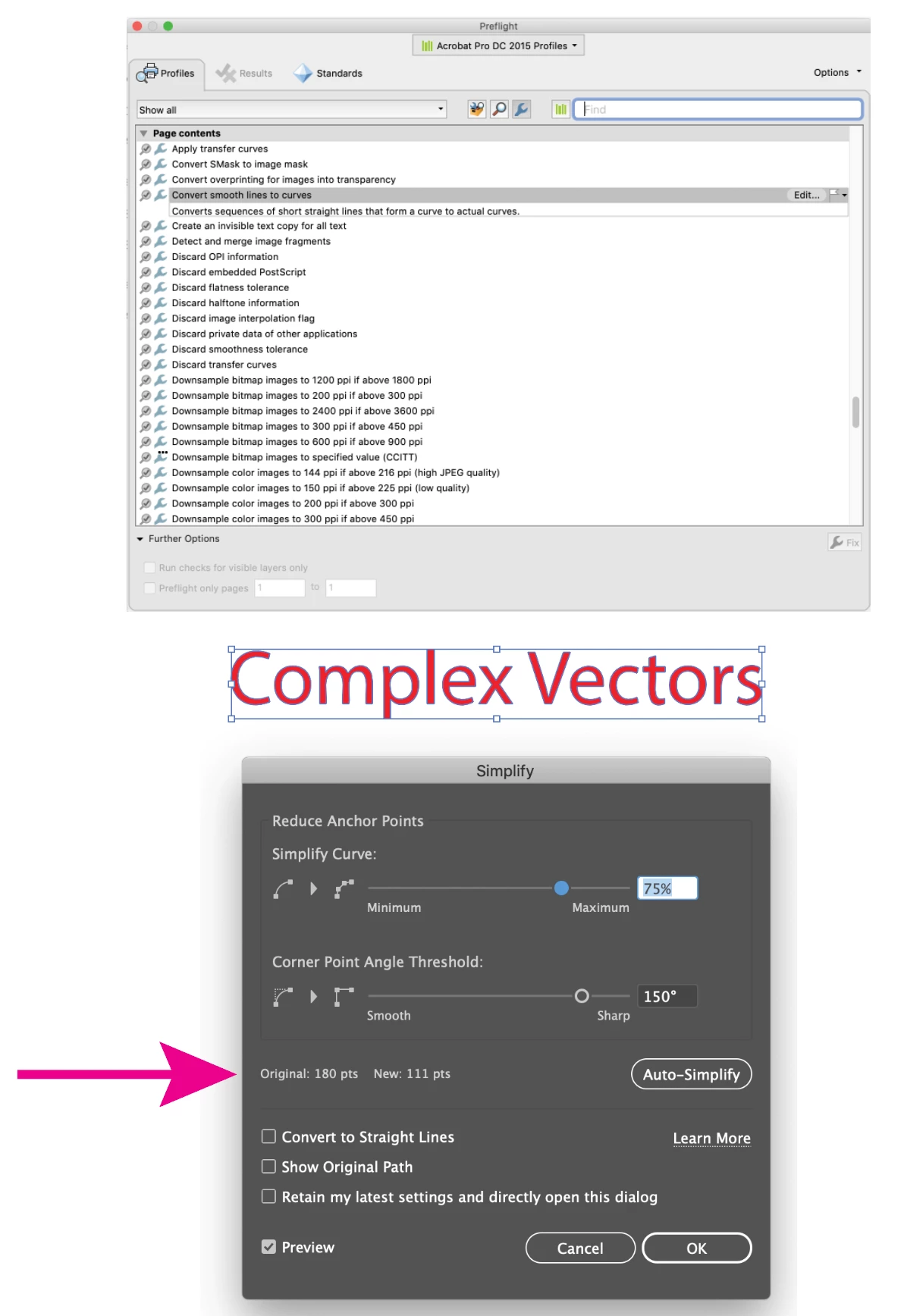
Not necessarily, AI files may contain effects that will be rasterized upon output (Document Raster Effect Settings) which can be adjusted, effecting file size, although downsampling upon PDF export will overide the raster effect settings. AI files may also contain elements with very complex vectors, which can either be converted to a raster image, or (sometimes) simplified using Object> Path> Simplify, or using an Acrobat preflight (applied to a copy of the AI file saved as a PDF)- Convert smooth lines to curves.

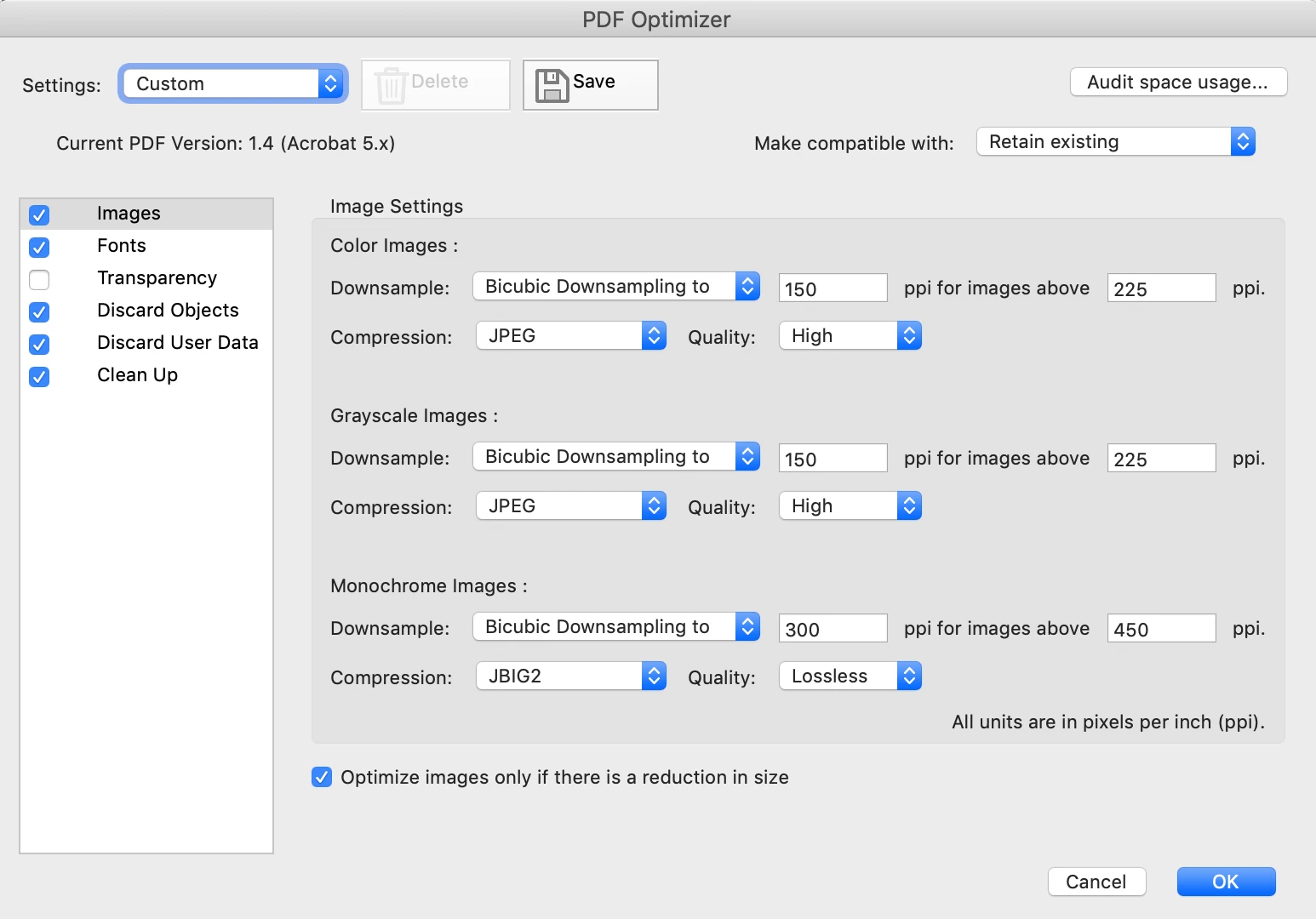
Optimizing the final PDF in Acrobat, discarding everything you don't need, can often greatly reduce the size of the PDF.

3 replies

Luke Jennings3
Community Expert
Luke Jennings3Community ExpertCorrect answer
Community Expert
September 16, 2020

Is that because those files are vector so they will never lose quality?

Yes

Hence I will not be able to make the PDF smaller unless I convert the AI files into JPEG files?

Not necessarily, AI files may contain effects that will be rasterized upon output (Document Raster Effect Settings) which can be adjusted, effecting file size, although downsampling upon PDF export will overide the raster effect settings. AI files may also contain elements with very complex vectors, which can either be converted to a raster image, or (sometimes) simplified using Object> Path> Simplify, or using an Acrobat preflight (applied to a copy of the AI file saved as a PDF)- Convert smooth lines to curves.

Optimizing the final PDF in Acrobat, discarding everything you don't need, can often greatly reduce the size of the PDF.

rob day
Community Expert
Community Expert
September 16, 2020


If the PDF is for screen viewing try something like this. You can also set the Output Destination to an RGB profile so everything is 3 channels:


Randy Hagan
Community Expert
Community Expert
September 16, 2020

Regarding the first question, it could be any number of reasons, but my suspicion is that there's a lot of extraneous information (layers not displayed, adjustment layers for various output purposes, saved selections/channels, etc.) stored in your .psd files. Any or all of that adds substantial headroom/file size to your placed documents that you'll never see. But InDesign will, and plop it all into your PDF unless you have settings to otherwise affect it.


I know lots of folks are proponents of the Place PSDs camp, but I'm not one of them. I'm of the set up your image the way you want, use the Layer> Merge Visible menu command and then immediately File>Save As... command to save a max quality JPEG to place into InDesign school of thought. I still get the same image I want, but without all the file overhead from my Photoshop working file. It also creates a file that's much smaller in size than a .psd, with a built-in scheme for handling additional compression if I need it down the line.


As for your second, there are lots of variables that need to be addressed. How big are the images? How many/how big are the pages? Is any interactivity being built into the PDFs? I'd start with the placing JPEGs strategy first, and see how well that works for you first. That may get where you want to be all by itself. From there, if it doesn't get you where you want, we can address other possibilities which may work for you.


Hope this helps,


Randy

rob day
Community Expert
Community Expert
September 16, 2020

Hi Randy, As long as your placed files are linked, there would be no meaningful difference in the InDesign document’s file size when placing JPEGs vs. PSDs—both PSDs and JPEGs use a low res proxy for the placed image’s preview when they are linked. With JPEGs you’ll get a double compression on a default PDF export, and you would still need to keep a copy of the original layered PSD file.


Here’s a page with a 611MB, 15 layer PSD, and the ID document size is only 2MB:


Randy Hagan
Community Expert
Community Expert
September 16, 2020

Hi Rob.


I agree. I would definitely keep the working PSD file. I just believe in a two-file workflow, for a number of reasons. This is just one of them.


I also agree that either option doesn't contribute dramatically to file size within InDesign, where we're linking files and using low-res proxies for representation in the .indd file. But I've found when outputting intrinsic PDF files that the extra filesize from placing my working PSD files, rather than a flattened JPEG file with only the information I want to output as an image, pays dividends for me. But of course, that might just be an unfortunate by-product of my workflow generating images for InDesign contributing to the problem too.


For anything but digital output, I try to run maximum quality for my JPEGs when generating PDFs. I may throw away resolution/downsample, but I work hard to avoid double-compressing the PDFs as much as possible from  InDesign. If I end up too large on file size, I'll take my shot at Compress PDF options in Acrobat. Then I can compare my reduced-size copy to the original to judge whether I got away with it or not. Fortunately, as I'm primarily a print puke and FTP lets me ship large files if I've got the time, it generally isn't much of an issue for me.


I absolutely respect your call, and I know by my experience YMMV. I just share what works for me, but I know better than to presume my option is the best, or even worse the only, option.


With mad respect,


Randy