Averee C
Inspiring
February 4, 2025
Answered

Exporting an interactive .pdf changes the colors

  • February 4, 2025
  • 4 replies
  • 343 views

I'm having a really frustrating issue. I am trying to export an interactive .pdf, but when I do there is some color conversion going on. Normally I would mess with the color settings in the export dialog, but the interactive .pdf export dialogue box has no color conversion settings (presumably this means that there is no color conversion going on when exporting this type of .pdf), however when I open the .pdf several of my colors are very obviously and significantly changed. Many of the colors look like they are approximating the "out of gamut" CMYK color coversions of my RGB color swatches - but I don't know why it would bother doing this for an interactive .pdf (which is presumed to be for digital use).


Any ideas? I found this thread that seemed to have a similar issue, but the proposed "correct answers" have yielded no results for me. Changing the color settings changes how they appear in the document to me, but the colors are still changing once exported.


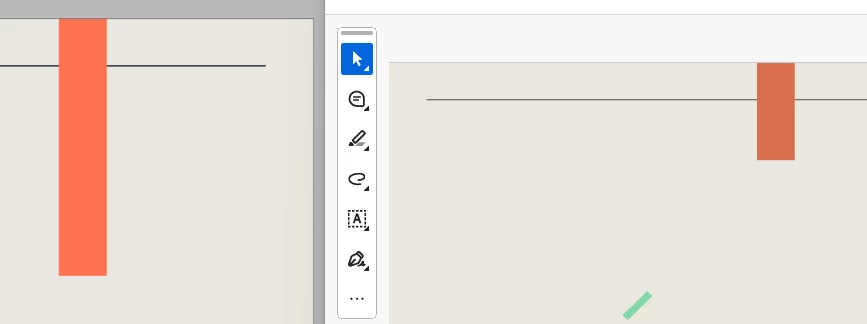
Here you can see the orange color in my document (left) is clearly much different than the orange color as it appears in the exported pdf (right).


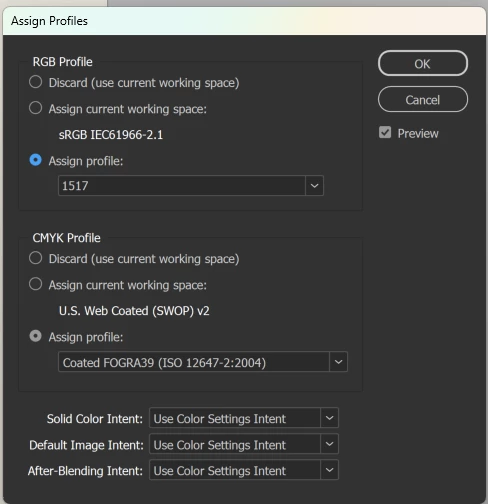
Here are some of my settings for INDD. I will openly admit that the "color settings" and "color profiles" make absolutely no sense to me and this is probably where the issue lies. I know these might be conflicting right now (I was changing them around to try and get my desired result), but even when the profiles are set to "assign current working space" it was not working. I don't know which color settings/profiles I "should" be using - I just want what appears in my document to appear in the final .pdf. 


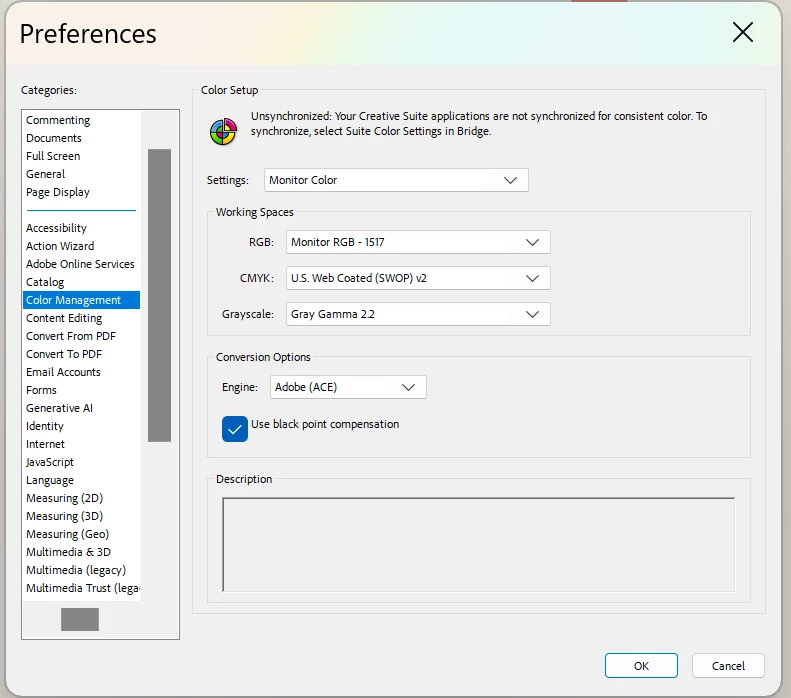
Here are my settings in Adobe Acrobat:


Correct answer Averee C

The workaround Ithat worked for me was to just export as a print .pdf and enable hyperlinks and bookmarks. The export dialogue box for the print .pdf gives control over color conversion (which the interactive box doesn't, which was my issue).


This worked for my specific case cause all I needed was the hyperlinks, but for someone making form fields or other interactive elements it might not since the print .pdf dialogue box has limited interactivity options available.

4 replies

rob day
Community Expert
Community Expert
May 4, 2026

Hi ​@MJ3108 , Does the problem happen if you view in a web browser—not Acrobat or some other PDF viewer?


I get this with ProPhoto RGB as the RGB assignment, exported an interactive PDF with RGB, Lab, and spot colors viewed in Firefox. Interactive PDF exports get converted to sRGB and include a profile.


MJ3108
Participant
May 4, 2026

I am having this same issue mentioned above, but exporting as print does not solve it for me. I double-checked all recommendations mentioned about making sure all colour swatches are set to RGB, which they are. I have my file transparency blend space as Document RGB. My colour settings were also set to sRGB as mentioned above from before on Adobe Bridge and synchronized across apps. 

The weirdest thing is that I have an older version of the same file, that does export properly. And after certain version, it stopped exporting this particular colour properly. No changes were made to the colour, the transparency blend space, nor the colour settings. The issue is on a brand colour, so it is essential that it exports properly, and it was before, but not anymore.

Anubhav M
Community Manager
Community Manager
May 5, 2026

Hello ​@MJ3108 


I’m sorry to hear you’re having similar trouble with your exported PDFs from InDesign. Would you mind sharing a sample INDD file and the exported PDF, along with screenshots of the export settings used, so we can try to replicate this on our end?


Looking forward to hearing from you.
Anubhav

Averee C
Averee CAuthorCorrect answer
Inspiring
February 4, 2025

The workaround Ithat worked for me was to just export as a print .pdf and enable hyperlinks and bookmarks. The export dialogue box for the print .pdf gives control over color conversion (which the interactive box doesn't, which was my issue).


This worked for my specific case cause all I needed was the hyperlinks, but for someone making form fields or other interactive elements it might not since the print .pdf dialogue box has limited interactivity options available.

Mike Witherell
Community Expert
Community Expert
February 4, 2025

Export to PDF Interactive implies using the sRGB colorspace.


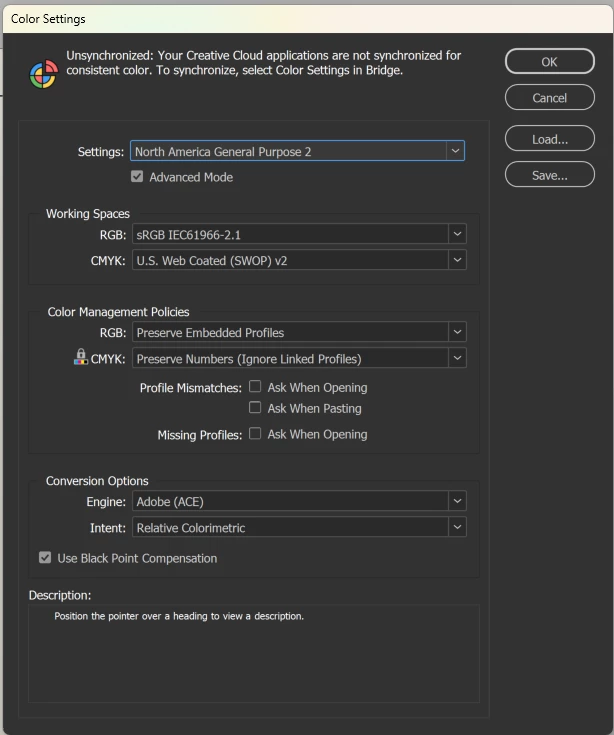
I prefer going all the way back to Photoshop Color Settings and make a choice of sRGB for your working RGB space. It appears you already have that. Make sure that that saved Color Settings File (.csf) is communicated/synchronized in InDesign as well. I use Adobe Bridge > Edit > Color Settings to make the saved .csf in Photoshop also imposed on / synchronized to InDesign, Illustrator, and (maybe also) Acrobat. Restart your apps.


In InDesign, make sure you have the Edit > Transparency Blend Space set to RGB for the document.

The Assign profile might be properly set to sRGB, if you bother to set it at all.


After sorting these things out, exporting to Interactive PDF should show much less color difference. You should not expect it to look like CMYK colors.


Mike Witherell