
Known Participant
February 16, 2017
Answered

Exporting from InDesign to jpg causing color corruption

  • February 16, 2017
  • 4 replies
  • 7353 views

The colors are all wrong when I export. I've researched this in the forums and can't find a good answer. Please, no acronyms or abbreviations in your answers, since I don't know what they stand for. Thanks!
    This topic has been closed for replies.
    Correct answer rob day

    Please, no acronyms or abbreviations in your answers

    Sorry, not possible when answering color questions.

    The colors are all wrong when I export.

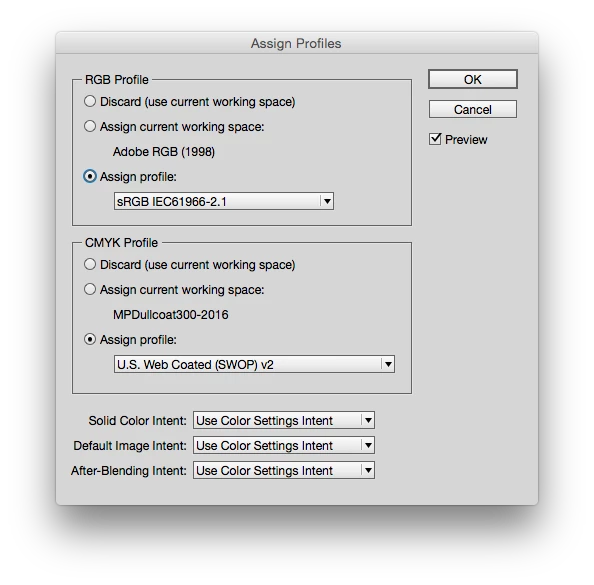
    Try choosing Edit>Assign Profiles...  and under RGB Profile set Assign Profile: pop-up selection to sRGB.

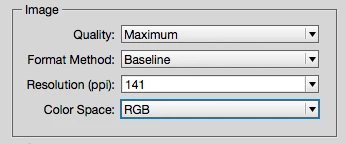
    Then from the JPEG Export dialog choose RGB as the Color Space

    4 replies

    Known Participant
    February 16, 2017

    Also, I just tried to do the same "assign profile" steps for CMYK, including in export settings checking the "embed color profile" box in the Options section, but no luck. Originally, the colors were showing with a bright neon hue. And now that issue is fixed, but the transparency is wrong. I have a background on this print ad featuring a full-page photo, but the photo is set to 50% transparency to allow font legibility. RGB version looks fine, but can't get this to carry over on CMYK.

    rob day
    Community Expert
    Community Expert
    February 16, 2017

    Where are you viewing the exported JPEG? Sounds like you are viewing in an app without full color management, like Preview or a browser.

    (the only file types accepted by client). It's ultimately going to live as a printed advertisement in a magazine, so I'm assuming CMYK is better than RGB, right?

    Usually magazine advertisement can be delivered as PDFs, which is the preferred format. Tiffs and Jpeg convert the page into a bitmap which will cause problems with text and other InDesign objects.

    Known Participant
    February 16, 2017

    Yep, I've always known them to accept pdf's so I thought these specs were a little strange.  I think you're right, that I'm viewing in some sort of preview mode (the default program used to open jpg's).  Is there a particular program you recommend I open them with?  Thanks!

    Known Participant
    February 16, 2017

    Thanks for the feedback, guys. Rob's "assign profiles" trick worked - thanks! Steve, in answer to your question, it's InDesign CC 2017 and I'm on Windows 7.

    I'm still wondering how to export as high-res jpg or tiff (the only file types accepted by client). It's ultimately going to live as a printed advertisement in a magazine, so I'm assuming CMYK is better than RGB, right?  If so, how do I meet those specs?

    Thanks again.

    rob day
    Community Expert
    rob dayCommunity ExpertCorrect answer
    Community Expert
    February 16, 2017

    Please, no acronyms or abbreviations in your answers

    Sorry, not possible when answering color questions.

    The colors are all wrong when I export.

    Try choosing Edit>Assign Profiles...  and under RGB Profile set Assign Profile: pop-up selection to sRGB.

    Then from the JPEG Export dialog choose RGB as the Color Space

    Steve Werner
    Community Expert
    Community Expert
    February 16, 2017

    What version of InDesign? What operating system? Please provide a better description of what's happening to the colors. What are you trying to use the JPEG file for?

    I'd guess that you're in CMYK in a print workspace. JPEG is designed for on-screen viewing in RGB color. CMYK stands for cyan/magenta/yellow/black the colors used for 4-color process printing. RGB stands for red/green/blue the colorants that are projected to your screen, tablet or smartphone.