Hi @m1b
I apologize for the trouble.
The preceding thought is a bit confusing.
Maybe I should have phrased it like this:
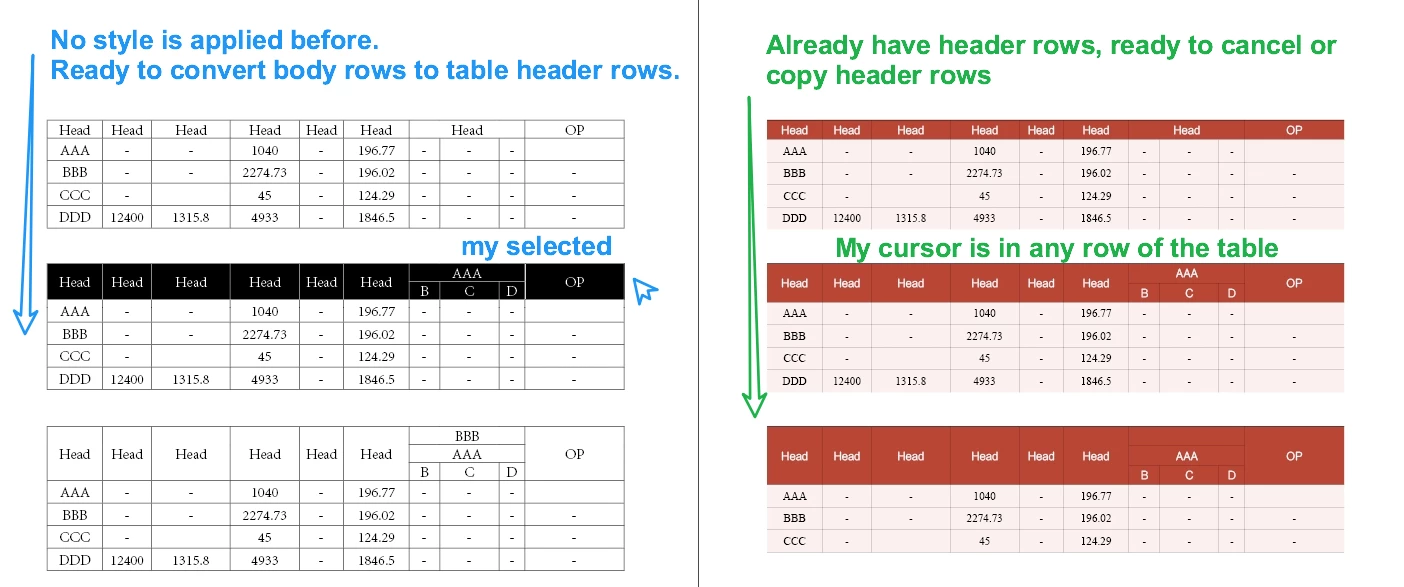
Judge this table, if there is no table header, convert the selected row to a table header.
If there is already a header, and record which rows are headers (I'm stubborn), then cancel the header.
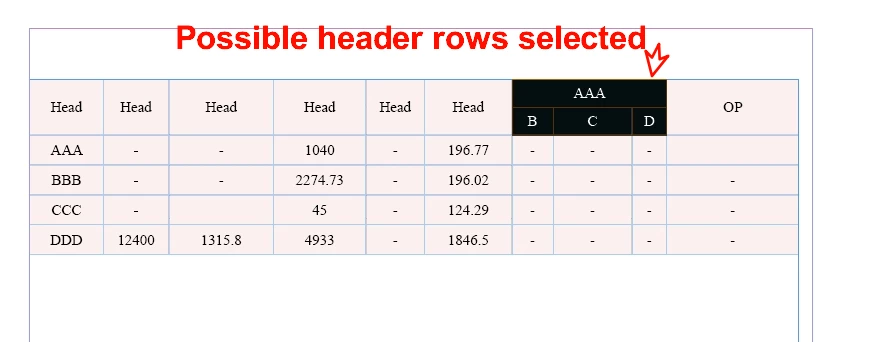
Okay @dublove you just want a script to simply convert the selected cells to header rows and other rows to body rows. Easy right? Haha, here you go...
- Mark
/**
 * @file Convert Table Row Types.js
 *
 * Will convert the selected rows to header rows
 * and also convert any non-selected header rows
 * to body rows.
 *
 * Note: will convert the minimum number of rows
 * necessary to obey the rules around converting rows
 * with merged cells. This may be *more* than the
 * selected rows.
 *
 * @author m1b
 * @version 2025-07-18
 * @discussion https://community.adobe.com/t5/indesign-discussions/how-can-i-accurately-perform-a-table-header-row-conversion-operation-with-a-script/m-p/15295606
 */
function main() {

    var doc = app.activeDocument,
        selectedRows = getRows(doc.selection[0]);

    if (0 === selectedRows.length)
        return alert('Please select some table rows and try again.')

    // convert the selected rows to header rows
    var headerRows = convertToRowType(selectedRows, RowTypes.HEADER_ROW);

    // collect all the rows that now *should* be body rows
    var bodyRows = [],
        table = headerRows[0].parent,
        lastHeaderRowIndex = headerRows[headerRows.length - 1].index;

    for (var i = lastHeaderRowIndex + 1; i < table.rows.length; i++)
        if (RowTypes.HEADER_ROW === table.rows[i].rowType)
            bodyRows.push(table.rows[i]);

    // convert them to body rows
    var bodyRows = convertToRowType(bodyRows, RowTypes.BODY_ROW);

};
app.doScript(main, ScriptLanguage.JAVASCRIPT, undefined, UndoModes.ENTIRE_SCRIPT, 'Convert to Header Rows');

/**
 * Converts each row in `rows` to the given `rowType`.
 * Note that this will expand the rows to include all merged rows
 * because you can't set the rowType of a partially merged row.
 * @author m1b
 * @version 2025-05-01
 * @param {Array<Row>} rows - the target rows.
 * @param {RowTypes} rowType - the desired row type.
 * @returns {Array<Row>} - the rows that were converted.
 */
function convertToRowType(rows, rowType) {

    if (0 === rows.length)
        return [];

    var merges = [],
        table = rows[0].parent;

    // this will expand the rows to include all merged rows
    // because you can't set the rowType of a partially merged row
    rows = getRows(rows, undefined, true);

    rows.sort(
        // footers must be converted in reverse order
        (RowTypes.FOOTER_ROW === rowType)
            ? function (a, b) { return b.index - a.index }
            : function (a, b) { return a.index - b.index }
    );

    if (RowTypes.HEADER_ROW === rowType) {

        // because header rows must be at the start of the table
        // add any rows until the start
        while (rows[0].index > 0)
            rows.unshift(table.rows[rows[0].index - 1]);

    }

    else if (RowTypes.FOOTER_ROW === rowType) {

        // because footer rows must be at the end of the table,
        // add rows until the end
        while (rows[rows.length - 1].index + rows.length < table.rows.length)
            rows.unshift(table.rows[rows[rows.length - 1].index + rows.length]);

    }

    // find and unmerge cells that span across the selected rows
    for (var i = 0; i < rows.length; i++) {

        var row = rows[i];

        cellsLoop:
        for (var j = 0; j < row.cells.length; j++) {

            var cell = row.cells[j];
            var rs = cell.rowSpan;
            var cs = cell.columnSpan;

            if (1 === rs && 1 === cs)
                // not merged
                continue cellsLoop;

            merges.push({
                row: cell.parentRow.index,
                column: cell.parentColumn.index,
                rowSpan: rs,
                columnSpan: cs
            });

            cell.unmerge();

        }

    }

    // set the rowType of each row
    for (var i = 0; i < rows.length; i++)
        if (rows[i].rowType !== rowType)
            rows[i].rowType = rowType;

    // re-merge the previously merged cells
    for (var i = merges.length - 1; i >= 0; i--) {

        var m = merges[i],
            topLeft = table.rows[m.row].cells[m.column],
            bottomRight = table.rows[m.row + m.rowSpan - 1].cells[m.column + m.columnSpan - 1];

        topLeft.merge(bottomRight);

    }

    return rows;

};

/**
 * Returns the merged rows of a given row.
 * @author m1b
 * @version 2025-05-01
 * @param {Row} row - the target row.
 * @param {Function} [isUnique] - private function to check for uniqueness.
 * @returns {Array<Row>}
 */
function getMergedRows(row, isUnique) {

    isUnique = isUnique || uniqueChecker();

    var rows = [],
        rowIndex = row.index,
        table = row.parent;

    if (isUnique(row.index))
        rows.push(row);

    // 1. check for spans going down from this row
    var cells = table.rows[rowIndex].cells;
    for (var i = 0; i < cells.length; i++)
        for (var j = 0; j < cells[i].rowSpan; j++)
            if (isUnique(table.rows[rowIndex + j].index))
                rows.push(table.rows[rowIndex + j]);

    // 2. check for cells in earlier rows that reach into this one
    for (var r = 0, testRow; r < rowIndex; r++) {

        testRow = table.rows[r];
        span = testRow.rowSpan;

        if (r + span - 1 < rowIndex)
            continue;

        for (var j = 0; j < span; j++)
            if (isUnique(table.rows[r + j].index))
                rows.push(table.rows[r + j]);

    }

    rows.sort(function (a, b) { return a.index - b.index });

    return rows;

};

/**
 * Given cells, returns the cells' rows.
 * @author m1b
 * @version 2025-07-19
 * @param {Cell|Cells|Array<Row>} cells - the cells to get rows from.
 * @param {RowTypes} rowType - the desired row type.
 * @param {Boolean} [includeMergedRows] - whether to include merged rows (default: false).
 * @param {Table} [table] - the rows' table.
 * @param {Function} [isUnique] - private function to check for uniqueness.
 * @returns {Array<Row>}
 */
function getRows(cells, rowType, includeMergedRows, table, isUnique) {

    var rows = [],
        isUnique = isUnique || uniqueChecker();

    if (!cells)
        return;

    if ('function' === typeof cells.getElements)
        cells = cells.getElements();

    if (
        'Array' === cells.constructor.name
        && cells[0].hasOwnProperty('cells')
    ) {
        // to handle the case of expanding an array of rows to include merged rows
        for (var i = 0; i < cells.length; i++)
            rows = rows.concat(getRows(cells[i].cells, rowType, includeMergedRows, table, isUnique))

        return rows;
    }

    if (
        cells.hasOwnProperty('cells')
        && cells.cells.length > 0
    )
        cells = cells.cells;

    if (
        !cells.hasOwnProperty('0')
        || !cells[0].hasOwnProperty('parentRow')
    )
        // can't get rows from `cells`
        return [];

    var table = table || cells[0].parent;

    while (
        'Table' !== table.constructor.name
        && table.hasOwnProperty('parent')
    )
        table = table.parent;

    for (var i = 0, row; i < cells.length; i++) {

        spanLoop:
        for (var j = 0; j < cells[i].parentRow.rowSpan; j++) {

            row = table.rows[cells[i].parentRow.index + j];

            if (
                undefined != rowType
                && rowType !== row.rowType
            )
                continue spanLoop;

            if (includeMergedRows)
                rows = rows.concat(getMergedRows(row, isUnique));

            else if (isUnique(row.index))
                rows.push(row);

        }

    }

    return rows;

};

/**
 * Returns a function that, given a String, will
 * return true if that String has not been seen before.
 *
 * Example:
 *   var isUnique = uniqueChecker();
 *   if (isUnique(myThing))
 *     // do something with myThing
 *
 * @author m1b
 * @version 2025-05-01
 * @returns {Function}
 */
function uniqueChecker() {

    var unique = {};

    return function (str) {

        if (unique[str])
            return false;

        unique[str] = true;
        return true;

    };

};
Edit 2025-07-18: fixed bug in getRows function.
Edit 2025-08-26: updated getRows function.




 AdChoices