



m1b
Community Expert
Community Expert
July 6, 2026
Answered

[ExtendScript] How to put a page item into another page item?

  • July 6, 2026
  • 2 replies
  • 37 views

Let’s say I have two page items in my document: a circle and a square. I move the square so its top left corner is in the centre of the circle. I cut (cmd-X) the square. It’s gone. I select the circle and I “Paste Into” (cmd-alt-V).

The square is now clipped by the circle frame:
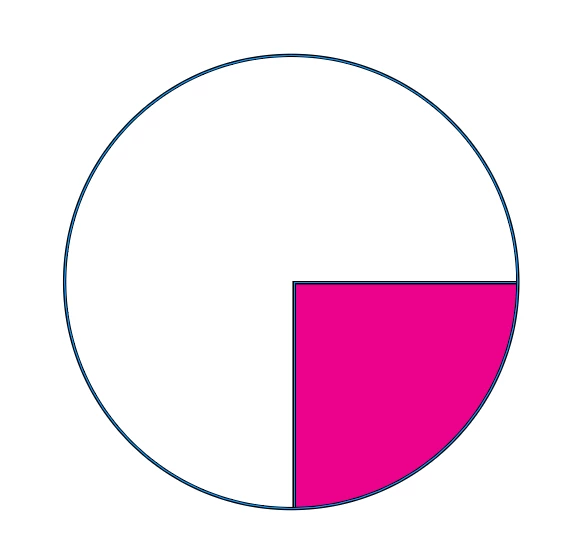
So, I want to do that via the scripting API. With the above example, I can select the circle and do:

$.writeln(app.activeDocument.selection[0].rectangles.length)

and the result is 1, which is correct. There is one rectangle IN that circle.


What I want to know is… how do I put the square in the circle via ExtendScript or UXP? It must be easy, but I can’t quite get it. I want `myPageItem.rectangles.add` to do it, but it only seems to want a Layer, which makes no sense.

– Mark

    Correct answer Peter Kahrel

    @m1b -- You use the contentPlace() method for this. Given a circle and a rectangle, you place the  rectangle in the circle as follows:

    circle = app.activeDocument.pageItems.item('circle');
    rectangle = app.activeDocument.pageItems.item('rectangle');

    circle.contentPlace ([rectangle]);


    2 replies

    Peter Kahrel
    Community Expert
    Peter KahrelCommunity ExpertCorrect answer
    Community Expert
    July 6, 2026

    @m1b -- You use the contentPlace() method for this. Given a circle and a rectangle, you place the  rectangle in the circle as follows:

    circle = app.activeDocument.pageItems.item('circle');
    rectangle = app.activeDocument.pageItems.item('rectangle');

    circle.contentPlace ([rectangle]);


    m1b
    Community Expert
    m1bCommunity ExpertAuthor
    Community Expert
    July 7, 2026

    @Peter Kahrel exactly what I was looking for! Thank you!

    The contentPlace method has a few quirks so I’ve written a little helper function around it. I’ll post it here in case it helps anyone else coming along.

    – Mark

    /**
    * Places item(s) in a page item container, similar to
    * using the "Paste Into" menu command.
    *
    * IMPORTANT: WILL RETURN A NEW REFERENCE to `item` - the original
    * reference will be invalid.
    *
    * Notes:
    * 1. If `container` already holds pageItems, they will be deleted.
    * 2. If `item` is an array of items, they will be grouped.
    * 3. this will *duplicate* the items, and then
    * remove the originals!
    * 4. Will return reference to the *new* placed item or group.
    * IT WILL NOT HAVE THE SAME ID.
    *
    * @author m1b
    * @version 2026-07-07
    * @param {PageItem} container - the page item to place into.
    * @param {PageItem|Array<PageItem>} item - the item(s) to place.
    * @returns {PageItem|Group}
    */
    function placeInto(container, item) {

    if ('function' !== typeof container.contentPlace)
    throw new Error('placeInto: bad `container` supplied.');

    var itemToPlace = item;

    if (!(itemToPlace instanceof Array))
    itemToPlace = [itemToPlace];

    // check page items for validity
    for (var i = 0; i < itemToPlace.length; i++)
    if (!itemToPlace[i].isValid)
    throw new Error('placeInto: item ' + i + ' is invalid.');

    // group multiple items
    if (itemToPlace.length > 1)
    itemToPlace = [itemToPlace[0].parent.groups.add(itemToPlace)];

    // at this point `itemToPlace` is always a one-element Array
    // and `itemToPlace[0]` is either a page item or a group

    // get coordinates of item in container's space
    var x = itemToPlace[0].geometricBounds[1] - container.geometricBounds[1];
    var y = itemToPlace[0].geometricBounds[0] - container.geometricBounds[0];

    // empty the container first
    if (container.pageItems.length > 0)
    container.pageItems.everyItem().remove();

    // place the item inside container
    container.contentPlace(itemToPlace, false, false, false, false);

    // remove the original
    itemToPlace[0].remove();

    // get a reference to the inner item
    var innerItem = container.pageItems[0];

    if (!innerItem.isValid)
    throw new Error('placeInto: could not get reference to innerItem.');

    // reposition within the container
    innerItem.move(undefined, [x, y]);

    return innerItem;

    };


    rob day
    Community Expert
    Community Expert
    July 6, 2026

    Hi ​@m1b , This doesn’t have any error checking, but works with a 2-item selection:


    var s = app.selection
    if (s.length == 2) {
    app.select(s[1]);
    app.cut()
    app.select(s[0]);
    app.pasteInto()
    }


    m1b
    Community Expert
    m1bCommunity ExpertAuthor
    Community Expert
    July 7, 2026

    Thanks ​@rob day that’s a decent workable solution, but I always go with the option that doesn’t mess with the user’s clipboard. :)

    – Mark