
Inspiring
January 14, 2025
Answered

Extra page numbers added in TOC

  • January 14, 2025
  • 3 replies
  • 303 views

I've had lots of problems with InDesign's Table of Contents generator, but this is a new one!


In addition to the correct page number of where the heading appears in text, the tool added another tab and then the page number of the Table of Contents itself. Has this happened to anyone else and do you know how to fix? Photo attached, the black bars were added by me.
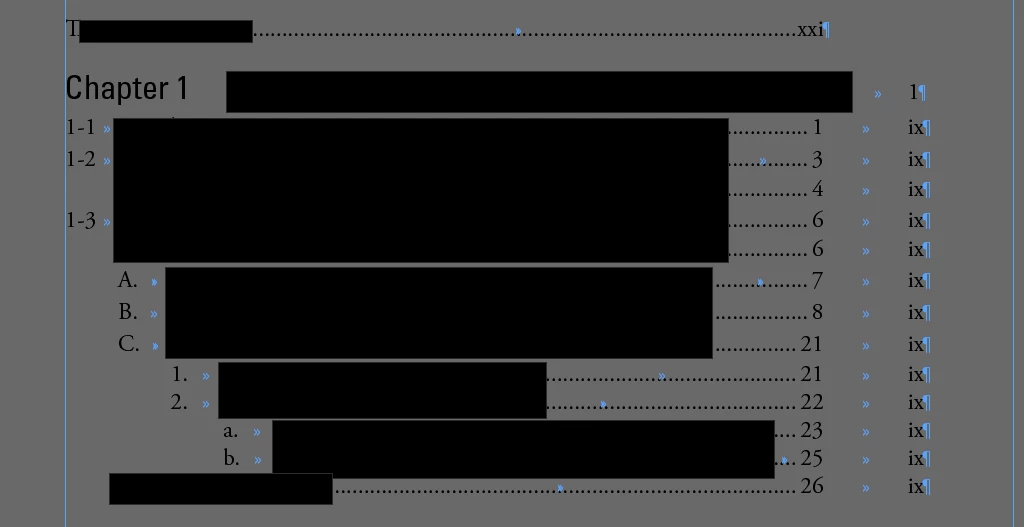
 

Running InDesign 20.0.1 on Mac Sonoma 14.7.2

Correct answer katieh64658769

Thanks for the ideas! It turned out to be a problem with our Table of Contents style—it was pulling the TOC entries themselves, not the headings from the rest of the book, which is where there seemed to be a "duplicate" number. We got it fixed!

3 replies

katieh64658769AuthorCorrect answer
Inspiring
January 15, 2025

Thanks for the ideas! It turned out to be a problem with our Table of Contents style—it was pulling the TOC entries themselves, not the headings from the rest of the book, which is where there seemed to be a "duplicate" number. We got it fixed!

Robert at ID-Tasker
Legend
January 14, 2025

@katieh64658769


Or your file got corrupted - try IDMLing - export as IDML, open, save with a new name - do not overwrite your original file. 


James Gifford—NitroPress
Legend
January 14, 2025

We'd need to see your TOC setup page for each of these levels. AFAIK, InDesign doesn't insert anything that's not in the definition for each line.


A simple cause might be that you have multiple TOCs/text frames assigned to the page. Delete all the TOC and other frames from those pages, generate a new TOC, and lay the new frame onto the first page. (Then extend it to additional pages as needed, once the flaw is fixed.)


It can be something of a mistake to keep changing and updating TOCs too many times, especially if you have  complex document structure. Blow it away and start from scratch occasionally.