
Known Participant
September 29, 2019
Answered

Eyedropper tool missing

  • September 29, 2019
  • 2 replies
  • 22224 views

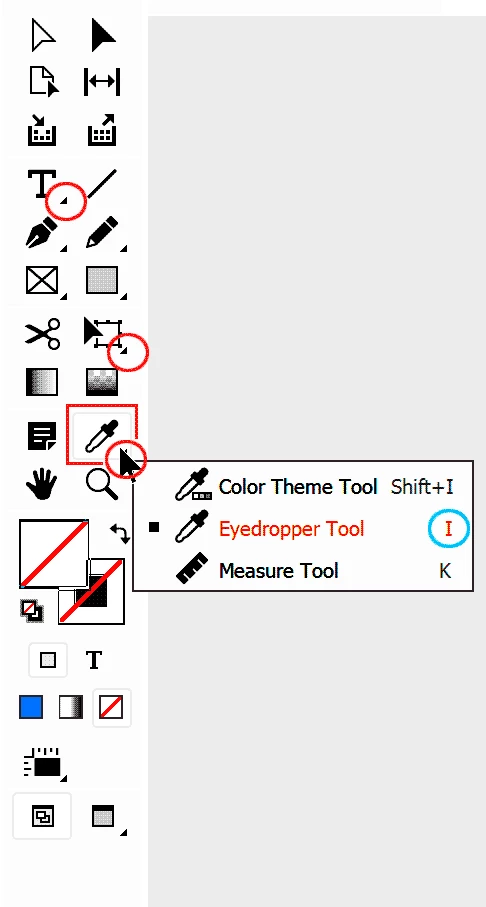
Hi, I have an ID CC online subscription.  My eyedropper tool does not appear in the tools menu, and after about two hours reading and searching others who have had problems in the past, nothing is of use.  Any ideas why I can't see it?  Shouldn't I be able to include it in the Tools panels somehow manually?  Photo of my Tool options are shown.
    This topic has been closed for replies.
    Correct answer federico platon

    Press and hold on the tiny black triangle on the lower right corner to show hidden tools, or Press the letter I on your keyboard.

    2 replies

    Legend
    September 29, 2019

    Please mark the answer as correct then.

    To restore the Eyedropper tool as the default one in your InDesign, just open the program, without a document open. Then in your Tools bar, choose the eyedropper. it will stay as the default for future files you start.


    (Click on the big ID logo at left below the menu bar to open ID with no document).

    Known Participant
    September 29, 2019
    Well did attempt to mark as correct, but can't see any way to do so?
    federico platonCorrect answer
    Legend
    September 29, 2019

    Press and hold on the tiny black triangle on the lower right corner to show hidden tools, or Press the letter I on your keyboard.

    Known Participant
    September 29, 2019
    Well that was foolishly simple! I did click on those arrows but never held them down long enough. I wonder why the Eyedropper changed to a Measure tool that I have never used before? Not to worry, thanks for that response.