Answered
facing page pdf export
Hello! I'm facing an issue when exporting my facing page pdf file. I do not have the middle preset line that give u the idea of the facing pages. can anybody help?

Hello! I'm facing an issue when exporting my facing page pdf file. I do not have the middle preset line that give u the idea of the facing pages. can anybody help?
In the export dialog, go to General> Viewing> Two-up. (set the inside bleed to 0, if needed).
In Acrobat or Reader you can view single pages as spread pages, with either a small gap or dashed line between pages (View> Page display). You can also set the pdf initial view document properties in Acrobat (File> Properties> Initial view) which will display the pages as spreads, as long as the person viewing the pdf has their Acrobat page layout display preference set to the default "Automatic",
and their Accessibility preference is not set to "override",
and their preference- Documents> Restore last view setting when reopening documents, is not on.
Non Adobe pdf viewers might not respect the pdf initial view properties.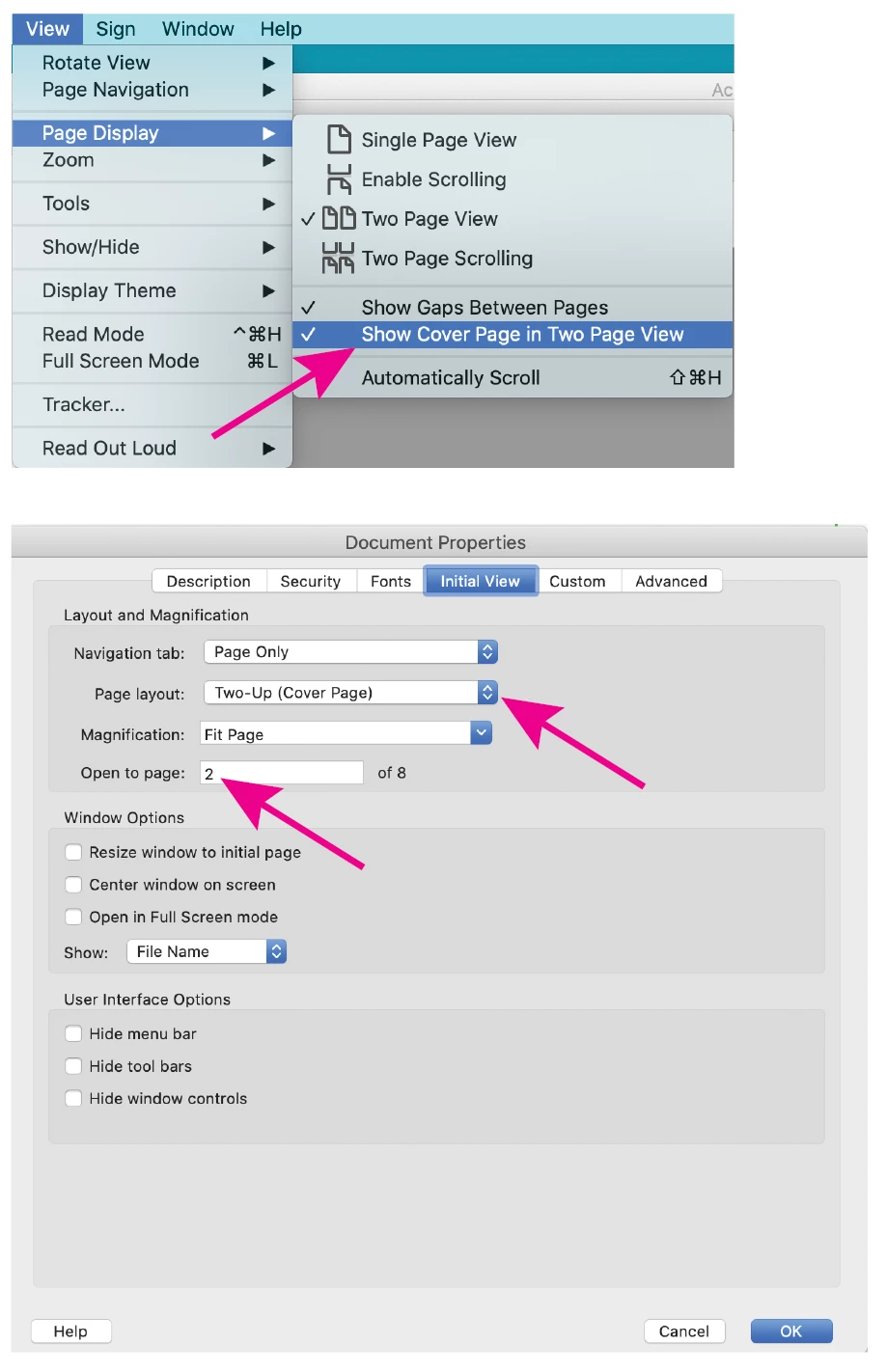
Already have an account? Login
Enter your E-mail address. We'll send you an e-mail with instructions to reset your password.
 AdChoices