
Participating Frequently
April 11, 2018
Answered

Facing Pages in Indesign

  • April 11, 2018
  • 3 replies
  • 14815 views

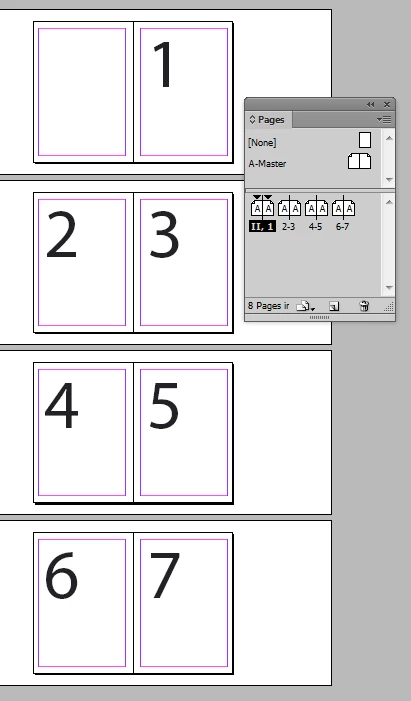
So, I am trying to make a multiple page document in indesign with page one right next to page two in a spread. I have done the whole right click and uncheck the allow selected spread to shuffle thing and it fixes it, unless I delete a page. I am formatting this document for a book we are putting together so we want to see the pages by each other, but if i do that then delete a page it single one out and I am back to square 1... Anyone?
This topic has been closed for replies.
Correct answer Dave Creamer of IDEAS

Sorry, but page layout must look like this, whatever OP thinks. Page shuffling not touched, Numbering & Section Options is your friend.


MookieP: If you are printing this document, either commercially or on a laser printer, you will need to deal with the opposite of the page you want to number 1. It has to exist.

You basically have two options:

  1. Keep the first page blank and start your TOC on page 2. Let the numbering fall as it may.
  2. Assuming you have a cover, you can use the inside front cover (IFC). For that, your numbering options are:
    1. Count the cover as page one; your TOC would still start on page 2.
    2. Do not count the cover and IFC, but still start the TOC on the IFC. If the TOC only takes up one page, your first page would be opposite the TOC but could start on page 1.

3 replies

New Participant
May 12, 2020

I am having difficulties to let my pdf to be facing pages eventhough I have already pressed the facing pages button in the document setup I have tried everythink and multiple times it's not working can someone help me?


rob day
Community Expert
May 12, 2020

When you Export you can set the initial layout view for Acrobat in General>Viewing>Layout


BobLevine
Community Expert
May 12, 2020
Which may or may not be honored in other PDF readers.
winterm
Brainiac
April 11, 2018

Easiest way to achieve this is to start New Document. In Page Setup dialog enter even value in Start Page # field - 2, 4, etc.). This way no need to bother with shuffling, and you can feel free to add / remove pages.

Any way, you should keep your left pages in spreads numbered with even numbers, and right pages - with odd numbers.

Dave Creamer of IDEAS
Community Expert
April 11, 2018

However, that would mess up the auto page numbering.

David Creamer: Community Expert (ACI and ACE 1995-2023)
Dave Creamer of IDEAS
Community Expert
April 11, 2018

I understand what you want to do technically in InDesign, but books in the Western world don't start odd pages on the left.

In other words, you don't open a book up to a spread of page 1-2; page 1 would be the first right-hand page (and could be blank).

David Creamer: Community Expert (ACI and ACE 1995-2023)
Dave Creamer of IDEAS
Community Expert
April 11, 2018

Is page one not a right-hand page?

David Creamer: Community Expert (ACI and ACE 1995-2023)
Participating Frequently
April 11, 2018

It is originally but I want it to be on the left with page two on the right.

Dave Creamer of IDEAS
Community Expert
April 11, 2018

Are you using auto page numbers?

David Creamer: Community Expert (ACI and ACE 1995-2023)