

c.pfaffenbichler
Community Expert
Community Expert
November 22, 2023
Answered

faulty resampling result at the right edge for small scaled images in exported pdf

  • November 22, 2023
  • 5 replies
  • 692 views

For pixel-images that are placed at a small scale and have certain detail near the edges the resampling result at the right edge appears to be faulty – namely a duplicated row of pixels. 

Adding space to the image will get the expected result. 


The screenshot shows the two images open in Photoshop (original dimensions 2048px x 2048px and 2148px x 2148px) and in the background the exported pdf from an indd in which they were placed at 5%. 
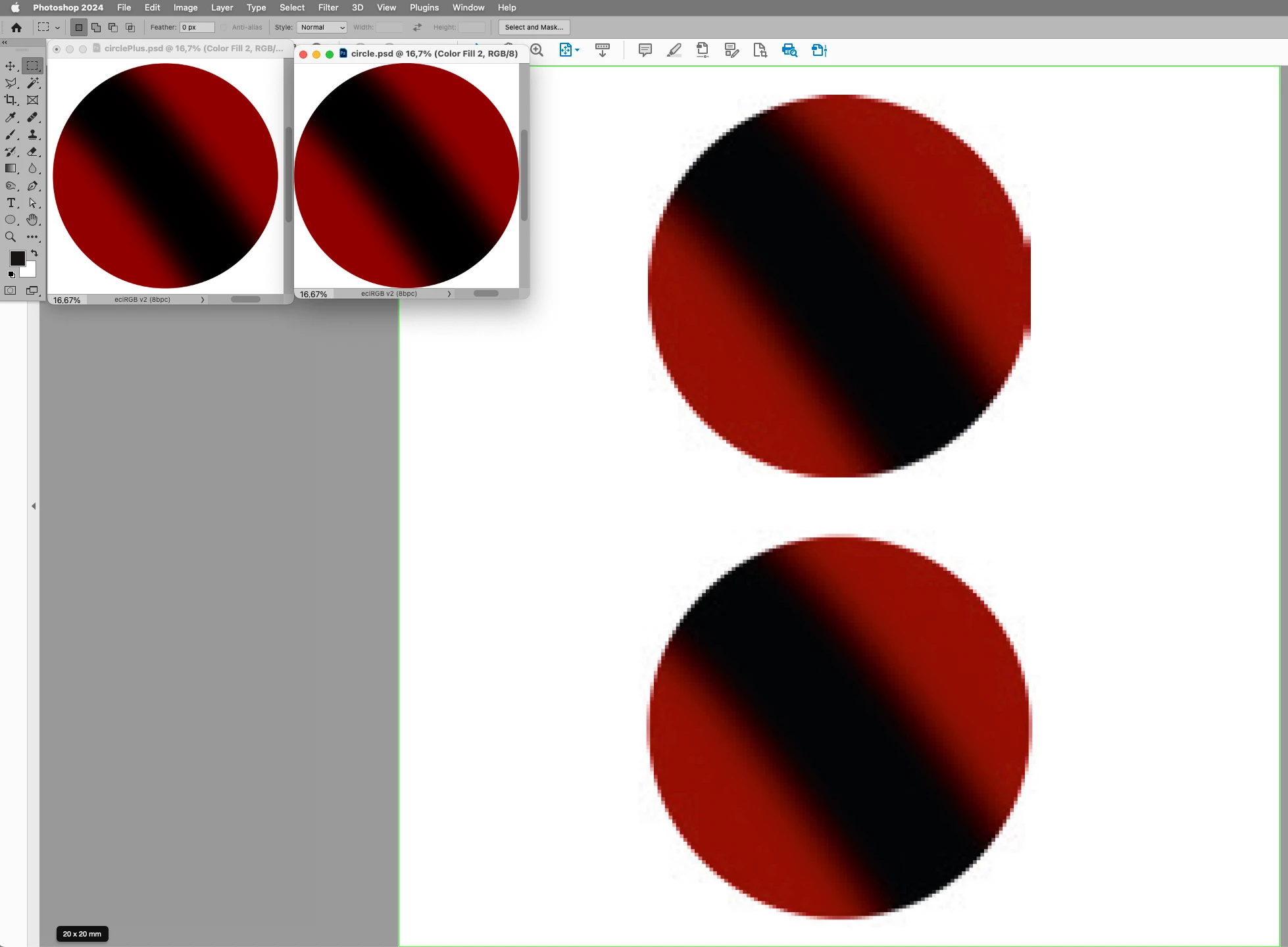
 

I suspect this may have come up before, but I couldn’t locate a pertinent thread. 

Anyway, thanks in advance for any insights on this. 

This topic has been closed for replies.
Correct answer Brad @ Roaring Mouse

Doesn't matter. The artifact occurs even without compression.

As I mentioned, it happens on a full image as well. There's a dupicate column of pixels down the right side. Not as noticeable as with the circle shape, but definitely there.


No matter the scale of the image, there's always one exact extra column of duplicate/near duplicate pixels at each size on the right edge.

5 replies

Brad @ Roaring Mouse
Community Expert
Community Expert
November 23, 2023

I started a bug report on User Voice (surprisingly, noone has posted it before as far as I could find), so if anyone wants to upvote this or add anything, here's the post:

https://indesign.uservoice.com/forums/601180-adobe-indesign-bugs/suggestions/47496800-bicubic-downsampling-artifacts

Brad @ Roaring Mouse
Community Expert
Community Expert
November 22, 2023

Yes, it has come up before. It's an unfortunate side-effect of Bicubic Downsampling. The short answer to why is that in order for it to work, Bicubic requires a certain grid of pixels to sample to create each pixel in the reduced image. If it doesn't have all it needs on the right and bottom edge, it repeats the last available column or row until it does. So depending on exactly what size (dimension) you are reducing to, the effect may be barely noticeable or REALLY noticeable, and our perception depends on what content is in the image. If these had been full photos, you might not even notice it. How to fix? Try Average Downsampling in your PDF export nstead. You might lose a bit of smoothness, but it will handle these outer edges better.


c.pfaffenbichler
Community Expert
Community Expert
November 23, 2023

I am afraid that may not be all there is to it. 

Bicubic Downsampling to 5% in Photoshop gets the left result, Indesign the right: 

James Gifford—NitroPress
Legend
November 23, 2023

InDesign's implementation is different and not as 'intelligent' about these details. That's the case for many features where a primary (focused) app does a better job than InDesign's equivalent feature.

c.pfaffenbichler
Community Expert
Community Expert
November 22, 2023

Thank you both for the feedback. 

rob day
Community Expert
Community Expert
November 22, 2023

Hi @c.pfaffenbichler , This has come up before, usually with icon art. It can happen when there are no pixels outside of the edge to sample from on the requested down sample. The solution, as you are showing is to include some padding.


https://community.adobe.com/t5/indesign-discussions/edges-of-images-distorting-on-pdf-export/m-p/13887889

James Gifford—NitroPress
Legend
November 22, 2023

Wasn't there also a factor of this happening (more often) with PNG rather than JPEG?

c.pfaffenbichler
Community Expert
Community Expert
November 22, 2023

In my test transparency/flat did not make a discernable difference. 

Willi Adelberger
Community Expert
Community Expert
November 22, 2023

I would consider this as a bug. 
in this case i would recommend a workaround. Put the form into an elliptic image frame to mask away that erratic pixels.