elisabethd64374840
Participant
February 2, 2026
Question

File Corruption Issue in InDesign 21.2 on Windows 11

  • February 2, 2026
  • 15 replies
  • 1319 views

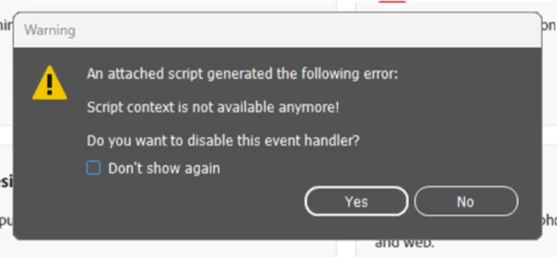
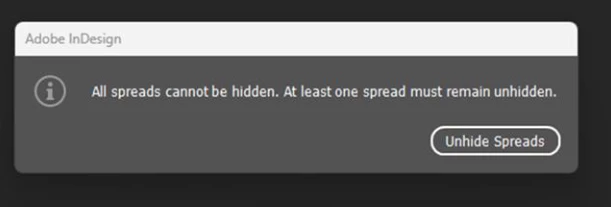
There is a bug in InDesign 21.2 (and Windows 11 Enterprise): our latest files were corrupted and unavailable when we opened them this morning. (Error message and warning sign.).

No actions were possible, screen freezes

We were all completely blocked, because the previous versions are unable to open our latest files.

Thank’s


    15 replies

    Abhishek Rao
    Community Manager
    Community Manager
    February 24, 2026

    Hi everyone,


    Thank you for sharing your updates here, and I’m sorry for the delay in getting back to you. I understand how disruptive and stressful this situation has been.

    As some of the experts have already mentioned, I’d like to confirm that the issue where files were showing as damaged and could not be saved was a known problem caused by a Windows update, and it has since been addressed by Microsoft. In many cases, this behavior was seen when working with synced storage locations such as OneDrive, Dropbox, or other cloud folders, and was not occurring when files were saved locally on the machine.

    You can find more details in this related community thread here:
    https://community.adobe.com/questions-671/indesign-files-corrupted-and-unable-to-save-after-windows-11-update-kb5074109-january-2026-post-2-1546893?postid=7484108#post7484108

    We’ve also published a HelpX article with the latest update and guidance to help resolve this issue, which you can refer to here:
    https://helpx.adobe.com/indesign/kb/error-2-or-crash-during-file-save-operations.html

    If you’ve already installed the latest Windows updates and are still seeing crashes or save errors, please let us know along with your Windows version and InDesign version so we can look into this further.

    Also, regarding the original post by ​@elisabethd64374840 , this appears to be different from the known Windows-related issue and may be specific to the file itself. Could you please let us know if this problem has been resolved for you, or if you are still experiencing it? Your update will help us understand how best to assist you.


    Thank you again for your patience and for working with us on this. Looking forward to your update.

    Abhishek

    Known Participant
    February 24, 2026

    Hi,

    i still have problems with my INDD files, savegames crashing and files being corrupted afterwards: 

    Current windows version: 25H2

    Installed Patches: 

    • KB5074109 on 16. Jan 2026
    • KB5078127 on 27. Jan 2026
    • KB5074105 on 31. Jan 2026
    • KB5077181 on 12. Feb 2026
    • no further updates available till now… 

    Indesign Versions with problems: all 21.xx

    Indesign without problems: I’ve downgraded to 20.5.2. and i haven’t seen damaged files so far… 

    The problem occurs on my local HDD not on Cloud or Dropbox storage! I’ve checked HDD/RAM already and cannot find problems there. 

    best regards

    Known Participant
    February 24, 2026

    @Abhishek Rao Hi Abhishek Rao,

    it does not happen to all files but only 2 files by now of maybe 30 or 40 files. I’m working with Indesign like atleast 3+ hours a day beside other stuff, so i actually don’t have time to try to reproduce the error and risk more damaged files but i will give you as much information as i have (still working with 20.5.2 without problems so far!):

    I’ve tried creating new documents and saving them, resaving then, reopening them several times on monday with v 21.2 but could not reproduce the error. I also moved them between disks and did the same without results. 

    I’ve also tried resetting my Indesign Preferences several times by holding down Shift+Ctrl+Alt on start. 

    If a files crashed, the next InDesign start was hanging. The next start after this opened with the attempt to restore the last file. If you tried to restore it crashed again. Needed to manually kill it with task manager and/or trash .idlk files. 

    I can remember that the InDesign error was: the file is corrupted – Error code: 6

    best regards

    DailyUser26644176srmh
    Participant
    February 6, 2026

    I’ve been having issues saving and recovering changes with InDesign and Windows Cloud since Feb. 2.

    Starting Feb. 5, the program has been closing randomly or becoming completely unresponsive while working on projects. I cannot complete my work or meet deadlines and have had to use Canva as a temporary workaround.

    All of our creative files are backed up to Windows cloud.

    Has anyone else experienced this, or is there a known solution/workaround?

    DailyUser26644176srmh
    Participant
    February 6, 2026

    Yes. And I’ve also been experiencing the issues mentioned in this thread.

    erikah13630568
    Participant
    February 5, 2026

    Having all the same issues. Tried repairing all the  C++ Redistributables (as was suggested in another post) and still no luck. Every time I try to save the files I’m working on, InDesign says that are corrupted. Now, I’ve literally lost a full day’s work. This is inexcusable. 

    KaisaV
    Participant
    February 5, 2026

    I have the same problem. When I tried to save the project with another name, I can see it saved, but ID won’t open it.


    leo.r
    Community Expert
    Community Expert
    February 5, 2026
    TomWellstudio
    Participant
    February 4, 2026

    Just to further update here, I am also getting this error message when unable to save the file


    Alphatram
    Participant
    February 4, 2026

    Hi, have the same problem since two weeks. Impossible to save files because it’s damaged… so impossible to work at all. 

    leo.r
    Community Expert
    Community Expert
    February 4, 2026

    Hi, have the same problem since two weeks. Impossible to save files because it’s damaged… so impossible to work at all. 


    You need to uninstall a specific Windows update or install a newer one as discussed here:

    luke_5280

    TomWellstudio
    Participant
    February 4, 2026

    We have the same problem too.  With both Adobe InDesign 2026 and 2025.


    Old files we open to save as to new files say they are damaged, then we cannot even save the original file. Then often the software just crashes and we have to re-open and it restores the file but then the same issue again - completely stuck! If a fix is not found ASAP I will be writing to Abobe for compensation as this is damaging our business. 

    An additional issue, is that when we are editing text inside a text box the screen will just randomly go black and we have to Zoom out to then see the screen again 


    Bozhidar Y Petkov
    Participant
    February 4, 2026

    This is what I get since last week.
    And the file is useless neither can be exported as anythig


    leo.r
    Community Expert
    Community Expert
    February 4, 2026

    This is what I get since last week.
    And the file is useless neither can be exported as anythig


    Uninstall a specific Windows update or install a newer one:


    luke_5280


    BobLevine
    Community Expert
    Community Expert
    February 5, 2026

    Hi ​@leo.r.  Those are Mac screenshots.

    HARSHIKA_VERMA
    Community Manager
    Community Manager
    February 4, 2026

    Hi All,

    We are sorry to hear you are having trouble using InDesign files. We escalated the issue to the product team for investigation. We will keep you posted here if we need more information from you all.
     

    Appreciate your collaboration and patience.
     

    Thanks,

    Harshika

    Phil the Mack
    Participating Frequently
    February 4, 2026

    Were these troubles only with files stored on Onedrive or other cloud-base storage? 

    TheDrMouse
    Participant
    February 3, 2026

    I’m having this same problem, even tried rolling back to an older version of InDesign and it still happens.

    leo.r
    Community Expert
    Community Expert
    February 3, 2026

    I’m having this same problem, even tried rolling back to an older version of InDesign and it still happens.


    Just to make sure: Can you please post screenshots of the exact error messages you get? The ones posted by OP are quite unusual, so it’s important to get a solid confirmation you get the same ones.


    In addition, another user in this thread suggested exporting to IDML to solve this problem.

    Phil the Mack
    Participating Frequently
    February 4, 2026

    I am getting the same message “Can not save document”   also still can’t use Times New Roman, can’t export anything to PDF without crashing InDesign.