Inspiring
January 3, 2023
Question

File Imported from Word creates Unwanted folder with unwanted styles in InDesign

  • January 3, 2023
  • 6 replies
  • 1571 views

Hi,


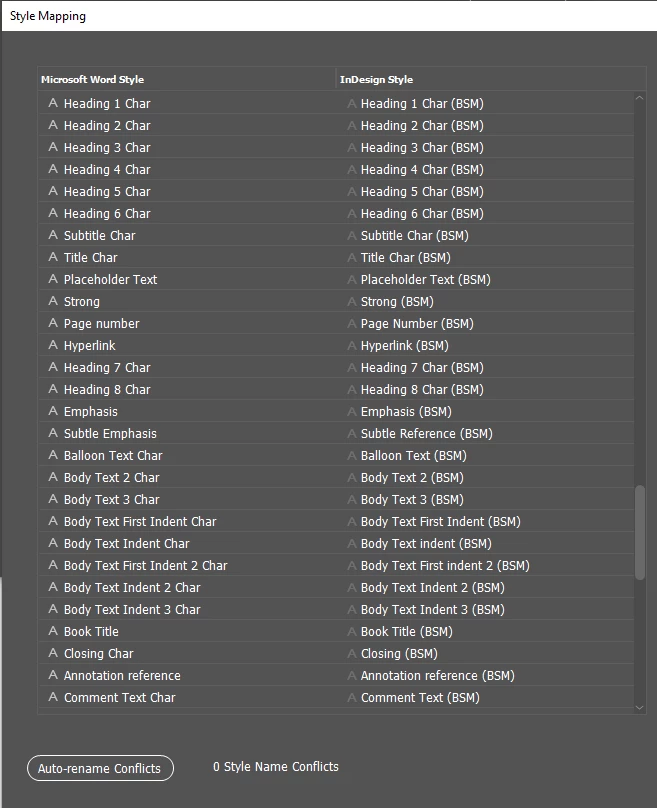
I'm currently trying to create a seemless or as seemless as possible process of importing a work Word document into InDesign. I've created all the Character and Paragraph styles that I need and I have zero name conflicts.

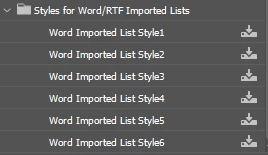
However, when I import the Word document a folder with Word Imported List style1-6 are created. I've created seperate Charcter styles for the List Styles and tried to re-import it but this folder of styles keep coming in, multiplying as I re-import.


Any ideas on how resolve this would be great.


Thanks.


<Title renamed by moderator>

This topic has been closed for replies.

6 replies

James Gifford—NitroPress
Legend
January 4, 2023

Two overall thoughts:


I often find it useful to do as much cleanup and restructuring in a Word doc as possible before importing it and trying to fix all its problems in ID. Can you make a copy and spend a few hours cleaning up as many of the duplicate and unneeded styles (as well as basic things like removing all double spaces and other duplicate white space, which ID doesn't need or like to deal with), etc.? (And maybe work back to clean up the original document so that the problem will be reduced in the future?)


Second... I'd say all those "extra" character styles are spot formatting that ID is trying to preserve. One of the things you want to get rid of in Step 1 above is as much spot formatting as possible.


I'd say the real solution lies in between these two points, and not on trying to get ID to shovel mountains of style gar-bajh. 🙂


Inspiring
January 4, 2023

James,


Thaks for the input appriciate it.


Found where the Word Imported List Style1 was coming from. It's all the Headings.


James Gifford—NitroPress
Legend
January 4, 2023

If the headings are numbered, yes, it would become a list style. Which is wrong, wrong, wrong... all headings should have their own individual style, with or without numbering.


Word tries too hard to manage list styles, instead of just allowing a style with bullets or numbers to, well, have bullets or numbers. The worst mess comes from applying list characteristics with spot formatting.


Mike Witherell
Community Expert
Community Expert
January 4, 2023

Yes, that is often the case. Someone else created a tangle that you have to pick your way through. Not easy to untangle. But it would start with imposing some order on the word docx. Remove styles not being used. Simplify and merge similar styles. Make sure that paragraph styles are doing the heavy lifting while the character styles supply the garnish and small touches of typesetting. The same cleanup needs to be organized on the InDesign end of things, too. To have a decent workflow, both ends of the matter have to have training: the writer in Word and the graphic designer in InDesign. There are do's and dont's for both parties.


As for index styles, where you say you don't want them, why not untick including the index as you place the word docx?

Mike Witherell
Inspiring
January 4, 2023

Thanks Mike,


That all sounds sensible and I'll approach it that way now.


As for, unticking including the index as you place the word docx, that didn't seem to solve the problem. The folder still shows its ugly head.


However, I think if I scroll through the word styles and 'fix' them, hopefully then I can re-import with no problems.


Robert at ID-Tasker
Legend
January 4, 2023

It's "interesting" why InDesign is labeling the group "Lists"? What lists?


Mike Witherell
Community Expert
Community Expert
January 4, 2023

I opened the file and looked at the styles and I have a question.

Why are there 150 paragraph styles and 100 character styles? Many appear to be the same. Many character styles appear to be defined as if they are paragraph styles. Is the Word docx really that full of styles that are necessary to InDesign? Are the Word docx styles well-defined and maintained? Personally, I have found that InDesign can stumble over style groups. Not sure if this is what is affecting you, and I'm not sure what you are trying to achieve.

Mike Witherell
Inspiring
January 4, 2023

Hi Mike, 


Yes it's definitely bloated unnecessarily. 

I grabbed every style in the word Document, even ones not used. Just to be sure if someone did, for some mad reason, use every word style I would have a corresponding style for it in InDesign. The final document won't have that.


quote

Why are there 150 paragraph styles and 100 character styles? Many appear to be the same. Many character styles appear to be defined as if they are paragraph styles


This word document was created by a previous employee who is no longer with the company so I'm not sure how they originally went about it. I haven't had a chance to run through all the styles and this test was really just to see if it imported correctly.


So I was curious why the folder Word Imported List style comes in when importing

Inspiring
January 4, 2023

And yes I say the style groups are creating some trouble so fixing the Word style groups may be the best solution. Just have to figure out which styles to fix

Robert at ID-Tasker
Legend
January 3, 2023

Can't see those extra styles on the mapped list? 


Inspiring
January 3, 2023

Robert,


Yes it's not listed. It's very strange.

Inspiring
January 3, 2023


Peter Spier
Community Expert
Community Expert
January 3, 2023

Have you set the import options to map the word styles to your InDesign styles?

Inspiring
January 3, 2023

Hi Peter,


Yes I have. All mapped.

I've saved out a preset too to avoid having to repeat the process.

Robert at ID-Tasker
Legend
January 3, 2023

Can you share your WORD file? 


Inspiring
January 3, 2023

Thanks for your reply Robert,

Unfortunately I cannot share my word file as it's an in house Word document and I wouldn't have permission to share it, but I'll try to share what I can through screenshots if that helps at all.

Sorry this probably makes it more difficult than it has to be.


Maybe it has something to so with this style circled?

Robert at ID-Tasker
Legend
January 3, 2023

No need for contents - just styles.