dublove
Legend
June 28, 2025
Answered

File.openDialog(); What is the result? What if I only have the path?

  • June 28, 2025
  • 2 replies
  • 273 views
Whether it's an object or a path is indistinguishable.
 
I don't want the dialog to open, I want it to open the file pointed to by the path by default, what should I write?

var file = File.openDialog();
alert("file:" + file);
Below is the result after I choose to select "my.json":
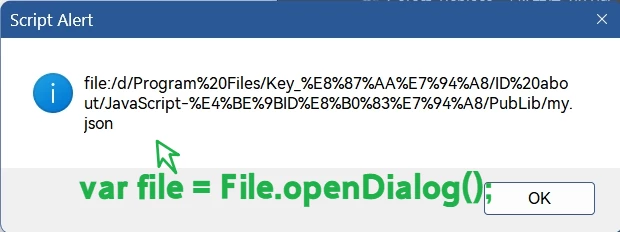


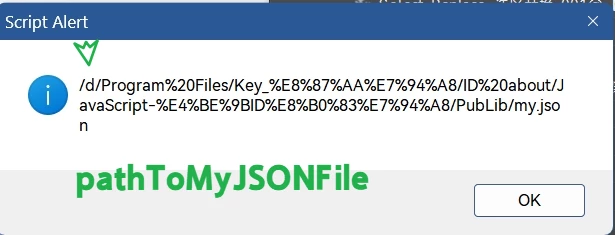
If I don't want to do it manually, it it directly opens this path “pathToMyJSONFile” (pathToMyJSONFile = File($.fileName).parent.parent + ‘/PubLib/my.json’;)

How do I change it?
var file = File.open(pathToMyJSONFile);
This seems wrong.


alert(pathToMyJSONFile); results in this:
 

Correct answer rob day

Something like this would read the contents of a text file:


var p = File(Folder.desktop + "/test.json");
var t = readFile(p)
alert(t);
  
/**
* Read a text file 
* @ param the file path of the file
* @ return the text in the file
*/
function readFile(p) {
	var f = new File(p);
	f.open("r");  
	var x = f.read();  
	f.close();
	return x;
}


2 replies

rob day
Community Expert
Community Expert
June 28, 2025

File.open() will not open a json or text file—open() is expecting an InDesign file path— .indt, .indd, idml

dublove
dubloveAuthor
Legend
June 28, 2025

Tried it out. I tried multiple ......
Looks like this:
file = File(pathToMyJSONFile);

rob day
Community Expert
rob dayCommunity ExpertCorrect answer
Community Expert
June 28, 2025

Something like this would read the contents of a text file:


var p = File(Folder.desktop + "/test.json");
var t = readFile(p)
alert(t);
  
/**
* Read a text file 
* @ param the file path of the file
* @ return the text in the file
*/
function readFile(p) {
	var f = new File(p);
	f.open("r");  
	var x = f.read();  
	f.close();
	return x;
}


dublove
dubloveAuthor
Legend
June 29, 2025

Hi rob day.

I tried out this one.
Thank you very much.