jeremiahe78940103
Participant
May 4, 2018
Answered

File Recovery Options

  • May 4, 2018
  • 1 reply
  • 2876 views

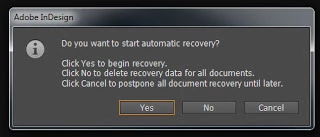
Hi! Does anyone know how to recover a document after choosing the third option shown in the attached image. I recently had a document crash, and I wish had clicked "Yes." Instead, I clicked "Cancel" and assumed that I could recover the document later as the message indicates. The image I attached is one I found online which matches the message I was shown. I still have not saved the document since it crashed because I don't want to risk any backups being deleted. However I have done a hard reset on my computer since then. Is all lost?

-Jeremiah
This topic has been closed for replies.
Correct answer Laubender

Thank you for your help. I eventually found the recovery folder. The problem was that the folder named "Library" is hidden by default on a mac.  Once I opened the recovery folder, I discovered that the time stamps on the recovery files went all the way back until the moment I hit cancel. It seems that clicking "cancel to postpone all document recovery until later" actually deletes the recovery files up to that point. This is contrary to what the message would make it seem. I think Adobe should change their wording of the message or have this fixed.


jeremiahe78940103  wrote

… It seems that clicking "cancel to postpone all document recovery until later" actually deletes the recovery files up to that point. …

I'm not sure about that.

The file you want to recover was temp saved before that point in time when you hit "Cancel".

InDesign Recovery will monitor constantly what's going on, so I think you really can postpone recovery by hitting "Cancel", work on with some other files, quit InDesign and reopen it.

Of course it's up to you to try this out and even do a duplicate of the whole Caches folder while InDesign is running.

Regards,
Uwe

1 reply

Community Expert
May 4, 2018

Hm, I think you'll get the same options if you do a restart of InDesign.
What's the version of InDesign on what operating system?

Regards,
Uwe

jeremiahe78940103
Participant
May 4, 2018

Thanks for the advice! When I go to restart, it asks if I want to save. I'm nervous that if I save, it will erase the backups. And I'm nervous that if I don't save, I might lose even more of my progress. I really don't know how the program handles these situations.

Community Expert
May 4, 2018

Then duplicate the backup files first and move them to a different folder.

Regards,
Uwe