


Wendy Tweehuysen
Participant
February 4, 2020
Question

File save issues on network using indesign 2020

  • February 4, 2020
  • 9 replies
  • 6168 views

Dear Abode,


I try to save a InDesign file to file server and since Adobe 2020 this is not working anymore.

I make some document and choose for SAVE or SAVE AS, but when saving in INDD file

This is resulting in an error and an message the file is corrupted
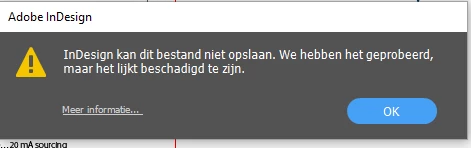

But this is strange, even newly created files are getting this message.

When I save the document as IDML at the same location, its working as expected.


Saving the file as INDD upon the desktop, is not having problems at all.

So only files as Indd saved upon the server are giving errors.


Trying to save files from Photoshop or Illustrator is no problem at all…


Please help me with this case to get it fixed.

This topic has been closed for replies.

9 replies

eggmoo
Participant
September 14, 2023

Adobe, any solution? I am having the same issue - though just with SAVE AS not SAVE.

blechinger
Participant
April 17, 2024

Hello! I also have now this issue with Adobe InDesign. Due the lack of great performance i amost fully switched to Affinity Publisher, but some projects i need to do in InDesign, and i cant save some jpg to the Synology NAS 923+ I can save the indd file normally, but not export.

Participating Frequently
April 17, 2024

The best thing you can do. To be honest, the subscription prices at Adobe are forcing you to look for new alternatives - unfortunately. But it's also getting easier for me: neither I nor our photo editor like the changed Photoshop interface. And little by little, this company is forcing us out of the customer relationship with many details. Annoying and unfortunate, but apparently intentional and unavoidable.

mendyw2425373
Participant
December 21, 2021

I am having the same issues... I can save to my desktop/hard drive but can't save from ID to my server. I have to save to desktop first then copy to the server. And if I accidentaly forget to save to desk top first, the file attempts to save to the server but doesnt and the file name appears but is locked and can't be opened, edited, moved, copied, nor deleted. It becomes a permanent, unusable file. HELP. This is so inefficient and has been happening for over a year now

mendyw2425373
Participant
December 21, 2021

I am on a mac running ID 2022 and OS Big Sur

Participating Frequently
November 9, 2021

Dear Adobe Developer Team,

This is the most pathetic performance I have ever experienced from a software house! This problem has existed for as long as InDesign has existed. You have already blamed it on the OS, reported it as fixed and yet this problem has been with us for many years! Are you really not able to ensure basic functionality? How pathetic is that? I have to (and should) expect from such an expensive software that at least the simplest things work - you can't work with the tool like this. EVERY decent company works on the "no local data" principle - but our employees can't comply with that with Adobe tools. It doesn't matter at all if our employees want to store on a Windows or macOS based file server: ID or PS steadfastly refuse to save properly.

FINALLY declare this an A priority and do your damn homework! ASAP! PLEASE!!!!

Participant
September 8, 2021

Hello community

I have the same problem, I work on MAC and the server is a Windows server 2019. Here's what I can say about it, if a folder was created and this, for reasons still unexplained to me, makes a seemingly correct assignment of rights, then you can partly not save to this folder as already described several times.
If I now change the owner of the folder on the server to the domain admin, and inherit the rights of the folder again, then it is no longer a problem to write files from Indesign directly into the folder.

However, this is not a solution that I prefer, but it is not bad for bridging. It can not be that I have to change every time I create a new folder first all rights on the server.

Maybe this helps someone.

Greetings Ciril

Participant
August 9, 2021

Same problem, I'm running OSX 11.5.1 with Indesign 16.3.2 on a 2013 late Mac pro.  Unable to save Indesign files opened on a file server (synology DSM 6.2.3-25426), reports the file is damaged and Indesign crashes.


Hope this gets fixed soon!

Participant
August 8, 2021

Same problem here. I have tried reinstalling InDesign but still happening.

I have the 16.3 version. @Adobe any updates to resolve this issue? 

Participant
January 18, 2021

Same problem. Mac OS X 10.15.7

Participating Frequently
May 25, 2020

Same Problem here, only one Client affected. InDesign 15.0.3. - Windows 10

Ashutosh_Mishra
Inspiring
February 4, 2020

Hi Wendy,


Sorry to hear about your experience. Would you mind sharing version of InDesign and OS?
Also, please try saving file on local drive and then copy/move it to the network location and see if that is working.
Looking forward to your response.


Regards,

Ashutosh

Wendy Tweehuysen
Participant
February 5, 2020

Hi Ashutosh,


Thanks for replying. We use Windows 10 and InDesign 15.0.1

The file saving on local disk is working (like I said) and copying to the network/share is working as expected as well. But only saving from InDesign isnt working. Photoshop and Illustrator don't have those problems.


We have this issue upon 4 computers, with different Adobe Accounts, so it isnt related to my account.


Would love to hear again.