tatum_ellise
Participant
December 12, 2025
Answered

Files asking what application to open in

  • December 12, 2025
  • 2 replies
  • 185 views

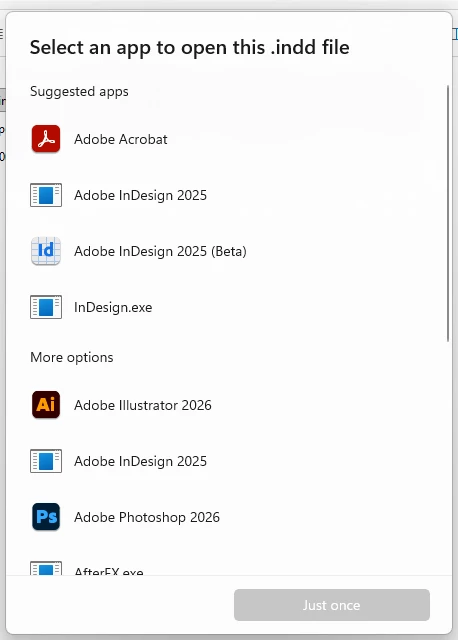
Since updating to indesign 2026, all my indesign files, even though creates in 2026 asks me what application to open them in. And as of today, indesign 2026 isn't even an option, yet I have it open in the background...

tatum_ellise_0-1765533307892.png


Correct answer Abhishek Rao

Hi @tatum_ellise,


I hope expert’s suggestion helped sort it out. If not, I'd like to add a bit more that should get the file associations working again. Please try resetting your InDesign file associations using the steps in these guides from Adobe and Microsoft:
https://adobe.ly/48CgTuo
https://adobe.ly/3MvmJ8c

If the issue continues, you can also update the association directly through the Registry. Open Run, type regedit, and go to
HKEY_CLASSES_ROOT\InDesign.Document\shell\open\command
Update the default entry, so it points to the correct InDesign.exe, inside quotes, followed by "%1". Restart your system and try opening an INDD file again.


Let me know how it goes. 

Abhishek

2 replies

Abhishek Rao
Community Manager
Abhishek RaoCommunity ManagerCorrect answer
Community Manager
December 12, 2025

Hi @tatum_ellise,


I hope expert’s suggestion helped sort it out. If not, I'd like to add a bit more that should get the file associations working again. Please try resetting your InDesign file associations using the steps in these guides from Adobe and Microsoft:
https://adobe.ly/48CgTuo
https://adobe.ly/3MvmJ8c

If the issue continues, you can also update the association directly through the Registry. Open Run, type regedit, and go to
HKEY_CLASSES_ROOT\InDesign.Document\shell\open\command
Update the default entry, so it points to the correct InDesign.exe, inside quotes, followed by "%1". Restart your system and try opening an INDD file again.


Let me know how it goes. 

Abhishek

Community Expert
December 12, 2025

Just a file association issue. 


You should be able to scroll down that list and choose other and pick from the install folder the application 2026 InDesign.
https://www.digitaltrends.com/computing/how-to-change-file-associations/


NOt sure this helps seems excessive 
https://techcommunity.microsoft.com/discussions/windows11/windows-11-24h2-breaks-the-exe-and-com-file-associations/4392734