


Inspiring
September 13, 2017
Answered

Files flagged as modified that haven't been changed

  • September 13, 2017
  • 4 replies
  • 4581 views

Hi Everyone,

We have worked in our same workflow for at least 5 years.  We have a folder that we frequently link to for our documents.

Yesterday, every file in this folder showed up as modified by InDesign.  I went in and updated all the links--but it was strange since the place date was after the file's modified date in the link details.

I opened the same document today and all the files were flagged as modified once again. 

All files in this folder are showing the same incorrect modification flag.  The folder or path name hasn't changed since it would show up as missing.

Have you seen this behavior before, and what fixed it?

We are using InDesign CC 12.1.0.56
This topic has been closed for replies.
Correct answer Marketing1918

Hi Bob,

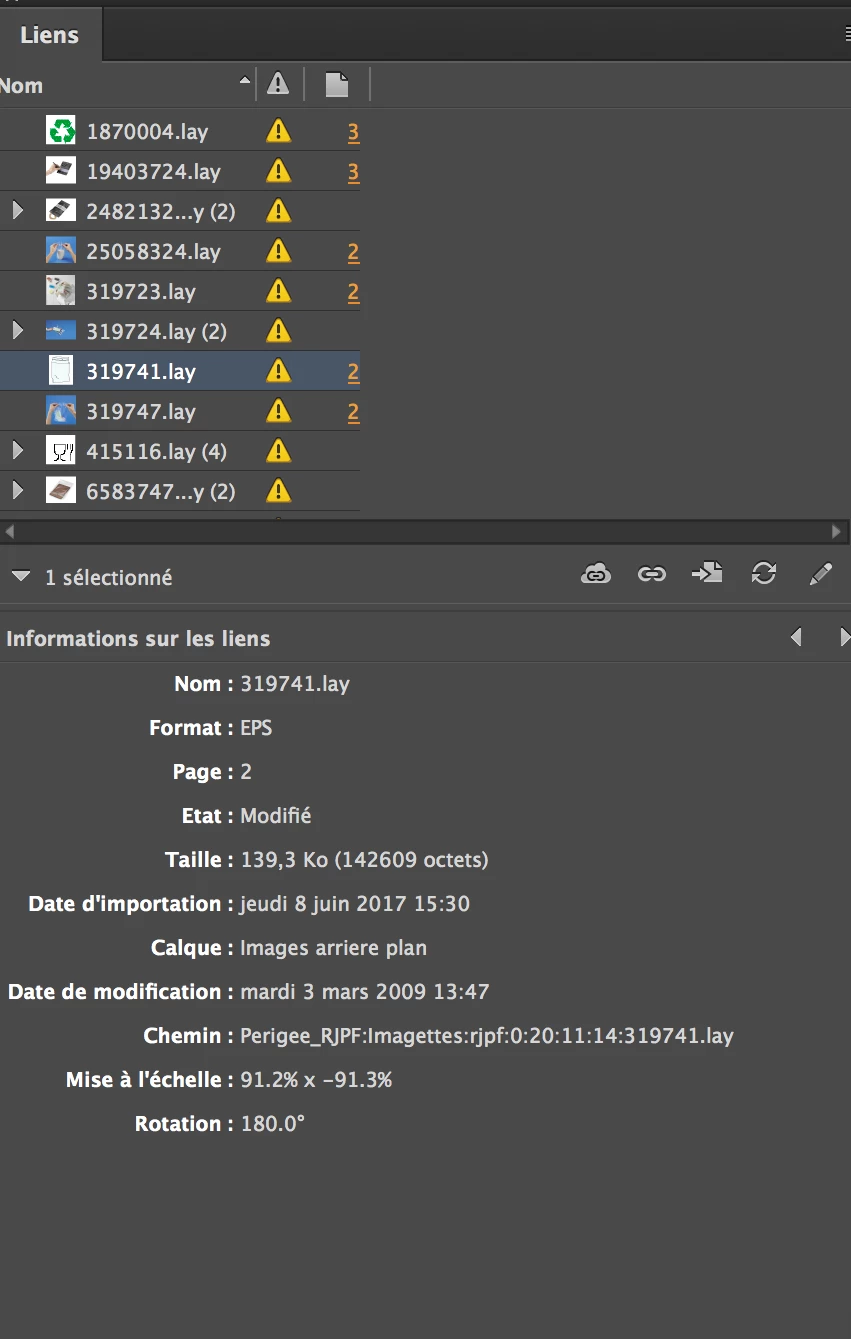
I wrote something about what happens... In addition, you'll find a screen capture. File changed in... 2009! and appear as modified in Indesign panel. I mean 'state = modifié' in the panel, but we can see it's impossible. Do you know how this value (modified) in handle by Indesign CC ? Which metadata is read for that?

Thanks for your help.


Hi Bill,

Hopefully what resolved the the issue for us can help you.

I googled the issue and found multiple references to date/time inconsistencies between the workstation and server.  Our workstations are Mac, and we run a Mac mini server.  The workstation date and time are set by the server, so I thought that couldn’t be the problem.

I finally went into the server room and rebooted the server, installing all updates (do NOT upgrade to the new os High Sierra without consulting a Mac IT person, though—it runs on a different file “system” and it’s too early to deploy in a network setting, IMO.)

After doing this all of our files returned to normal in InDesign—only those that had actually been modified had the update icon.

My guess is that either a process stalled out or the need for an update affected the date/time as seen by InDesign. 

It was a maddening issue, to be sure. I really thought I was losing my marbles!!

4 replies

Participant
June 20, 2018

Hello,

This issues started after upgrading to CC 2018. Date and Time is matching on client and server.

Have not done the server reboot yet.

Participating Frequently
June 21, 2018

There was another topic on the forums about it, and the solution was to downgrade Universal Type Client from 6.1.6. to 6.1.5.

There is also an KB article on Extensis website where they admit it is UTC fault and that they are working on a fix.

TimWux!
Participant
June 28, 2018

This. This 1000%. Holy profanities that was painful.

I just deployed a small fleet of iMacs with both sets of software all the way up to date and was getting hammered by requests to fix this error. Never would I have suspected a conflict with UTC this sort of error...

https://help.extensis.com/hc/en-us/articles/360005410534

Participating Frequently
May 29, 2018

Hi Guys,

Did any of you figure it out in the end? We just started having this issue when updating from CC2014 to CC2018.

Thanks

bill_graph
Participant
October 31, 2017

Hi Marketing1918,

i've the same trouble... Since yesterday, all the links are shown as 'modified' but files had not been modified! It is the same behavior with all the workstation (more than 40 MAc, with MAc OS 10.11.6, Indesign CC 2015 - build 11.4.1.102).

We worked with Indesign CC 2015 last 6 month without trouble like that. The image file are stored in another server over the network, and we are mount volume with smb protocol.

Another fact : we are also using Indesign CS3 (build 5.0.4) for some other stuff. With this Indesign version : no trouble! And the image file are stored exactly on the same server over the network...

So, for me, it's clearly an issu with Indesign CC 2015.

And, last thing, only one thing changed last week-end in France : we change for the 'winter hour'... Please help!!!

thanks

Inspiring
October 31, 2017

Bill—thanks for the tip about the ‘winter’ hour.  That wasn’t what threw us off before, but we change our clocks locally next weekend.  I’ll keep this in mind if the problem comes back next week.

Thanks Bob for helping to narrow down the source of the problem!

Inspiring
September 13, 2017

Apparently, Adobe is happy to support sharing files over their creative cloud libraries, but not over a shared network folder.

I'm not sure who still works on an isolated C: drive in a business environment these days.  Their entire product line is marketed as a team and collaboration oriented SaaS.  We have worked with networked files for 13 years without a problem.

It is impractical to upload 1TB of data just to use their "supported" infrastructure.  Even if I did, they'd eventually tell me that I'm trying to sync too much across the internet and that is why I have performance issues.

This is a bug, and it is one that has rendered our marketing department dead in the water.  None of the files have actually been modified, and even the links panel (whose screen shot was deleted by the moderator in my post) shows that the file was placed in InDesign AFTER the last modified date.  Even if we update the links, the next day they all show as modified again.

And yes, I checked the Date / Time stamps on both the server and workstation.  Both are set automatically by Apple servers for the same time zone.  It does not make sense that this is the issue, as has been suggested in other support threads.

BobLevine
Community Expert
Community Expert
September 13, 2017

You're making a lot of assumptions here and giving us virtually no details on the files themselves or the network.

I agree this shouldn't be happening but I hardly think clicking update links is leaving you dead in the water. I'd need evidence of serious crashing or performance issues before I bought that.

So, how about backing up and providing full details including screenshots and we'll see if we can get to the bottom of it.

Inspiring
September 14, 2017

I did try to add screenshots, but they have been deleted from the post on moderation.

The network is hosted on a Mac mini server running Sierra, and workstations are also Mac with Sierra OS.  The network drives are mounted as SMB shares.  If you have other specific questions about our network configuration please let me know.

Every linked file in our InDesign documents show up as having been modified.  All linked InDesign documents also show as modified, as well as all links contained within them.  The link details for each link show that the date the file was placed into InDesign occurred AFTER the last date the file was modified, and this is the case for every link or link within another document.  This is happening for all 3 users in our company that use creative cloud.

Even if we go through the effort of updating the HUNDREDS of links in each document, the next time the file is opened they all show up as needing an update all over again.  Maybe it's not "dead in the water" if you have a dozen links in a file, but we have hundreds in each, and each INDD needs to be opened individually to update all links within.  Several linked files also use layer visibility overrides which need to be re-checked each time we update.  A five minute text change turns into a nearly hour long relinking process, which only solves our problem long enough to export a pdf.

There is and will be no help from Adobe on this--in my support chat they called files on a network a "feature" that they do not support.  Creative Cloud has promoted their products as being built for teams, businesses, and for collaboration ever since the transition to CC, so this has been pretty frustrating.

I have attached two screen shots...hopefully they go through this time.

Thanks.

PastedGraphic-1.png