
Participating Frequently
August 14, 2018
Answered

Financial Tables - align closing paren

  • August 14, 2018
  • 1 reply
  • 779 views

Hello,

Using tables, I can create the following effect one of three ways.
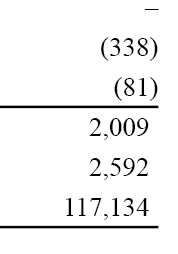
1. Decimal alignment, aligning on the ')' character.

2. Right alignment. Add a closing paren of no colour to cells without a ')'

3. Add a right text inset equivalent to the width of the closing paren.

What I'd really like to achieve is the following:
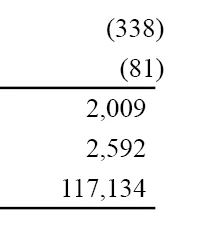
Where the parens overhang the right cell boundary. The only way I've been able to achieve this is to add another column and left align the closing paren. Is this the only option available to me?

Regards.

--

Kevin 

This topic has been closed for replies.
Correct answer Laubender

Hi Kevin,

not an answer but a comment first:


Typographically I would stay with the first result where numbers are aligned vertically.

For the second result you could try to introduce paragraph borders and paragraph styles that work with right indent.

Can you show cell borders and hidden characters in your screenshots?

Also cell insets?

Regards,
Uwe

1 reply

LaubenderCommunity ExpertCorrect answer
Community Expert
August 14, 2018

Hi Kevin,

not an answer but a comment first:


Typographically I would stay with the first result where numbers are aligned vertically.

For the second result you could try to introduce paragraph borders and paragraph styles that work with right indent.

Can you show cell borders and hidden characters in your screenshots?

Also cell insets?

Regards,
Uwe

Participating Frequently
August 14, 2018

Hi Uwe,

Well Spotted! I hadn't removed the invisible closing parens. I am after.

>>For the second result you could try to introduce paragraph borders and paragraph styles that work with right indent.

Now why didn't I think of that? I've had a quick play around and I think I can get the desired results.

My next challenge is to style the table through scripting!

Thanks for your help.

--

Kevin