


Inspiring
Apr 26, 2026 10:19 PM UTC
Answered

Find a font that has specific glyph

A long time ago I had a tab open that explained how to find a font that contained a specific glyph, but it’s been lost to too many updates. Who knows how to use InDesign to find a font that has a specific (semi-obscure, an asterism) glyph?
    Manan JoshiCorrect answer
    Community Expert
    Apr 27, 2026 3:30 AM UTC

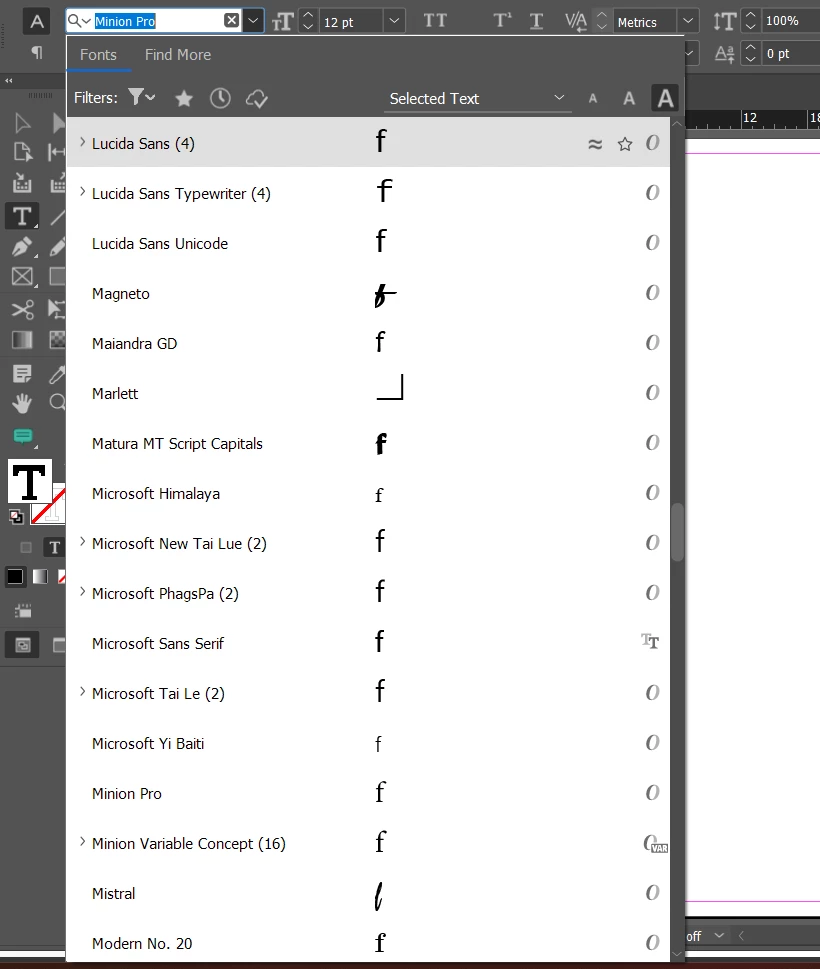
    @detritus books ok, in that case you can do a trick. Paste the glyph in a textframe and select it. Then open up the font dropdown from the toolbar. Every font entry should show the character preview if it is supported by that font. You can quickly scan the whole font list visually to find all the fonts that support and don’t support the selected glyph


    -Manan

    13 replies

    MerMaiden
    Participating Frequently
    Oct 29, 2026 7:35 PM UTC

    I am translating a book into Spanish, and the glyphs are complicated to find. It's a children's book and the more simple hand written fonts don’t have glyphs. I don’t want to copy and paste an entire accented word over 30 pages


    Translate
    Joel Cherney
    Community Expert
    Community Expert
    Oct 29, 2026 7:56 PM UTC

    You shouldn’t have to copy and paste accented glyphs! Spanish input should be very easy to set up at the operating system level, in both macOS and Windows. (If you’re in Windows, then I suggest adding the US International keyboard; it adds combining accents you can e.g. just type an apostrophe followed by the e to key in é. There is something similar for macOS, but I do not remember all the details - it’s something like option-n followed by n for ñ, option-e followed by a vowel to write a grave accent over a vowel.)


    Unfortunately, there aren’t too many good suggestions I can make for finding good matches for hand-written fonts that have your necessary complement of accented characters. Back when I was doing a lot of Vietnamese curriculum work, I got good at editing fonts really fast. These days, you can use Adobe Fonts to search for all fonts that support Spanish and are classified as handwritten, which strikes me as a better resource than I had back in the days of rapid editing of VNI fonts.

    Translate
    MerMaiden
    Participating Frequently
    Oct 30, 2026 1:34 AM UTC

    THANK you so so much for the response. I actually did just that! and it worked out. I appreciate it … 😁

    Translate
    David W. Goodrich
    Participating Frequently
    May 31, 2026 3:29 PM UTC

    I've had problems logging in to add comments, and when I tried a month ago the post was declined.  What I wrote then was "Andrew West’s splendid BabelMap, where the Fonts/Font Coverage tool can list any installed fonts containing a specific code point or all the chars. in a pasted-in text snippet."

    Translate
    Inspiring
    May 31, 2026 8:23 PM UTC

    Ooh, how do I get this tool???

    Translate
    Joel Cherney
    Community Expert
    Community Expert
    May 31, 2026 9:00 PM UTC

    Hi, David, nice to see you around here again! 


    ​@detritus books , you might not have seen my response as it’s buried under the “more replies” link, but you can get BabelMap from Andrew’s site:https://babelstone.co.uk/Software/BabelMap.html . 


    Translate
    Community Expert
    Apr 27, 2026 2:55 AM UTC

    Are you looking for the Glyph panel in InDesign? You can access that from the Type Menu>Glyphs


    Translate
    -Manan
    Inspiring
    Apr 27, 2026 2:59 AM UTC

    Does the glyph panel show you which fonts contain a specific glyph?

    Translate
    Community Expert
    Apr 27, 2026 3:00 AM UTC

    Yes, see the screenshot. It is showing the glyphs in Minion Pro font. You can change the font you want to see by using the drop downs at the bottom

    Translate
    -Manan