Participating Frequently
September 15, 2022
Answered

Find and replace date format InDesign CS6

  • September 15, 2022
  • 1 reply
  • 919 views

Thx melnyk

what if i will change the format to "day/month/year"
15/9/2022

please help with the script
Thank you

This topic has been closed for replies.
Correct answer Manan Joshi

maaf ya

saya punya data
09/15/2020
(MM/DD/YYYY)

saya hendak mengantinya dengan
15/09/2020 (DD/MM/YYYY )

Terimakasih sudah membantu


In such a case probably you just need a Grep Find/Replace. Try the following

Find What :- (\d{1,2})/(\d{1,2})/(\d{4})

Replace With :- $2/$1/$3
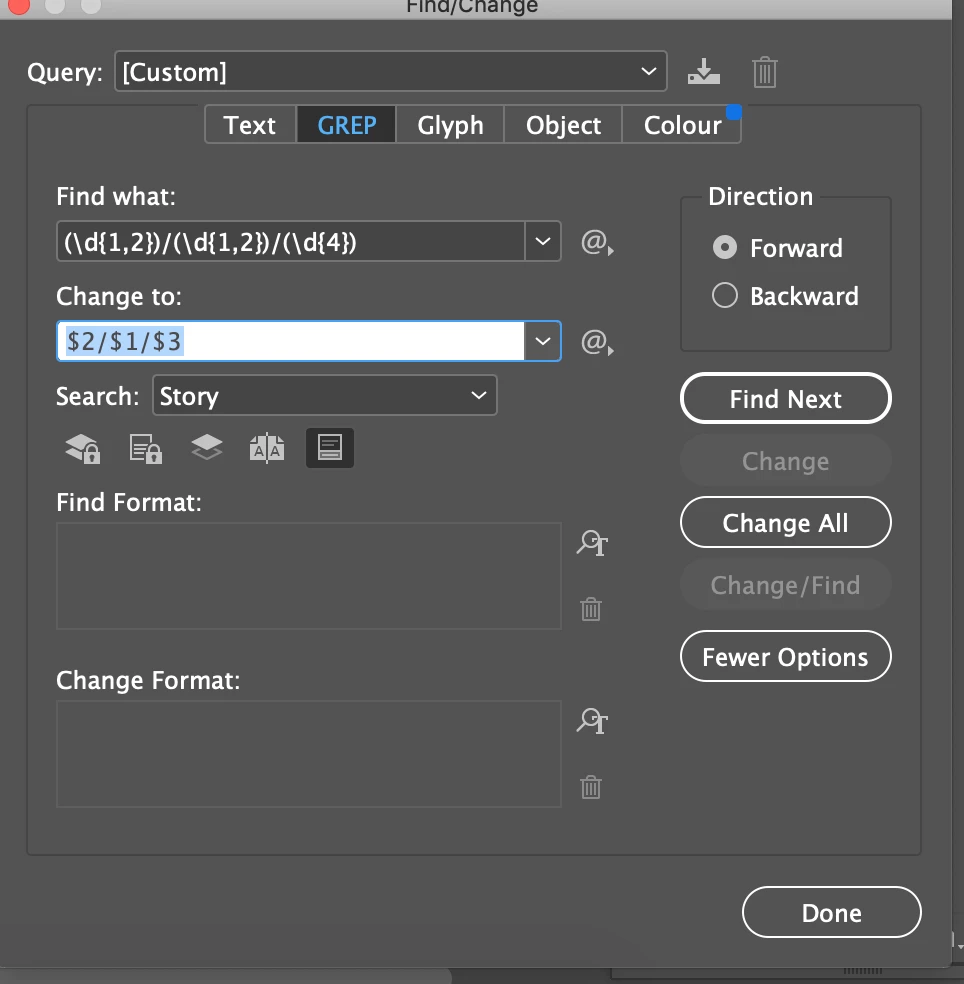
--Manan

1 reply

Community Expert
September 15, 2022

Hi @anantatara,

Try the following modified version of the code

//DESCRIPTION: Convert date format - finds 09/05/1936 and replace it with 09 May 1936
#target indesign;

/*
    by Oleh Melnyk at 5 April 2017
    requested at https://forums.adobe.com/message/9436296#9436296
	
    Edited By :- Manan Joshi
    Edited the date format to dd/mm/yyyy or d/m/yyyy
*/

//> START OF doUndoWraper
if (parseFloat(app.version) < 6) // "app.version < 6" if it's running under an earlier version than CS4, as earlier versions don't support "Undo" in scripts
    doUndoWrapper();
else
    app.doScript(doUndoWrapper, ScriptLanguage.JAVASCRIPT, undefined, UndoModes.ENTIRE_SCRIPT, "Change Date Format");
//< END OF doUndoWraper

function doUndoWrapper(){
    function toUnique(a, b, c) { //array,placeholder,placeholder
        b = a.length;
        while (c = --b)
            while (c--) a[b] !== a[c] || a.splice(c, 1);
        return a // not needed ;)
    }
    
   function convertDateFormat(date){
	var t = date.split("/")
	date = t[1] + "/" + t[0] + "/" + t[2]
        var objDate = new Date(date);
        var monthName = ["January", "February", "March", "April", "May", "June", "July", "August", "September", "October", "November", "December"];
        return  ("0" + objDate.getDate()).slice(-2) + " " + monthName[objDate.getMonth()] + " " + objDate.getFullYear();
    }

    app.findGrepPreferences = app.changeGrepPreferences = NothingEnum.nothing; // clear settings

    app.findChangeGrepOptions.includeLockedLayersForFind = false; // search in Locked Layers
    app.findChangeGrepOptions.includeLockedStoriesForFind = false; // search in Locked Stories
    app.findChangeGrepOptions.includeHiddenLayers = false; // search in HiddenLayers
    app.findChangeGrepOptions.includeMasterPages = false; // search in Master Pages
    app.findChangeGrepOptions.includeFootnotes = true; // search in Footnotes

    app.findGrepPreferences.findWhat = "\\d{1,2}\/\\d{1,2}\/\\d{4}";

    var whereToSearch = app.activeDocument; // default - search in entire document
    var foundPrep = whereToSearch.findGrep();
    
    var foundElements = [];
    for(var x = 0; x < foundPrep.length; x++){
         foundElements.push(foundPrep[x].contents); 
    }

    var foundUnique = toUnique(foundElements);

    for(var i = 0; i < foundUnique.length; i++){                
        var option = foundUnique[i];                
        app.findGrepPreferences.findWhat = option;           
        app.changeGrepPreferences.changeTo = convertDateFormat(option);        
        whereToSearch.changeGrep();        
        app.findGrepPreferences = app.changeGrepPreferences = NothingEnum.nothing; // clear find what and change to field        
    } 
}

-Manan


-Manan
Participating Frequently
September 16, 2022
thanks manan, but I mean "day/month/year"
15/9/2022
month by number
january = 01
february= 02
etc.
Sorry to bother
Community Expert
September 16, 2022

I am confused now. The edit I did would change 

15/9/2022

to 15 September 2022. What do you want it to show instead?

-Manan 

-Manan