Inspiring
September 19, 2017
Question

Find and Replace Font - Redefine styles when changing all

  • September 19, 2017
  • 1 reply
  • 9216 views

Hi,

     I need to enable the checkbox "Redefine Style When Changing All" in Find Font dialog.  How can I enable this check box when replacing fonts??
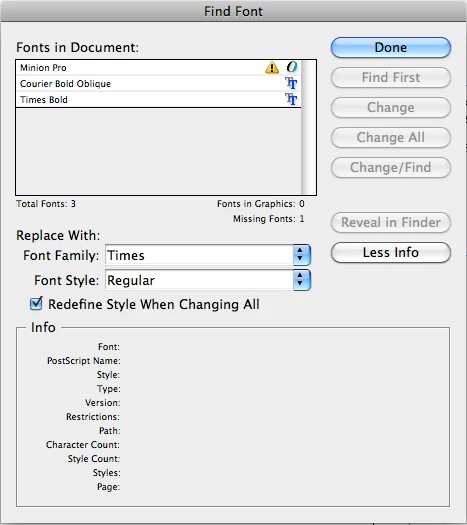
- Sudha K

This topic has been closed for replies.

1 reply

Kasyan Servetsky
Legend
September 19, 2017

As far as I know, this button has no relative property in scripting. However, there's a workaround: you can achieve the same effect by breaking it into three steps.

Find-replace a font

  1. in all paragraph styles
  2. in all character styles
  3. in locally formatted text

Here's a script that uses this approach.

Hope this helps.

— Kas

Sudha_KAuthor
Inspiring
October 5, 2017

Hi,

     Sorry for late reply...

     Thanks it is useful to me...   But when I am checking this with manually, i have confused...

    1. Actual function of "Redefine Styles When Changing All"  in Find Font Menu.

     2. What is the difference between "Redefine Styles When Changing All"  in Find Font Menu  &  the "Redefine Style in Paragraph Style Palete".

     3. I have used the below code. Font is applied for "#" but there is no character. Manually we can replace it. But using programatically its throwing "


- Sudha K

Kasyan Servetsky
Legend
October 5, 2017

1. Actual function of "Redefine Styles When Changing All"  in Find Font Menu.

For example, you're replacing font A with font B.

If the "Redefine Styles When Changing All" is off, the font will be replaced as local formatting: in the styles it will remain defined as A, but in the text it will be overridden as B.

If the "Redefine Styles When Changing All" is on, in the styles it will be redefined as B.

2. What is the difference between "Redefine Styles When Changing All"  in Find Font Menu  &  the "Redefine Style in Paragraph Style Palete".

In the Find font dialog box, it finds one font in the whole document and replaces it with another one.

In the paragraph/character styles panel, you select some text, apply formatting -- e.g. choose another font, size, leading, etc. -- and by choosing Redefine style, you say InDesign: "I want the formatting of the applied style to be exactly the same as I just applied to the selected text".

3. I have used the below code. Font is applied for "#" but there is no character. Manually we can replace it. But using programatically its throwing "

You run some code that applied some formatting to some text in some document and something went somewhat wrong somewhere. Did I understand you correctly?

— Kas