Inspiring
July 14, 2018
Answered

Find and replace Panel

  • July 14, 2018
  • 3 replies
  • 729 views

Hi,

I have a some problem in find & replace pannel. Pannel is exceeded to length. i cant able to do anything.  Please suggest
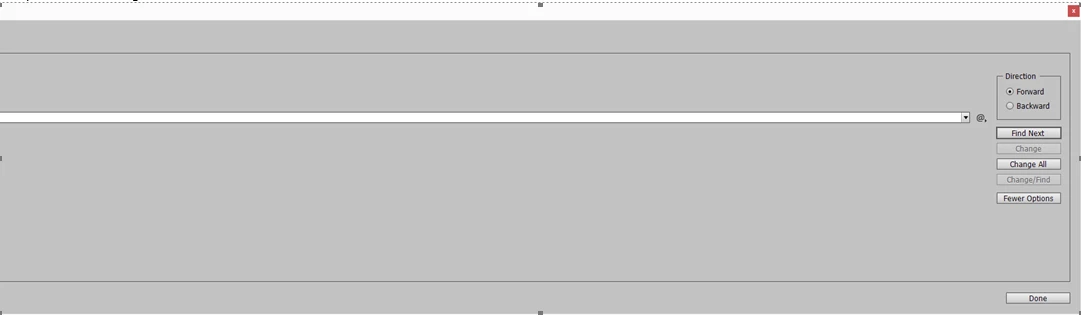
Regards,

Velu

    This topic has been closed for replies.
    Correct answer Dan Rodney

    Try the Restore all preferences and default settings found here: Set preferences in Adobe InDesign and it may fix the issue.

    3 replies

    VeluVKAuthor
    Inspiring
    July 16, 2018

    Thanks Bill,

    I have deleted the cache files, now its getting solved the issue.

    Thanks for your help.

    Regards,

    Velu

    Bill Silbert
    Community Expert
    Community Expert
    July 16, 2018

    Happy to help.

    Dan Rodney
    Community Expert
    Dan RodneyCommunity ExpertCorrect answer
    Community Expert
    July 14, 2018

    Try the Restore all preferences and default settings found here: Set preferences in Adobe InDesign and it may fix the issue.

    — Adobe Certified Expert & Instructor at Noble Desktop | Web Developer, Designer, InDesign Scriptor
    Abambo
    Community Expert
    Community Expert
    July 14, 2018

    What is your version of Indesign, what is your OS and version. This looks like an incompatibility between the OS and Indesign.

    ABAMBO | Hard- and Software Engineer | Photographer
    VeluVKAuthor
    Inspiring
    July 16, 2018

    Hi Abambo,

    I have using InDesign CC 2014 windows version.

    Regards,

    Velu

    Bill Silbert
    Community Expert
    Community Expert
    July 16, 2018

    Problems with panels can many times be solved by trashing your InDesign Cache files—which is not the same as trashing preferences.

    To do so:

    For Macintosh Users: With InDesign closed launch a Finder Window in column view and click on your home folder. With the Option Key pressed choose Library from the Finder Go Menu. Within the Library folder find the “Caches” folder. Within the Caches folder find and delete the entire folder “Adobe InDesign”. I find that deleting the InDesign cache folder completely leads to a lasting change.

    For Windows Users: On Windows 7 and above the caches files are hidden. To find them go to the Control Panel and open Folder Options and then click the View tab. Then select “Show hidden files and folders” or “Show hidden files, folders or drive options” in Advanced Settings. Then delete (or rename) the folder at the end of this path: C:\Users\[User Name]\AppData\Local\Adobe\InDesign\Version [#]\<Language>\Cache.

    EDIT: You can also try to go under the Workspace Menu and use the Reset "Whatever Workspace you're using" option and see if the Panel resets.