
manuelb27477138
Inspiring
May 31, 2018
Answered

Find Change Index Entries All Levels

  • May 31, 2018
  • 2 replies
  • 2530 views

Hello!

I find a fantastic script here:

How to find/change/delete index entries text in documents

to find and change index entries, but unfortunate my Indesign document have 4 levels of entries, and this script is only working in the first level.

Please, Do you know how can I find and replace for all levels?

#target "indesign"; 

(function () { 

    var doc = app.activeDocument, 

        indexIdx = doc.indexes.length - 1; 


    function removeNewEntriesFromIndex(index) { 

        var idx = index.topics.length - 1; 


        for (; idx >= 0; idx -= 1) { 

            // index.topics[idx].name = index.topics[idx].name.replace(/ *NEW$/, ''); 

            index.topics[idx].name = index.topics[idx].name.replace(/ *Article 1.$/, 'Article One'); 

            index.topics[idx].name = index.topics[idx].name.replace(/ *rights$/, 'human rights');

        } 

    } 


    for (; indexIdx >= 0; indexIdx -= 1) { 

        removeNewEntriesFromIndex(doc.indexes[indexIdx]); 

    } 

}());

Is important change exactly the correct word , for example In my document are many times the word "rights", but I only want change the "rights" placed in the four level:

Article 1. > persons > free > rights

Like you can see in the picture:
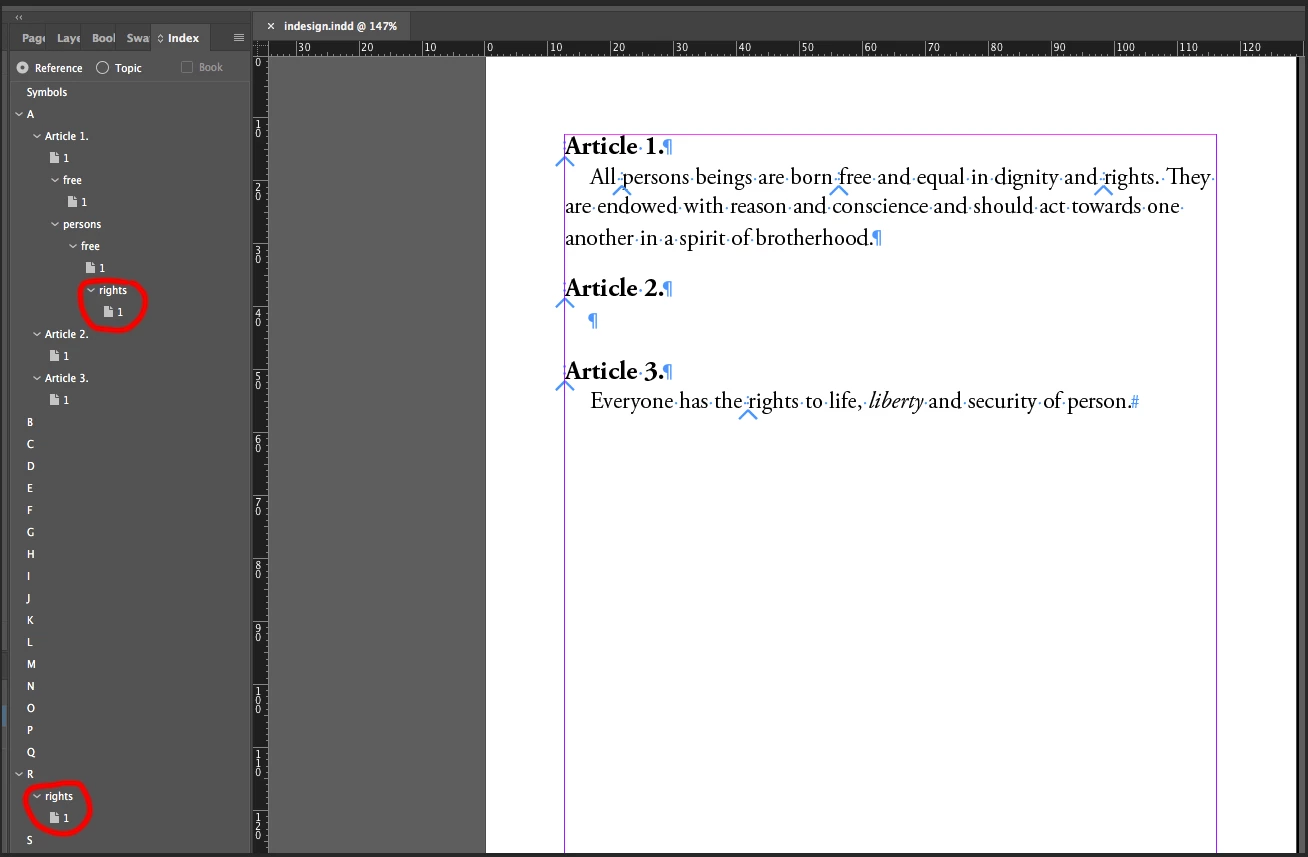
Thanks so much!

This topic has been closed for replies.
Correct answer ChocoBeast

You've probably either figured this out or moved on by now, but I was having the same issue and came up with a fix, so I figured I'd share it in case anyone else needed it

#target "indesign";   

(function () {   

    var doc = app.activeDocument,   

        indexIdx = doc.indexes.length - 1;   


    function removeNewEntriesFromIndex(index) {   

        var idx = index.topics.length - 1;   


        topics = app.documents[0].indexes[0].allTopics;


        for (idx = topics.length-1; idx >= 0; idx--) {

            // index.topics[idx].name = index.topics[idx].name.replace(/ *NEW$/, '');   

            index.topics[idx].name = index.topics[idx].name.replace(/ *Article 1.$/, 'Article One');   

            index.topics[idx].name = index.topics[idx].name.replace(/ *rights$/, 'human rights');  

        }   

    }   


    for (; indexIdx >= 0; indexIdx -= 1) {   

        removeNewEntriesFromIndex(doc.indexes[indexIdx]);   

    }   

}());  

2 replies

manuelb27477138
Inspiring
April 12, 2019

Hi ChocoBeast,

thanks for your script is just I was looking for.

I appreciatte, thanks for share!

Participating Frequently
August 14, 2023

Unfortunately this doesn't seem to be a "bullet-proof" solution - I think you were lucky 🙂 with your particular index.
It turns out that InDesign re-sorts the index entries (= the topics) instantly in the background as soon as you change their "name" ... and with this two things can and will happen:

1. You won't catch each index entry if you need to change one of the first letters - no matter if you iterate back or forth through the array "topics" or even "allTopics";

2. You can and will get an error message telling you about an invalid object which is no longer in place.

The real issue is the instant re-sorting done by InDesign - so far I haven't found a way to suppress that. It might be worth to investigate the following tracks:

a) completely duplicate the array "topics" (or "allTopics"), do the alterations there and then declare the new array the new index;
b) iterating multiple times through the topics/allTopics array;

c) iterate recursively through all four levels of the index

At the moment, I doubt if any of these could lead to a "bullet-proof" solution.

Participating Frequently
August 15, 2023

The API says "indexes - a collection of indexes" and offers a method "add" ... however, it seems that only one index is allowed. You can't add a second index behind the scenes - which might make a little sense because in the front end there is in fact only one index (in opposite to TOCs). However, this would have been a nice approach: to add a second index, copy all topics with changed names into it and then remove the first index, making the second the actual index.

Maybe it works with a "standard" array in which you can push all topics first ... might be worth to try.

Anyway, just looping through "topics" (only first level!) or "allTopics" (all 4 levels), changing and resaving names, will NOT bring the intended result.

ChocoBeastCorrect answer
Inspiring
January 16, 2019

You've probably either figured this out or moved on by now, but I was having the same issue and came up with a fix, so I figured I'd share it in case anyone else needed it

#target "indesign";   

(function () {   

    var doc = app.activeDocument,   

        indexIdx = doc.indexes.length - 1;   


    function removeNewEntriesFromIndex(index) {   

        var idx = index.topics.length - 1;   


        topics = app.documents[0].indexes[0].allTopics;


        for (idx = topics.length-1; idx >= 0; idx--) {

            // index.topics[idx].name = index.topics[idx].name.replace(/ *NEW$/, '');   

            index.topics[idx].name = index.topics[idx].name.replace(/ *Article 1.$/, 'Article One');   

            index.topics[idx].name = index.topics[idx].name.replace(/ *rights$/, 'human rights');  

        }   

    }   


    for (; indexIdx >= 0; indexIdx -= 1) {   

        removeNewEntriesFromIndex(doc.indexes[indexIdx]);   

    }   

}());