
acmegfx
Participant
March 23, 2022
Answered

Find/change search criteria only allowing "Document"

  • March 23, 2022
  • 3 replies
  • 426 views

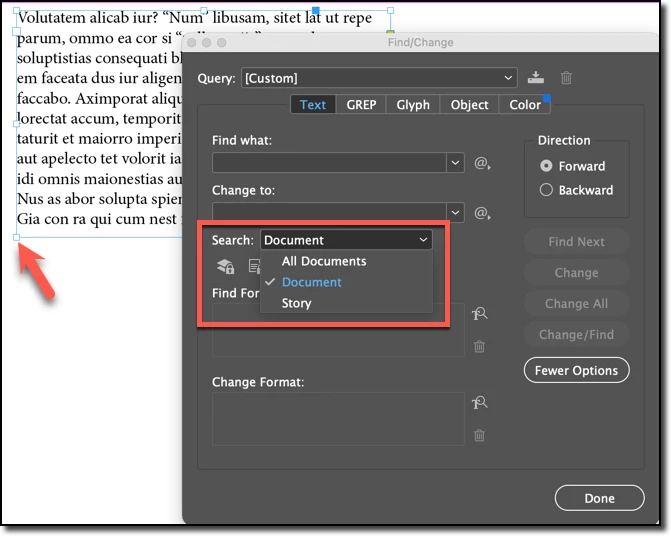
All of a sudden the search criteria in my Find/Change dialog box only allows one option. It always had a list that included Document, Selection or Story. Why did it disappear? I reset my preferences and perused all the options but cannot figure out how to get them back. I am working in InDesign 17.1 on Mac OS Monterey 12.2.1 ... can anyone help?
This topic has been closed for replies.
Correct answer Barb Binder

Hi @acmegfx:


If you don't have an insertion point in a story, the only options you will be given are Document and All Documents.


If a frame is selected, Story is added.


With an insertion point, To End of Story is added.


If you make a selection, then Selection is added.


~Barb

3 replies

Barb Binder
Community Expert
Community Expert
March 24, 2022

We are always happy to help, @acmegfx.


~Barb

~Barb at Rocky Mountain Training
Barb Binder
Community Expert
Barb BinderCommunity ExpertCorrect answer
Community Expert
March 24, 2022

Hi @acmegfx:


If you don't have an insertion point in a story, the only options you will be given are Document and All Documents.


If a frame is selected, Story is added.


With an insertion point, To End of Story is added.


If you make a selection, then Selection is added.


~Barb

~Barb at Rocky Mountain Training
acmegfx
acmegfxAuthor
Participant
March 24, 2022

Got it! Thank you, it makes sense now.

Peter Spier
Community Expert
Community Expert
March 23, 2022

Try the manual method for resetting the prefs in Reset InDesign Preferences and Other Troubleshooting.

Note that the folders are hidden on Mac.

acmegfx
acmegfxAuthor
Participant
March 24, 2022

I did this, it made no difference.