

Find only tofu square in Indesign using Indesign Extendscript
I tried with
var doc = app.activeDocument;
// --- Create / get highlight color ---
var highlightColor;
var existingColor = doc.colors.itemByName("JunkHighlight");
if (existingColor.isValid) {
highlightColor = existingColor;
} else {
highlightColor = doc.colors.add({
name: "JunkHighlight",
model: ColorModel.PROCESS,
space: ColorSpace.RGB,
colorValue: [255, 0, 0]
});
}
// --- Create / get character style ---
var highlightStyle;
var existingStyle = doc.characterStyles.itemByName("JunkCharStyle");
if (existingStyle.isValid) {
highlightStyle = existingStyle;
} else {
highlightStyle = doc.characterStyles.add({
name: "JunkCharStyle",
fillColor: highlightColor
});
}
// --- Loop through all stories and characters ---
var stories = doc.stories;
for (var s = 0; s < stories.length; s++) {
var chars = stories[s].characters;
for (var i = 0; i < chars.length; i++) {
var c = chars[i].contents;
if (typeof c === "string" && c.length > 0 && c.charCodeAt(0) > 127) {
chars[i].appliedCharacterStyle = highlightStyle;
}
}
} this code it provides the output like
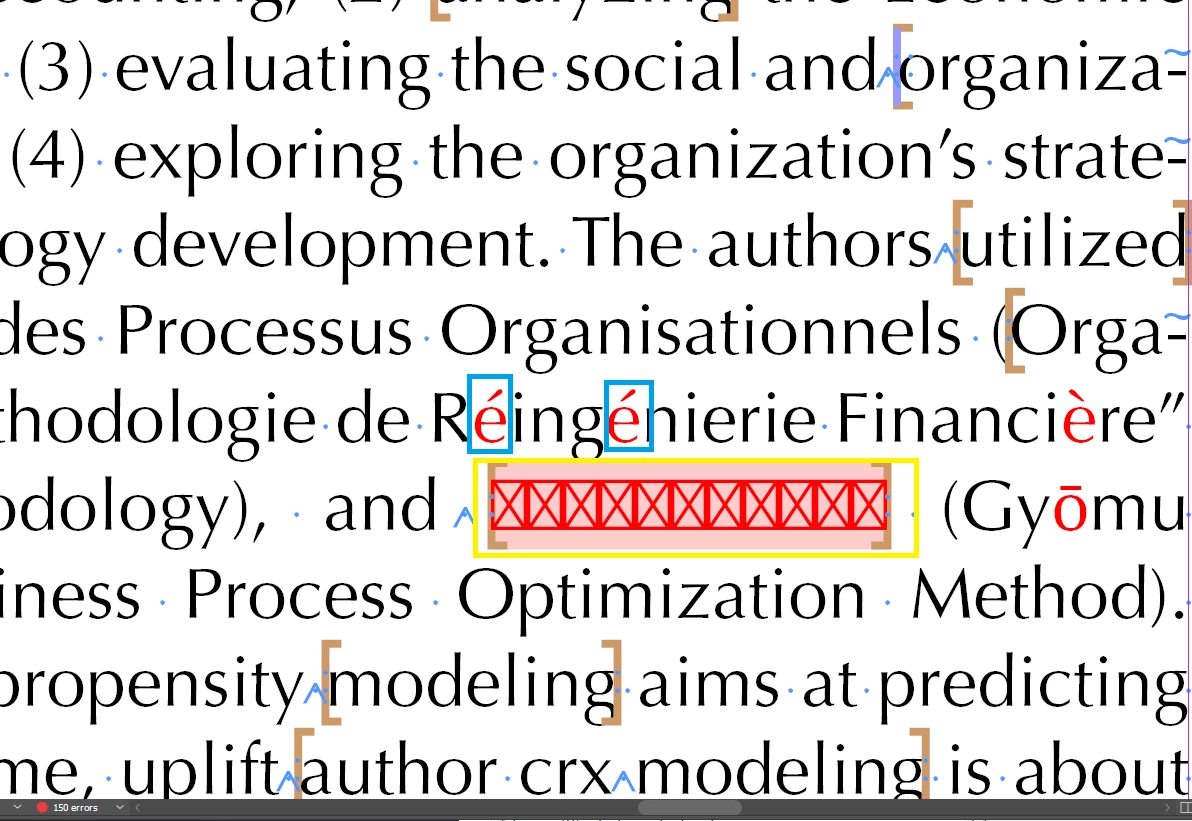
look here it find all the junk but i only need to find the tofu square box.


 AdChoices