manuelb27477138
Inspiring
May 17, 2018
Answered

Find the same page number in the same paragraph

  • May 17, 2018
  • 1 reply
  • 971 views

Hello everyone!

in my Index texts one of common mistakes, are a duplicate page number in the same paragraph or page number and range that include the same page numbers.

¿is possible get an Alert with the problematic paragraph?

For example, here are my 2 problems:

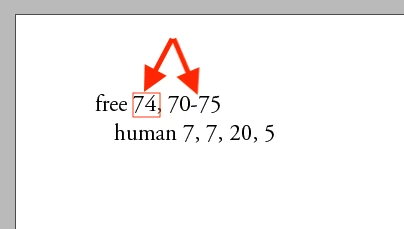
1º the number 74 are inside the range between 70 and 75, then I need get an Alert.

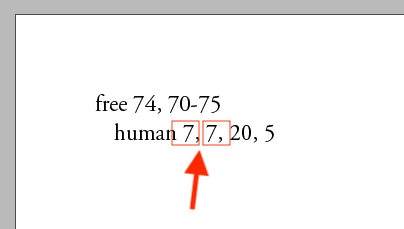
2º the number 7 appear 2 times, then I need get an Alert.

Thanks so much in advance!

This topic has been closed for replies.
Correct answer manuelb27477138

Hello!

I have the solution.

I share 2 scripts, unfortunate I can not do with InDesign and I used python. I hope is helpful to someone.

1º SCRIPT - INDEX FIND DUPLICATE NUMBER PAGES

Download the files

SCRIPT:

index.py

import re

import sys

# all possible unicode dashes

dashes = '\u002D|\u058A|\u05BE|\u1400|\u1806|\u2010|\u2011|\u2012|\u2013|\u2014|\u2015|\u2E17|\u2E1A|\u2E3A|\u2E3B|\u2E40|\u301C|\u3030|\u30A0|\uFE31|\uFE32|\uFE58|\uFE63|\uFF0D'

def validate_nums(nums):

seen = []

for num in nums:

if num in seen:

return False

seen.append(num)

return True

def find_errors(filename):

try:

with open(filename, 'r') as f:

i = 1

for line in f:

line = re.split('(\d+|{0})'.format(dashes), line)

nums = []

dash = False

for s in line:

if s.isdigit():

n = int(s)

if dash:

nums.extend(range(nums[-1]+1, n+1))

dash = False

else:

nums.append(n)

elif re.match(dashes, s):

dash = True

if not (validate_nums(nums)):

print("Error on line ", i)

i += 1

except FileNotFoundError as e:

print("No such file found.")

def main():

try:

find_errors(sys.argv[1])

except IndexError as e:

print("You need to specify the filename when calling the script.")

if __name__ == '__main__':

main()

index.txt

human  27–29, 27,29

human rights  50, 50-60

beings  34, 100

DESCRIPTION:

This script find the error page numbers in a Index. The script will output the numbers of the wrong lines.

For example, the next entry have a mistake, because the number 50 already is include in the range of "50-60"

Human 10, 50, 50-60

Then the script will output the number error line, after you manually can modify. The correct line will be:

Human 10, 50-60

1. install python 3.

NOTICE: you need run the python version 3, because is not working properly with python 2.

2. check in terminal if you have the version python 3, with this:

python3 -V

The output will be something like this:

Python 3.7.0

3. Run the script in terminal:

python3 index.py index.txt

Notice, also you can run multiples files, type this in terminal:

python3 index.py index1.txt index2.txt index3.txt

4. you will get the number line errors, similar like this:

Error on line 2

Error on line 3

Error on line 5

Error on line 15

Error on line 38

Error on line 159

Error on line 160

Error on line 161

Error on line 162

Error on line 163

Error on line 221

Error on line 239

5. Enjoy!

2º SCRIPT - INDEX FIND RANGE OF PAGES GREATHER THAN X NUMBER

Download the files

IMAGES:
SCRIPT:

index.py

import re

import sys

RANGE_LIMIT = 7 # maximum page range limit, change this to what you want

# all possible unicode dashes

dashes = '\u002D|\u058A|\u05BE|\u1400|\u1806|\u2010|\u2011|\u2012|\u2013|\u2014|\u2015|\u2E17|\u2E1A|\u2E3A|\u2E3B|\u2E40|\u301C|\u3030|\u30A0|\uFE31|\uFE32|\uFE58|\uFE63|\uFF0D'

def find_errors(filename):

try:

with open(filename, 'r') as f:

i = 1

for line in f:

matches = re.findall('\d+\s*(?:{0})\s*\d+'.format(dashes), line)

for match in matches:

match = re.split(dashes, match)

n1 = int(match[0])

n2 = int(match[1])

if n2 - n1 > RANGE_LIMIT:

print("Excessively large range on line ", i)

i += 1

except FileNotFoundError as e:

print("No such file found.")

def main():

fnames = sys.argv[1:]

if not fnames:

print("You need to specify the filename when calling the script.")

else:

for fname in fnames:

print("Errors in file {0}:".format(fname))

find_errors(sys.argv[1])

print()

if __name__ == '__main__':

main()

index.txt

human  27–29, 27,29

human rights  50, 50-60

beings  34, 100

DESCRIPTION:

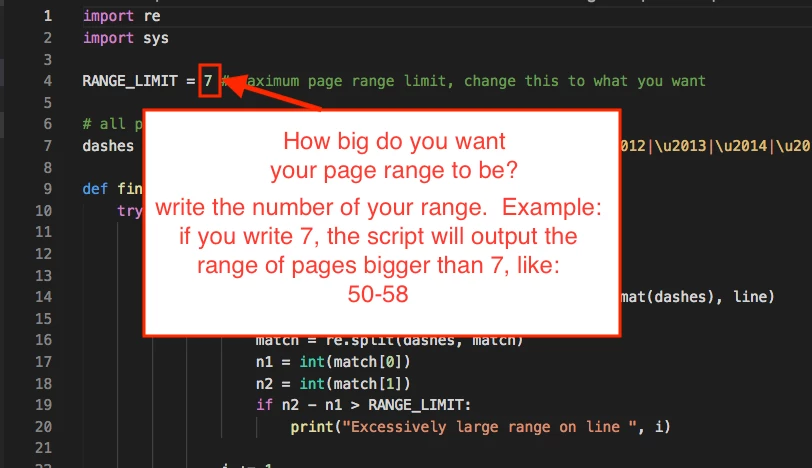
This script find the error page numbers in a Index. The script will output the numbers with a range bigger than specify for you in the variable RANGE_LIMIT.

Example: error output if you have config your RANGE_LIMIT =7, and the script find the next range:

Human 10, 50-60

The error is because the range of 50-60 is 10, and you said the RANGE_LIMIT=7

INSTRUCTIONS:

1. install python 3.

NOTICE: you need run the python version 3, because is not working properly with python 2.

2. check in terminal if you have the version python 3, with this:

python3 -V

The output will be something like this:

Python 3.7.0

3. Run the script in terminal:

python3 index.py index.txt

Notice, also you can run multiples files, type this in terminal:

python3 index.py index1.txt index2.txt index3.txt

4. you will get the number line errors, similar like this:

Error on line 2

Error on line 3

Error on line 5

Error on line 15

Error on line 38

Error on line 159

Error on line 160

Error on line 161

Error on line 162

Error on line 163

Error on line 221

Error on line 239

5. Enjoy!

1 reply

Community Expert
May 17, 2018

Hi Manuel,

not exactly the thing you want, but very close.
Marc Autret's Page Range Formatter.

Indiscripts :: Page Range Formatter

Regards,
Uwe

manuelb27477138
Inspiring
May 17, 2018

mmm... interesting

I think is good for start. Thanks so much Laubender!

manuelb27477138
manuelb27477138AuthorCorrect answer
Inspiring
November 15, 2018

Hello!

I have the solution.

I share 2 scripts, unfortunate I can not do with InDesign and I used python. I hope is helpful to someone.

1º SCRIPT - INDEX FIND DUPLICATE NUMBER PAGES

Download the files

SCRIPT:

index.py

import re

import sys

# all possible unicode dashes

dashes = '\u002D|\u058A|\u05BE|\u1400|\u1806|\u2010|\u2011|\u2012|\u2013|\u2014|\u2015|\u2E17|\u2E1A|\u2E3A|\u2E3B|\u2E40|\u301C|\u3030|\u30A0|\uFE31|\uFE32|\uFE58|\uFE63|\uFF0D'

def validate_nums(nums):

seen = []

for num in nums:

if num in seen:

return False

seen.append(num)

return True

def find_errors(filename):

try:

with open(filename, 'r') as f:

i = 1

for line in f:

line = re.split('(\d+|{0})'.format(dashes), line)

nums = []

dash = False

for s in line:

if s.isdigit():

n = int(s)

if dash:

nums.extend(range(nums[-1]+1, n+1))

dash = False

else:

nums.append(n)

elif re.match(dashes, s):

dash = True

if not (validate_nums(nums)):

print("Error on line ", i)

i += 1

except FileNotFoundError as e:

print("No such file found.")

def main():

try:

find_errors(sys.argv[1])

except IndexError as e:

print("You need to specify the filename when calling the script.")

if __name__ == '__main__':

main()

index.txt

human  27–29, 27,29

human rights  50, 50-60

beings  34, 100

DESCRIPTION:

This script find the error page numbers in a Index. The script will output the numbers of the wrong lines.

For example, the next entry have a mistake, because the number 50 already is include in the range of "50-60"

Human 10, 50, 50-60

Then the script will output the number error line, after you manually can modify. The correct line will be:

Human 10, 50-60

1. install python 3.

NOTICE: you need run the python version 3, because is not working properly with python 2.

2. check in terminal if you have the version python 3, with this:

python3 -V

The output will be something like this:

Python 3.7.0

3. Run the script in terminal:

python3 index.py index.txt

Notice, also you can run multiples files, type this in terminal:

python3 index.py index1.txt index2.txt index3.txt

4. you will get the number line errors, similar like this:

Error on line 2

Error on line 3

Error on line 5

Error on line 15

Error on line 38

Error on line 159

Error on line 160

Error on line 161

Error on line 162

Error on line 163

Error on line 221

Error on line 239

5. Enjoy!

2º SCRIPT - INDEX FIND RANGE OF PAGES GREATHER THAN X NUMBER

Download the files

IMAGES:

SCRIPT:

index.py

import re

import sys

RANGE_LIMIT = 7 # maximum page range limit, change this to what you want

# all possible unicode dashes

dashes = '\u002D|\u058A|\u05BE|\u1400|\u1806|\u2010|\u2011|\u2012|\u2013|\u2014|\u2015|\u2E17|\u2E1A|\u2E3A|\u2E3B|\u2E40|\u301C|\u3030|\u30A0|\uFE31|\uFE32|\uFE58|\uFE63|\uFF0D'

def find_errors(filename):

try:

with open(filename, 'r') as f:

i = 1

for line in f:

matches = re.findall('\d+\s*(?:{0})\s*\d+'.format(dashes), line)

for match in matches:

match = re.split(dashes, match)

n1 = int(match[0])

n2 = int(match[1])

if n2 - n1 > RANGE_LIMIT:

print("Excessively large range on line ", i)

i += 1

except FileNotFoundError as e:

print("No such file found.")

def main():

fnames = sys.argv[1:]

if not fnames:

print("You need to specify the filename when calling the script.")

else:

for fname in fnames:

print("Errors in file {0}:".format(fname))

find_errors(sys.argv[1])

print()

if __name__ == '__main__':

main()

index.txt

human  27–29, 27,29

human rights  50, 50-60

beings  34, 100

DESCRIPTION:

This script find the error page numbers in a Index. The script will output the numbers with a range bigger than specify for you in the variable RANGE_LIMIT.

Example: error output if you have config your RANGE_LIMIT =7, and the script find the next range:

Human 10, 50-60

The error is because the range of 50-60 is 10, and you said the RANGE_LIMIT=7

INSTRUCTIONS:

1. install python 3.

NOTICE: you need run the python version 3, because is not working properly with python 2.

2. check in terminal if you have the version python 3, with this:

python3 -V

The output will be something like this:

Python 3.7.0

3. Run the script in terminal:

python3 index.py index.txt

Notice, also you can run multiples files, type this in terminal:

python3 index.py index1.txt index2.txt index3.txt

4. you will get the number line errors, similar like this:

Error on line 2

Error on line 3

Error on line 5

Error on line 15

Error on line 38

Error on line 159

Error on line 160

Error on line 161

Error on line 162

Error on line 163

Error on line 221

Error on line 239

5. Enjoy!