
Known Participant
September 1, 2010
Answered

finding MANUALLY applied character styles

  • September 1, 2010
  • 1 reply
  • 2109 views

Hi all,

We're in the process of switching to an XML workflow, and as one of our interim steps we're applying tags to paragraph and character styles in some of our documents. I'm aware of the option to map styles to tags and this should work well for paragraph styles. However, we're looking for a way to only map the character styles that have been manually applied.

As an example, we have a paragraph style for instructions that has a bold number nested at the beginning of each paragraph. In other places, the same character style may be used to bold a specific word, but it is applied manually. Is it possible to map to tags ONLY the character styles that were applied manually? We do not want tags identifying character styles that were applied via Nested Styles or GREP Styles.

I am assuming this would take some sort of script, which is why I'm posting in the scripting forum. Does anyone know if this is possible?

Thanks in advance,

Matthew
This topic has been closed for replies.
Correct answer Shonkyin-CF145T

Thanks Jongware—do you think that's a bug? I don't see how that would be a feature...

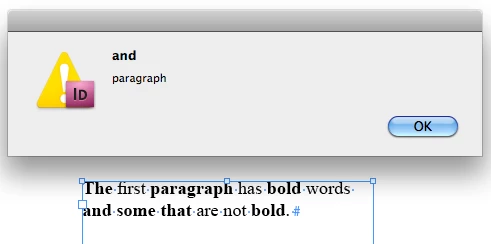
The script you provided worked...sort of. I did a test as you suggested with bold applied manually (to the words "paragraph" and "and"), via nested style (through one word), and via GREP style (all four letter words). Here's the result I got:

So it looks like the script returns a list of the words that are affected, yes? This is helpful, but in a long document, how would I know where the affected words were?

What would be really useful is if, instead of returning a list, the script could apply an XML tag to the text that is manually styled. That's what we ultimately want to accomplish. Would that be complicated? Also, would doing this for multiple character styles be as simple as repeating the text you provided and replacing instances of "bold" with a different style name ("italic," for example)? I was hoping we could achieve this using the Find/Change dialog, but with the limitations outlined in my original post it doesn't seem possible.

I clearly need to learn some scripting...it seems more and more important needed with every project! I'll have to read some books on the subject. In the meantime, thanks so much for all your help!

Matt


Hi Matt,

Please try below code, hope it will help you.

applyTag("bold", "b");
applyTag("italic", "i");


function applyTag(StyleName, TagName)
{
app.findTextPreferences = null;
app.findTextPreferences.appliedCharacterStyle = StyleName;
list = app.activeDocument.findText();
app.findTextPreferences = null;
while (list.length)
{
     next = list.pop();
     if (next.appliedCharacterStyle == app.activeDocument.characterStyles.item(StyleName))
     {
          next.associatedXMLElements[0].xmlElements.add(TagName, next)
     }  
}
}

Shonky

1 reply

tomaxxi
Inspiring
September 1, 2010

Hey!

Maybe for start try this little script. It will mark all localy applied formatting.

http://www.indiscripts.com/post/2010/05/show-local-formatting-in-indesign-cs4

--

tomaxxi

http://indisnip.wordpress.com/

mattacaAuthor
Known Participant
September 1, 2010

Thanks, tomaxxi. That's a cool little script. Unfortunately for this project, I don't need to know where there are manual overrides, I need to know where character styles have been manually applied. I'm not even sure if this is possible, which is why I asked. I'm sure your script will come in useful in the future though!

Matt

Jongware
Community Expert
Community Expert
September 1, 2010

Another InDesign oddity!

If you fill a frame full of placeholder text and assign a "Bold" character style to, for example, a Nested Style:1 word, and a GREP style \<\w{4,6}\>, then use regular (or GREP) Find Text to search for the character style, it'll only highlight words that are at the start of the paragraph. Now that is wrong, wrong, wrong, because

(a) it should not find any of them -- if you click your cursor into one of these bolded words, the Character Style panel says it's [None].

or

(b) it should find all of them, not just those that happen to be at the start of a paragraph. (BTW -- it's not the Nested Style it picks up; when using only GREP styles it'll also find words-at-the-start).

It is funny, if things like this tickle you, that in a script "findText" works exactly the same. However: if you 'found' bold text and then interrogate what character style it has applied, it will only return your "bold" style if it was applied manually.

See this script -- test with a placeholder text, aforementioned Nested/GREP styles, and a few hand-picked words that you applied "bold" to yourself. It will only report the ones you marked.

app.findTextPreferences = null;

app.findTextPreferences.appliedCharacterStyle = "bold";

list = app.activeDocument.findText();

r = [];

while (list.length)

{

     next = list.pop();

     if (next.appliedCharacterStyle == app.activeDocument.characterStyles.item("bold"))

          r.push (next.contents);

}

alert (r.join("\r"));