
jocstone_me
Inspiring
October 18, 2012
Answered

finding out where a certain colour is used

  • October 18, 2012
  • 4 replies
  • 23077 views

Hi everyone,

is there a way to find out where a certain colour (swatch) is used inside a document, like on what page or something?

Inside a single-page document is not a big deal, in a 200+ paged document it is hell to find out…

I can search for "character colour" and search again for object fill and again for stroke and again and again.

I'm looking for an "easy" way to use.

or maybe there is a script for that?

thanks for helping me out!
This topic has been closed for replies.
Correct answer winterm

following zero budget solutions...

I doubt there's a way to bypass first stage of Steve's method. However, you can avoid entering Separations Preview and manual cycling through hundreds of pages.

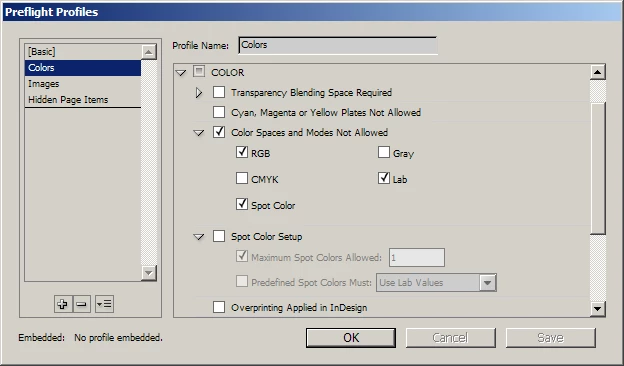
Just convert your color to spot, create special Preflight profile and run it:

you'll get the pages where spot colors occur, even more, ID will select it for you when you click on page number in "problem list" in Preflight pallette.

4 replies

Participant
February 1, 2021

Latest version (Jan 2021) has Color option in the Find command


Participant
September 3, 2014

This video shows you how to use the Find and Replace tool to do this, and it's the best answer, better than replacing with spot colors etc., works for me every time!!!

Find Where a Color is Used in InDesign - YouTube

Participating Frequently
October 18, 2012

jocstone_me wrote:

Hi everyone,

is there a way to find out where a certain colour (swatch) is used inside a document, like on what page or something?

Inside a single-page document is not a big deal, in a 200+ paged document it is hell to find out…

I can search for "character colour" and search again for object fill and again for stroke and again and again.

I'm looking for an "easy" way to use.

or maybe there is a script for that?

thanks for helping me out!

The commercial Blatner Tools plug-in for InDesign from dtptools.com can find colors and can create a report of all colors or only those used in the current document. There's a 14-day free trial.

I have no connection to the company other than being a satisfied user.

HTH

Regards,

Peter

_______________________

Peter Gold

KnowHow ProServices

jocstone_me
Inspiring
October 19, 2012

Hi Peter,

thanks for your idea, the plugin is only 99$, so it is to consider …

Steve Werner
Community Expert
Community Expert
October 18, 2012

One trick is to temporarily use the Swatches panel to change the color from process to spot. Then choose Window > Output > Separations Preview, and turn on Separations. Turn off the process colors, but turn on the color you're looking for. Page through the document and you can see where it occurs.

jocstone_me
Inspiring
October 18, 2012

Steve,

your solution is an option, though, also time-consuming for large documents.

When using the "Find Font" command in Indesign, and showing "More Info", there you can see on which pages a certain font is used, that is fast and easy.

winterm
wintermCorrect answer
Legend
October 18, 2012

following zero budget solutions...

I doubt there's a way to bypass first stage of Steve's method. However, you can avoid entering Separations Preview and manual cycling through hundreds of pages.

Just convert your color to spot, create special Preflight profile and run it:

you'll get the pages where spot colors occur, even more, ID will select it for you when you click on page number in "problem list" in Preflight pallette.