Inspiring
April 23, 2012
Answered

Finding the end of line

  • April 23, 2012
  • 1 reply
  • 7692 views

Is It possible to find and change a character in the end of each line from a block text?

I know Indesign GREP can't do this, GREP only finds the end of paragraph, not lines.

I understand this is a problem because every time the text frame is modified, you have another character being changed.

Is It possible to do this with a script?

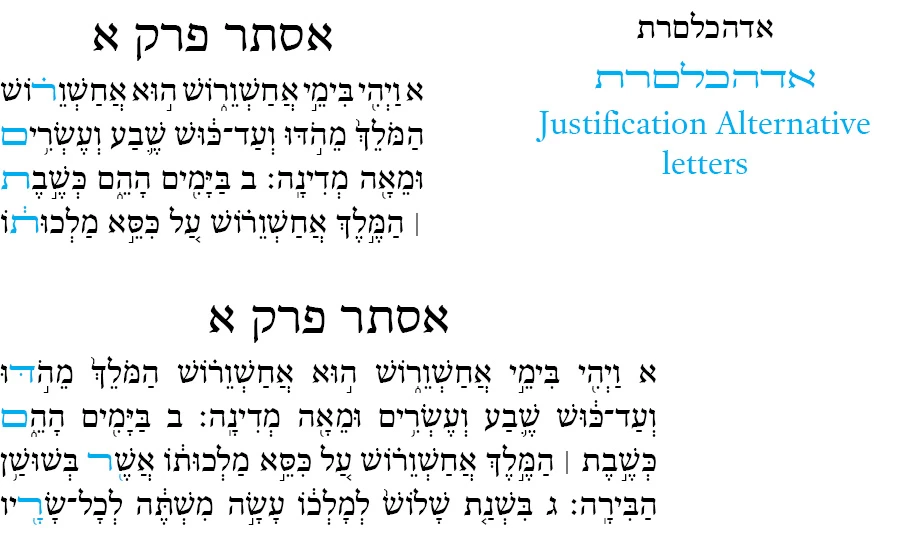
I have attached an image of what I would like to do.

The text in the image is Hebrew (R2L language) and the end of line is in the left.

Any help would be great.

Sami

This topic has been closed for replies.
Correct answer Jump_Over

Thank's again Ariel,

I am a beginner in Java Script and I don't know what I am doing wrong.

Please take a look:

main();

function main(){

          mySetup();

          mySnippet();

          myTeardown();

}

function mySetup(){

}

function mySnippet(){

          if (app.documents.length != 0){

                    if (app.selection.length == 1){

                              switch (app.selection[0].constructor.name){

                                        case "InsertionPoint":

                                        case "Character":

                                        case "Word":

                                        case "TextStyleRange":

                                        case "Line":

                                        case "Paragraph":

                                        case "TextColumn":

                                        case "Text":

                                        case "Story":

                                                  myProcessText(app.selection[0]);

                                        break;

                                        case "TextFrame":

                                                  myProcessText(app.selection[0].texts.item(0));

                                                  break;

                                        default:

                                                  alert("The selected object is not a text object. Select some text and try again.");

                                                  break;

                              }

                    }

                    else{

                              alert("Please select some text and try again.");

                    }

          }

}

function myTeardown(){

}

function myProcessText(myTextObject){

}

var myDocument = app.documents.item(0);

var myPage = myDocument.pages.item(0);

var myTextFrame = myPage.textFrames.item(0);

var myTextObject = myTextFrame.parentStory.characters.item(0);

var myStory = myDocument.stories.item(0);

var myStringArray = myTextFrame.lines.everyItem().contents;

myPara = app.selection[0];

myLines = myPara.lines;

for (var i =0; i<myLines.length; i++){

    myFinds = myLines.findText(ת);

myFinds[-1].contents = "z";

}

Sami


Hi,

Assuming your text is inside one or more text frames which are connected. Select one of them and run this:

-------------

myLines = app.selection[0].parentStory.lines;

for (k=0; k<myLines.length; k++){

     if(myLines.characters[-1] == "\r")                         // if there is an end of paragraph

          myLines.characters[-2].contents = "z";          // change a second last character to "z"

     else myLines.characters[-1].contents = "z";     // otherwise change a last character to "z"

}

------------

This is just for show the way.

Hope you step into

1 reply

TᴀW
Legend
April 23, 2012

Well, if you've got some text (paragraphs, story, whatever):

myText.lines.characters[-1]

will get you the last character on the line.

If you want to change what it is,

myText.lines.characters[-1].contents = "Z"

etc.

Ariel

id-extras.com | InDesign tools & scripts for typesetters, form designers, and translators
Inspiring
April 23, 2012

Thank you Ariel, but I am receiving this message:

Object does not support the property or method 'characters'

Sami

TᴀW
Legend
April 24, 2012

It depends on how you're getting hold of the block of text.

Let's say you select a paragraph in InDesign.

So then  you can say:

myPara = app.selection[0];

then the lines in this paragraph are:

myLines = myPara.lines;

so now you can do a loop:

for (var i =0; i<myLines.length; i++){

now let's say you've set you app.findTextPreferences and app.changeTextPreferences to whatever you want, you can search the line as follows:

myFinds = myLines.findText();

and the last find on the line will be:

myFinds[-1]

so you can change that to whatever you want:

myFinds[-1].contents = "Z";

}

If you want to substitute justification alternatives with regular letters it's obviously a little more complicated (you've got to find the unicode values, etc.) but this is the basic idea.

One thing you've got to be careful about is that if you make a replacement, the lines shouldn't change. If the line breaks change, myLines will no longer be valid and you can get some weird results.

HTH,

Ariel

id-extras.com | InDesign tools & scripts for typesetters, form designers, and translators