Participant
March 31, 2018
Answered

Fit content to frame without line breaks

  • March 31, 2018
  • 2 replies
  • 724 views

Hi, I am looking for a scripting solution for a problem I have:

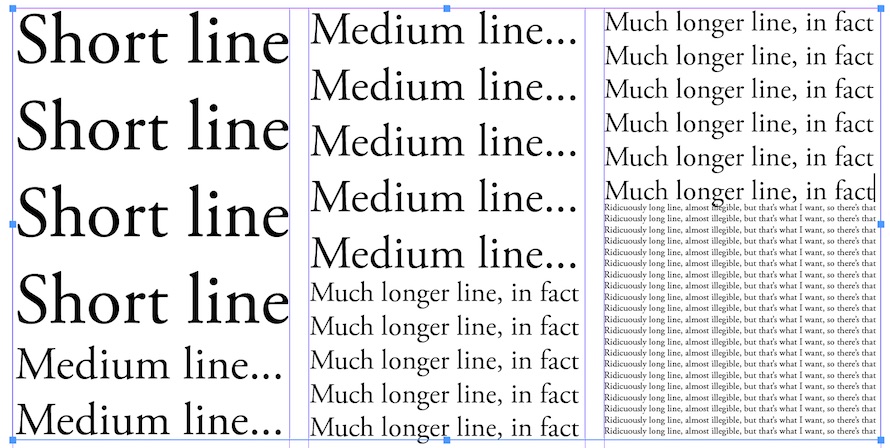
I have a text that needs to fit in a three columned layout with progressively longer lines of text.

I want to adjust the font size automatically, so that it always has the correct size to fill the line completely.

Does anyone have an idea how to do this?

Here's an example:

lines.jpg

Thank you for your help!

This topic has been closed for replies.
Correct answer Robert Kyle

Try something like this:

var b = app.selection[0];

for (var i = 0; i < b.parentStory.paragraphs.length; i++) {

var g = b.parentStory.paragraphs;

g.hyphenation = false;

if (g.lines.length === 1) {

var pts = g.pointSize;

while (g.lines.length === 1) {

g.pointSize = pts++;

} // end loop

g.pointSize = g.leading = g.pointSize - 1;

} else { // paragraphs is two or more lines

var pts = g.pointSize;

while (g.lines.length > 1) {

g.pointSize = pts--;

} // end loop

g.leading = g.pointSize;

} // end if

} // end loop

It assumes that you have selected a text frame before running it. It also assumes that the original text has hard paragraph returns at the end of what will be each line. In other words, it takes each PARAGRAPH and fits it to a single LINE.

Note that the leading is adjusted to match the pointSize. It looks like your example also has some kind of adjustment applied to the leading.

Years ago, I wrote a script for copy editors to use when a headline was too long for its container, so the downsizing section has some miles on it. In the interest of full disclosure, I will say that it wasn't very successful because it imposed a limit (3 points) on the amount of adjustment permitted. That was the official style but the editors quickly learned how to bend the rules.

But here's hoping it is of some help to you.

Bob

2 replies

Inspiring
March 31, 2018

Oh and one more thing, as Lt. Columbo might say:

This script will throw an error (data out of range) if the original text frame is overset. It wasn't an issue with my original script because that one was operating on a single selected paragraph.

There're a lot of smart people on this forum, so maybe one of them knows the best way to handle the overset box.

MrTIFF
Participating Frequently
April 1, 2018

Well, the flag to look at to detect being overset is myFrame.overflows or myStory.overflows. You probably want some sort of loop that adjusts one or more text attributes (leading, font size, linespacing, wordspacing, etc) until the overset text doesn't overflow any more.

Robert KyleCorrect answer
Inspiring
March 31, 2018

Try something like this:

var b = app.selection[0];

for (var i = 0; i < b.parentStory.paragraphs.length; i++) {

var g = b.parentStory.paragraphs;

g.hyphenation = false;

if (g.lines.length === 1) {

var pts = g.pointSize;

while (g.lines.length === 1) {

g.pointSize = pts++;

} // end loop

g.pointSize = g.leading = g.pointSize - 1;

} else { // paragraphs is two or more lines

var pts = g.pointSize;

while (g.lines.length > 1) {

g.pointSize = pts--;

} // end loop

g.leading = g.pointSize;

} // end if

} // end loop

It assumes that you have selected a text frame before running it. It also assumes that the original text has hard paragraph returns at the end of what will be each line. In other words, it takes each PARAGRAPH and fits it to a single LINE.

Note that the leading is adjusted to match the pointSize. It looks like your example also has some kind of adjustment applied to the leading.

Years ago, I wrote a script for copy editors to use when a headline was too long for its container, so the downsizing section has some miles on it. In the interest of full disclosure, I will say that it wasn't very successful because it imposed a limit (3 points) on the amount of adjustment permitted. That was the official style but the editors quickly learned how to bend the rules.

But here's hoping it is of some help to you.

Bob
Participant
April 1, 2018

Thank you so much, this works like a charm! Exactly what I was looking for!!