

Chuck Uebele
Community Expert
Community Expert
October 10, 2017
Answered

Flowing text to second column.

  • October 10, 2017
  • 3 replies
  • 3192 views

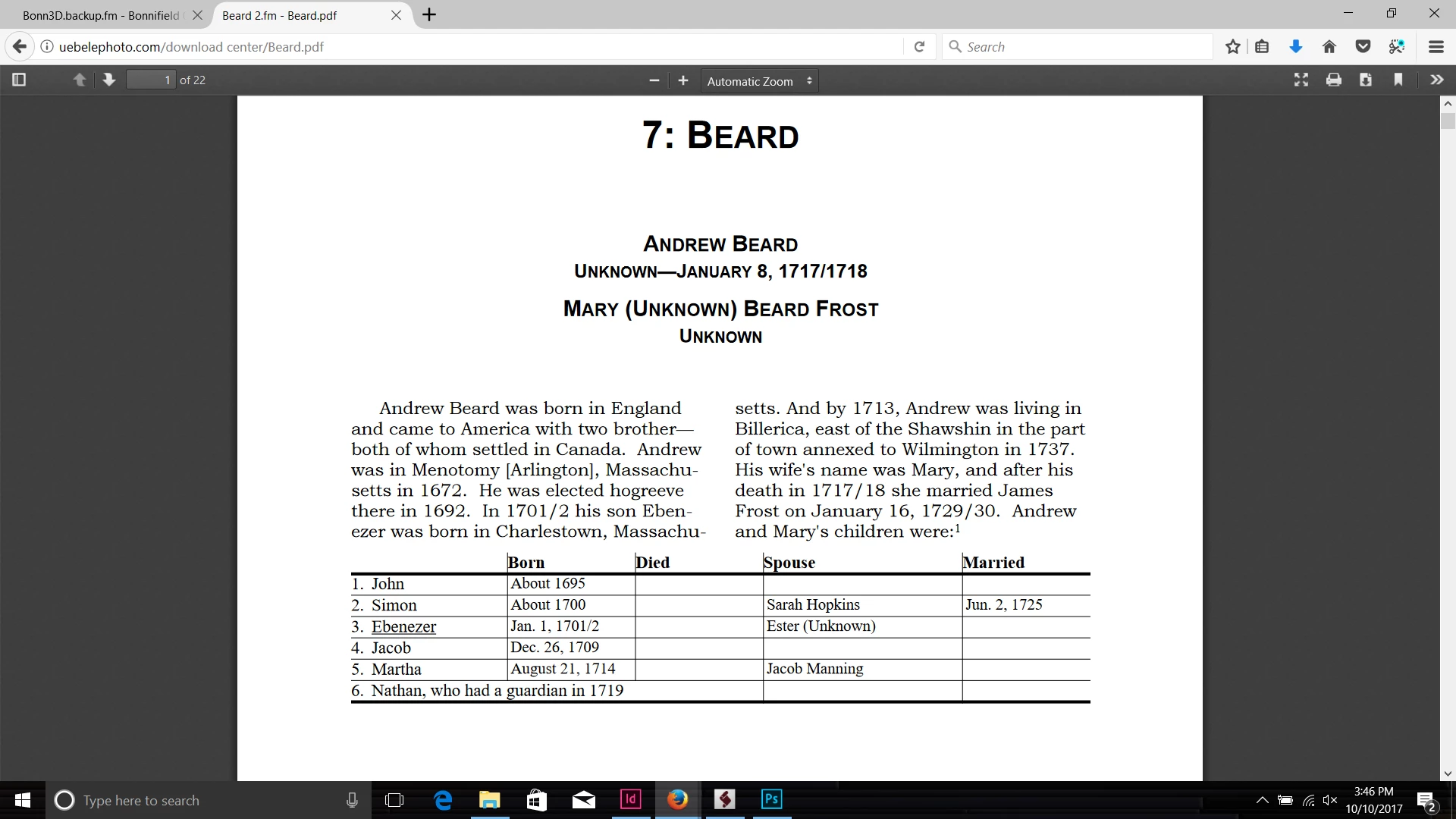
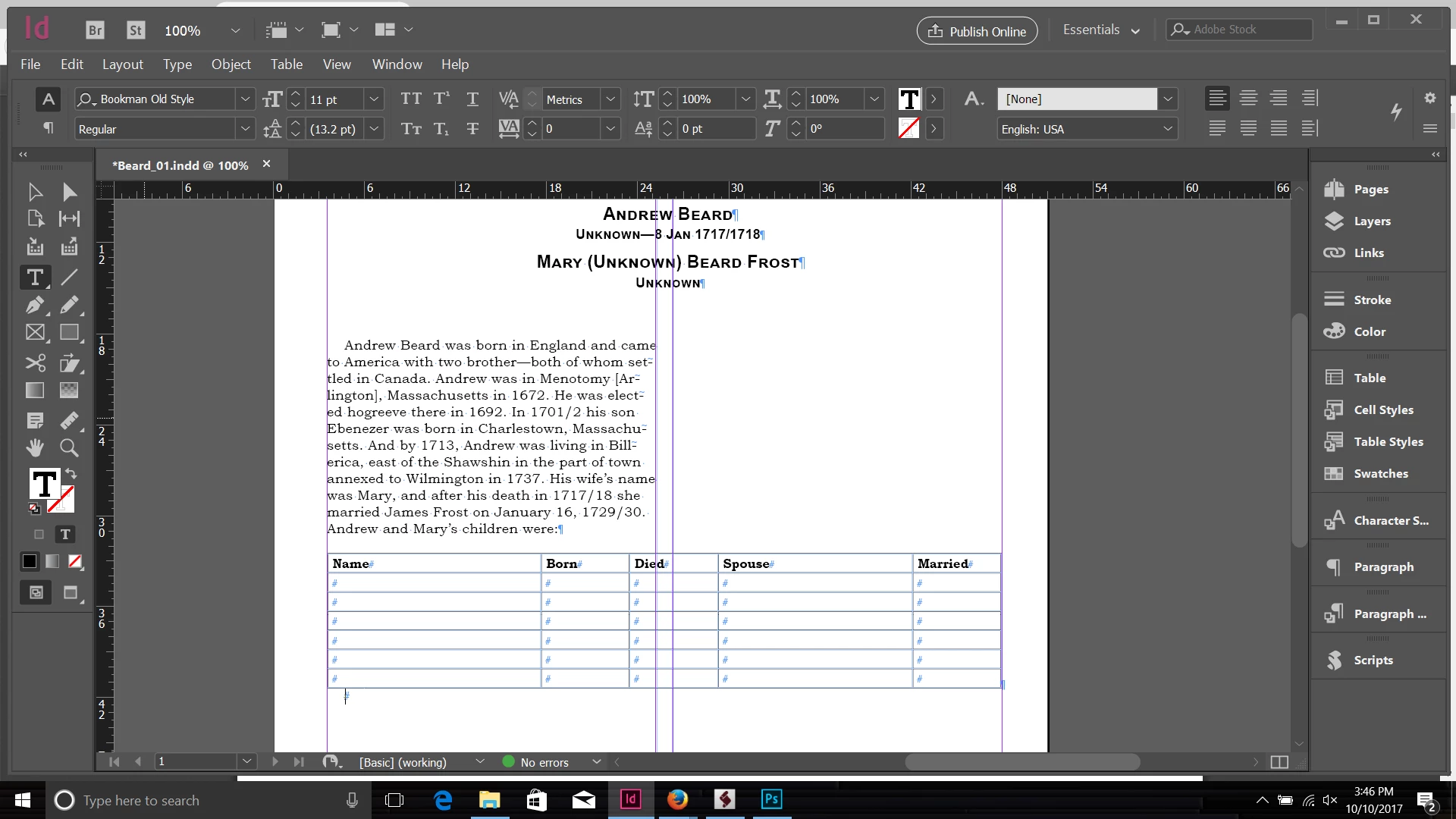
Just relearning ID and trying to convert some PDFs to ID. I have my doc set up with a single text frame with 2 columns. I have a table that I inserted that spans both columns. I want the text above it to split and span both columns rather than flow in just the one column. Is there a trick to do this without splitting the text frame? Below is my PDF, and what I'm getting in ID.
    This topic has been closed for replies.
    Correct answer Barb Binder

    I forgot my screen shot! That should help, Chuck. It's hard to see the flow though with the Lorem Ipsum text. It flows from col 1 to 2 above the table, and then again 1-2 below the table. If it needs to flow down 1 and then down 2 and also hop the frame, then the frame needs to be pulled from the text thread and anchored in a frame with text wrap.

    ~Barb

    3 replies

    Barb Binder
    Community Expert
    Community Expert
    October 10, 2017

    So I didn't pull the table out of the frame, it's still in the story, but my insertion point is sitting on the ¶ just after the table. Then you set that paragraph to span, and the table follows along.

    ~Barb at Rocky Mountain Training
    Chuck Uebele
    Community Expert
    Community Expert
    October 10, 2017

    Okay, I'll try that too. Yea, I don't know much about ID, but trying to learn it a bit, so I can transfer these write-ups to it. My Framemaker is so old that it doesn't work with my current OS. Don't use it enough to upgrade.

    Barb Binder
    Community Expert
    Community Expert
    October 10, 2017

    This is actually a FrameMaker feature (straddle) that was ported over to InDesign (and renamed span) a few years back.

    I'm always happy to help Chuck, and if you need further clarification, just ask. See you next week?

    ~Barb at Rocky Mountain Training
    Barb Binder
    Community Expert
    Community Expert
    October 10, 2017

    I would set this up as a 2-column text frame, and the set the titles and the table (which must be on an empty ¶ so as to not disrupt nearby text) to Span 2 or Span All.

    ~Barb

    ~Barb at Rocky Mountain Training
    Chuck Uebele
    Community Expert
    Community Expert
    October 10, 2017

    Barb, If I span the text to span all, it will just no longer be two columns of text, right? Is that what you're talking about?

    Barb Binder
    Community Expert
    Barb BinderCommunity ExpertCorrect answer
    Community Expert
    October 10, 2017

    I forgot my screen shot! That should help, Chuck. It's hard to see the flow though with the Lorem Ipsum text. It flows from col 1 to 2 above the table, and then again 1-2 below the table. If it needs to flow down 1 and then down 2 and also hop the frame, then the frame needs to be pulled from the text thread and anchored in a frame with text wrap.

    ~Barb

    ~Barb at Rocky Mountain Training
    Obi-wan Kenobi
    Legend
    October 10, 2017

    Hi,

    Maybe just the contrary of what you try to do! 

    Chuck Uebele
    Community Expert
    Community Expert
    October 10, 2017

    Hard to tell how the text flows with the fill text. So what did you do? Are there separate text frames? I'm starting to rethink what I want to do, as the table I'm inserting always comes at the end of the section, so I guess shrinking the frame so the text flows to the second column would be okay.

    Obi-wan Kenobi
    Legend
    October 10, 2017

    Try to play with a simple 1-column text flow! … 

    (^/)