Known Participant
November 24, 2020
Answered

flush space error

  • November 24, 2020
  • 3 replies
  • 1007 views

Hi there, 

In the lastest version 16.0, if I try and space items, (eg. phone, email, website) margin-to-margin, I full justify the text bow and then add a flush space between items, i do not get the required spacing as usual (see screen shot) is this an error or is there anything I can do to fix?


This topic has been closed for replies.
Correct answer Laubender

Hi Turner Design Agency,

what is the paragraph composer you are using?


Your screenshot is showing a known bug with one of the two Adobe World-Ready Composers.

Solution: Switch to the Adobe Paragraph Composer or the Adobe Single-line Composer.


Here I show the difference. On top the Adobe Paragraph Composer is used.

At the bottom you see the bug with the Adobe World-Ready Composer ( in German "Globaler Adobe Absatzsetzer" ) :
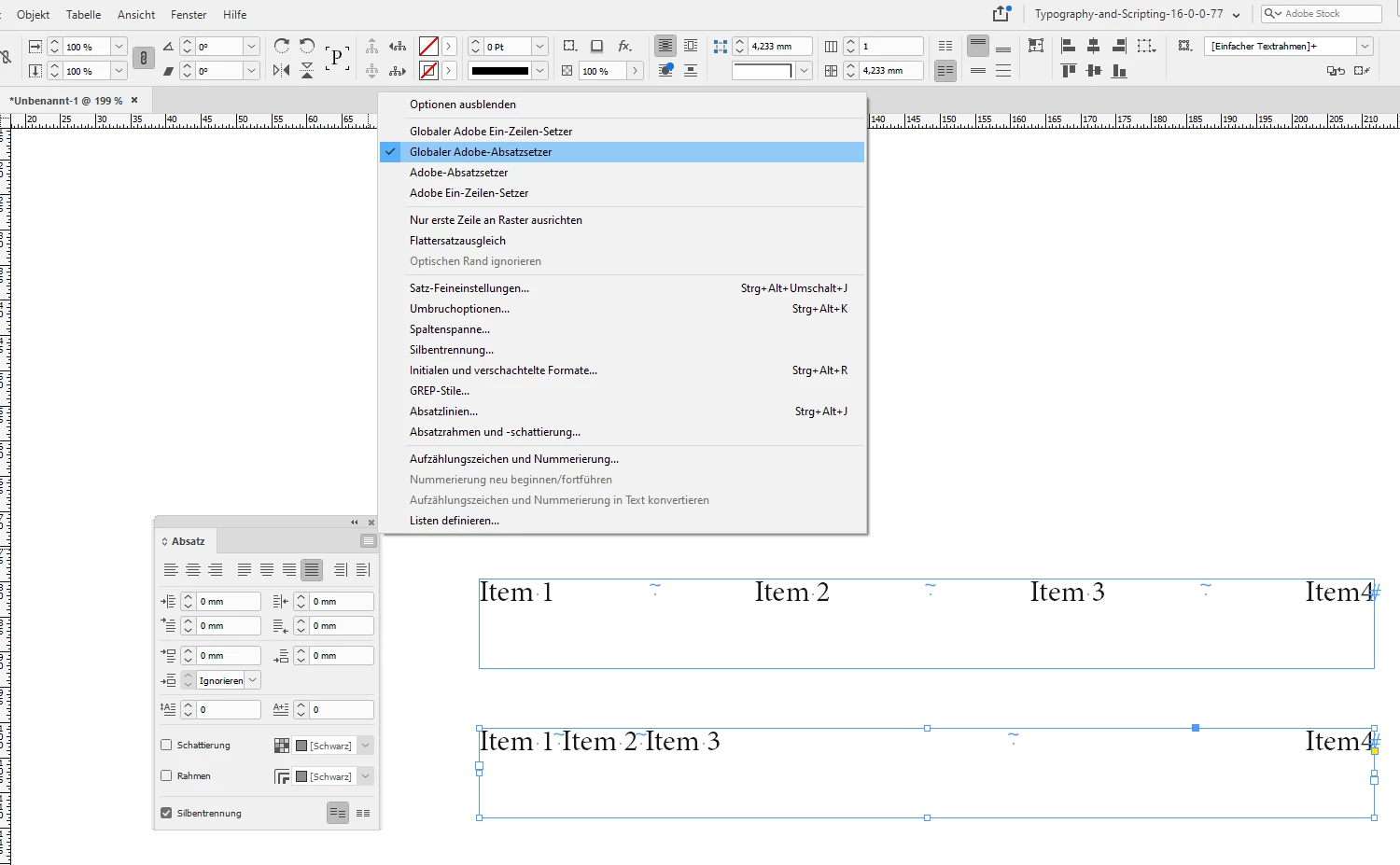
 

Screenshot is from my German InDesign 2021 version 16.0.0.77 on Windows 10.


Regards,
Uwe Laubender

( ACP )

3 replies

Participant
September 22, 2024

I also have the same problem. But I need to use the World composer because I'm using hebrew text.

Is there a way to fix it?


James Gifford—NitroPress
Legend
September 22, 2024

I'm always delighted to see anyone has discovered this useful litttle meta-character that is so badly misnamed in InDesign. (In FrameMaker and most other apps that have it, it's a "spring tab" or something that much more clearly indicates its function!)


I am hazy on why the differing composers would handle this differently — my notion is that composers only control text entry, more or less, and don't manage it after that point — but if the bug still exists, it must be for some persistent reason.


The alternate way to get the 'spring tab' effect is to put fixed spaces (em, en, sixth, etc.) within word/number groups and use full-full justification; ID will apply the same effect of expanding the regular spaces (between each 'group') to fill the line space. Some tweaking of tracking is sometimes needed as well. (Note that regular hard spaces will "spring" as well; you have to use one of ID's fixed-width spaces for this.)


As good a place as any to include this:

LaubenderCommunity ExpertCorrect answer
Community Expert
November 24, 2020

Hi Turner Design Agency,

what is the paragraph composer you are using?


Your screenshot is showing a known bug with one of the two Adobe World-Ready Composers.

Solution: Switch to the Adobe Paragraph Composer or the Adobe Single-line Composer.


Here I show the difference. On top the Adobe Paragraph Composer is used.

At the bottom you see the bug with the Adobe World-Ready Composer ( in German "Globaler Adobe Absatzsetzer" ) :


Screenshot is from my German InDesign 2021 version 16.0.0.77 on Windows 10.


Regards,
Uwe Laubender

( ACP )

Known Participant
December 10, 2020

Uwe, many thanks! thats solves the mystery...it's been driving me crazy 🐵

Barb Binder
Community Expert
Community Expert
November 24, 2020

It's working fine for me on v16. Can you double check that you actually have the flush space character in there, and that the alignment is set to Justify All Lines?


~Barb 


~Barb at Rocky Mountain Training
