
Participant
April 20, 2017
Answered

Font issues in one document only

  • April 20, 2017
  • 1 reply
  • 7635 views

Hi,

Hope someone can help me!

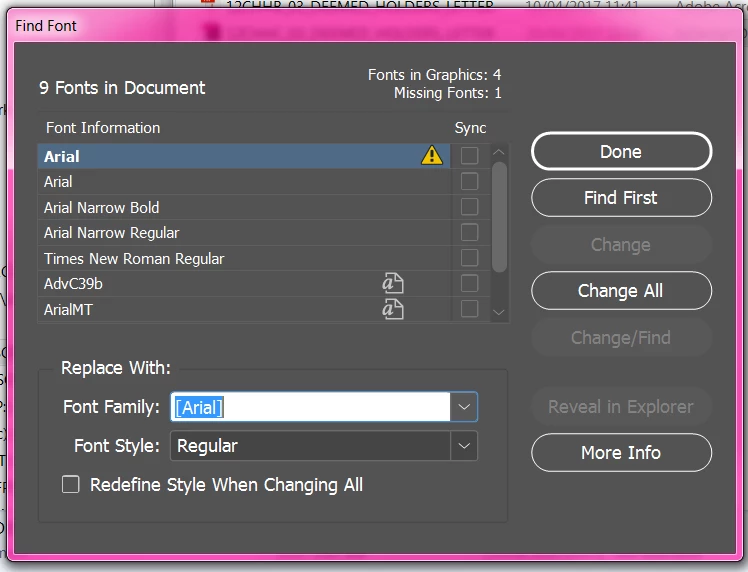
I am having issues with my fonts in one document only. It says my Arial font is missing despite the fact that it is a system font and is not turned on or off etc.

I use the 'find font' window to replace the font but no matter what font it is replaced with it will not recognize it. It just adds the [square brackets] around any of my fonts (that I know are installed correctly on computer) and says they aren't found.

I checked to see if it was a font issue but it seems to be a document issue.

I can copy the text box with "missing font" in it and past it into a another document with the same font and there is no issue in that document at all, works fine!

I have attached some screenshots

Any help would be great

Thanks guys
This topic has been closed for replies.
Correct answer Steve Werner

Could we see the Find Font panel in the document where it's working OK?

Is 'ArialMT' available in your menu to replace the seemingly missing 'Arial'?


Anytime there is an issue in one document open, you should consider it could be caused by corruption. To test, save the file as an IDML file (File > Save > InDesign CS4 or later [IDML]). Then reopen and test again.

1 reply

Willi Adelberger
Community Expert
Community Expert
April 20, 2017

It could be that you have used a font with the same name, but not the same font. Change to a font you have on your computer.

Do you really want to work with Arial? … I don't let my commends disturb you.

Participant
April 20, 2017

I only have the one Arial font and if I change the font to another font entirely it still does the same thing

rob day
Community Expert
Community Expert
April 20, 2017

If you click More Info button and you can view the font's version number. The Arial listed below the missing Arial probably has a different version number.
