Participant
October 7, 2019
Question

Font issues when copying artwork from Illustrator to InDesign

  • October 7, 2019
  • 1 reply
  • 174 views

Hi all,

I'm having some issues with artwork that I've copied from Illustrator to InDesign.

I created some exhibition banner artwork in Illustrator but the exported PDF was huge so I copied everything over to a new document in InDesign (not best practise I know, but I just needed to get it out the door!).

All of the text appeared to come over as vectors (not editable) but the printers came back to me and said that the document contains fonts that they don't have. So I've gone back in and sure enough, 'find fonts' is showing 256 fonts in the document (multiple duplicates of the same font). When I navigate to one of the instances I can't edit the text so it appears to be outlined. Here's a screenshot of the 'find fonts' window for reference.
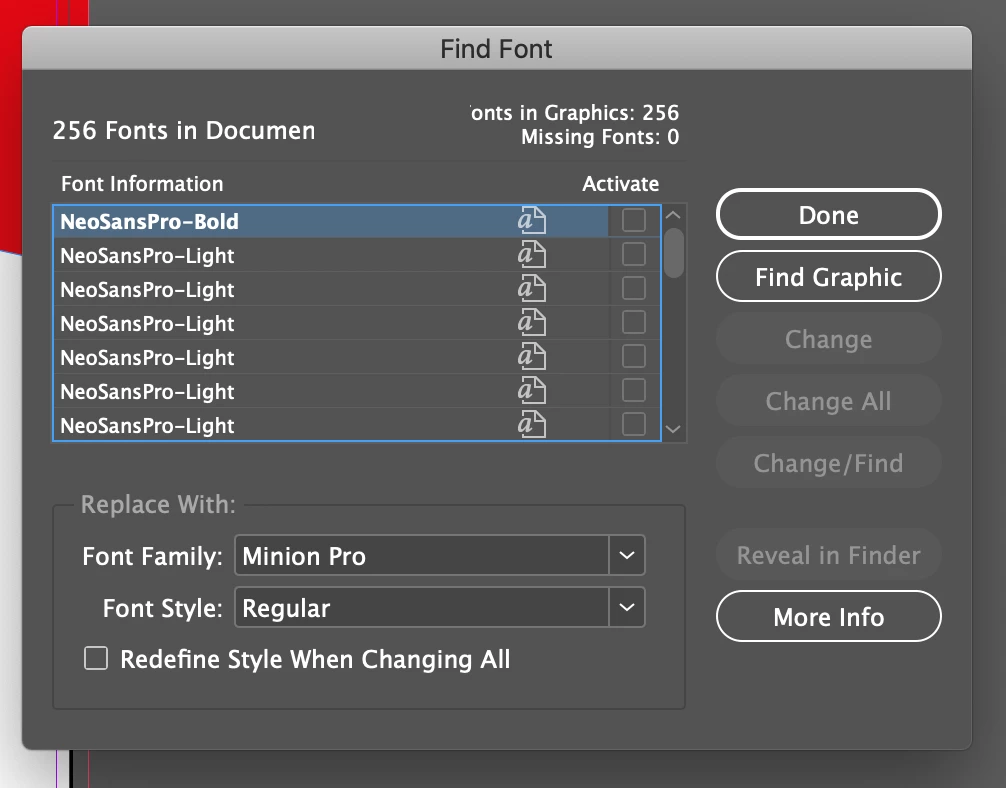


Can anyone help me figure out what's going on please?


Thanks,


Lucy

    This topic has been closed for replies.

    1 reply

    Steve Werner
    Community Expert
    Community Expert
    October 7, 2019

    You can only copy and paste small vectors from Illustrator to InDesign. Text and fonts aren't handled, nor large vector graphics.


    You should save as an AI file and place into InDesign (but then it will not be editable). You can use CC Libraries to bring text from Illustrator to InDesign. See the AI Help file below, section on Add and Share Text Objects:


    https://helpx.adobe.com/illustrator/using/creative-cloud-libraries-sync-share-assets.html


    Then use CC Libraries in InDesign to drag into InDesign.

    iglu89Author
    Participant
    October 7, 2019
    Hi Steve, thanks for your reply. That makes sense, I'll place the AI into InDesign instead of copying and pasting. Many thanks!