
Participant
January 24, 2024
Answered

Font issues with Helvetica Neue bold in InDesign

  • January 24, 2024
  • 2 replies
  • 4561 views

Since updating my computer to macOS Sonoma 14.2.1, My helvetica Neue Bold TT font shows as missing when using Indesign 2024. It is definitely installed in the Adobe Cloud.  I've tried restarting, deleting font and reinstalling. Is there anything I can do to fix this issue?
This topic has been closed for replies.
Correct answer rob day

Hi, I meant I’ve uploaded it to creative cloud.


A font stored in a directory on your Adobe account’s server would not work with InDesign, all fonts have to be stored locally—in your System font folders, the InDesign application folder,  a packaged Font folder, etc


and all the other versions of Helvetica Neue are still working


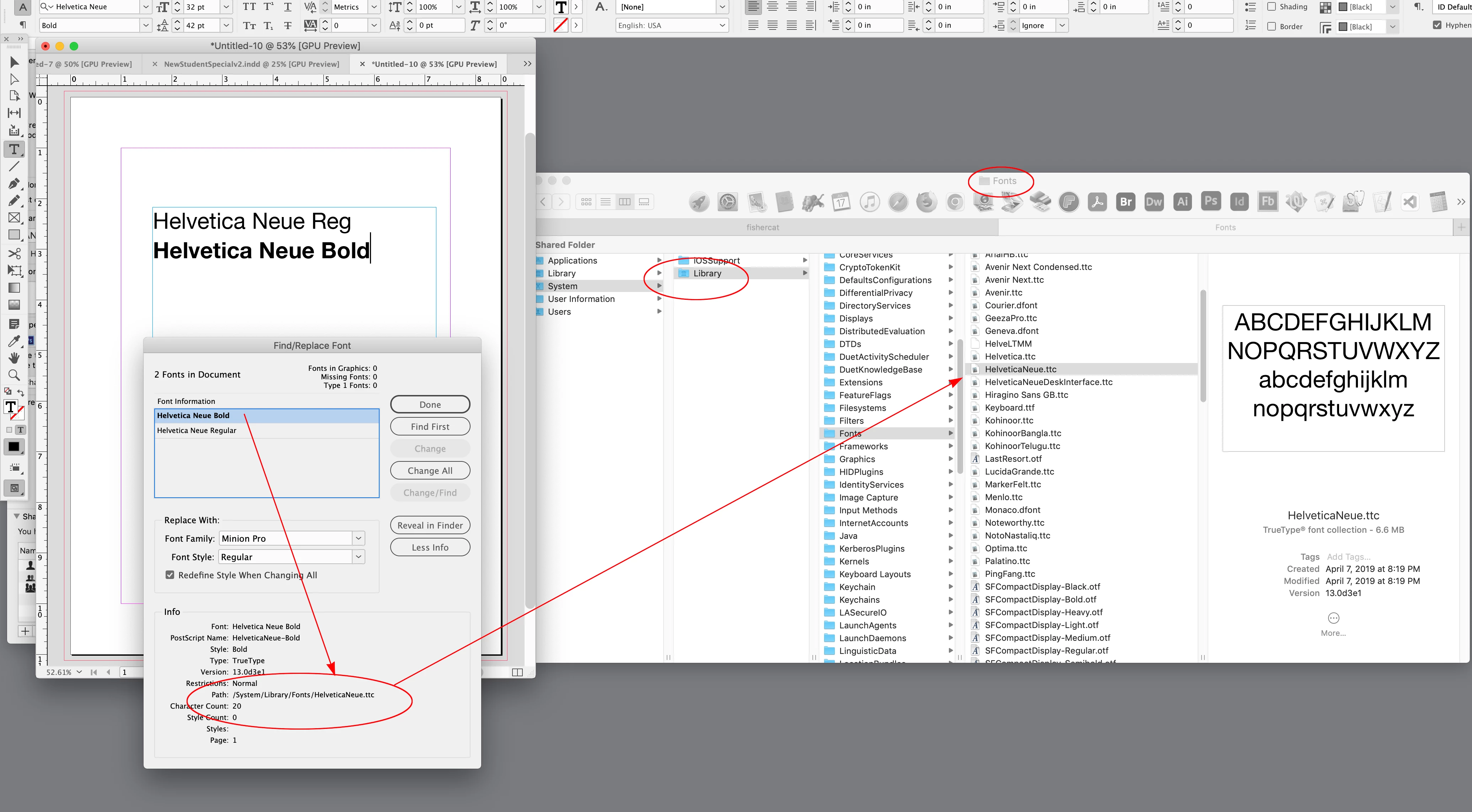
You can check the path of the working fonts via Find/Replace Font. Open a file with the font, select the font in Find/Replace Font, click More Info, and the Path will tell you where the working fonts are stored:


2 replies

rob day
Community Expert
Community Expert
January 24, 2024

It is definitely installed in the Adobe Cloud.


Hi @Debbie @ Bella , can you clarify what you mean by installed in the Adobe Cloud? Helvetica Neue is not included at Adobe Type as a subscription font, so to use Helvetica Neue Bold TT you would have to install it locally, usually in one of your system font folders.


If you did a clean install of Sonoma, rather than an upgrade to an existing system, the fonts you installed in the old system's user fonts folder would not have been installed.

Participant
January 24, 2024
Hi, I meant I’ve uploaded it to creative cloud. I’ve been using it since the cloud was introduced without an issue and all the other versions of Helvetica Neue are still working. Bold is the only one with an issue.


Debbie Pilarinos
Art Director / Beauty Editor


+61 (0)2 7209 0682
rob day
Community Expert
rob dayCommunity ExpertCorrect answer
Community Expert
January 24, 2024

Hi, I meant I’ve uploaded it to creative cloud.


A font stored in a directory on your Adobe account’s server would not work with InDesign, all fonts have to be stored locally—in your System font folders, the InDesign application folder,  a packaged Font folder, etc


and all the other versions of Helvetica Neue are still working


You can check the path of the working fonts via Find/Replace Font. Open a file with the font, select the font in Find/Replace Font, click More Info, and the Path will tell you where the working fonts are stored:


Community Expert
January 24, 2024

Some font types may not work with Apple or indeed InDesign.

https://community.adobe.com/t5/indesign-discussions/apple-unsupporting-fonts-in-2023-format-confusion/m-p/12524488#M453420


Can you clarify the exact type of font it is - can you share more info?