
Participant
October 12, 2026
Question

Font list in Paragraph Style Options is displayed too large, cannot access all fonts in the list

  • October 12, 2026
  • 5 replies
  • 22 views

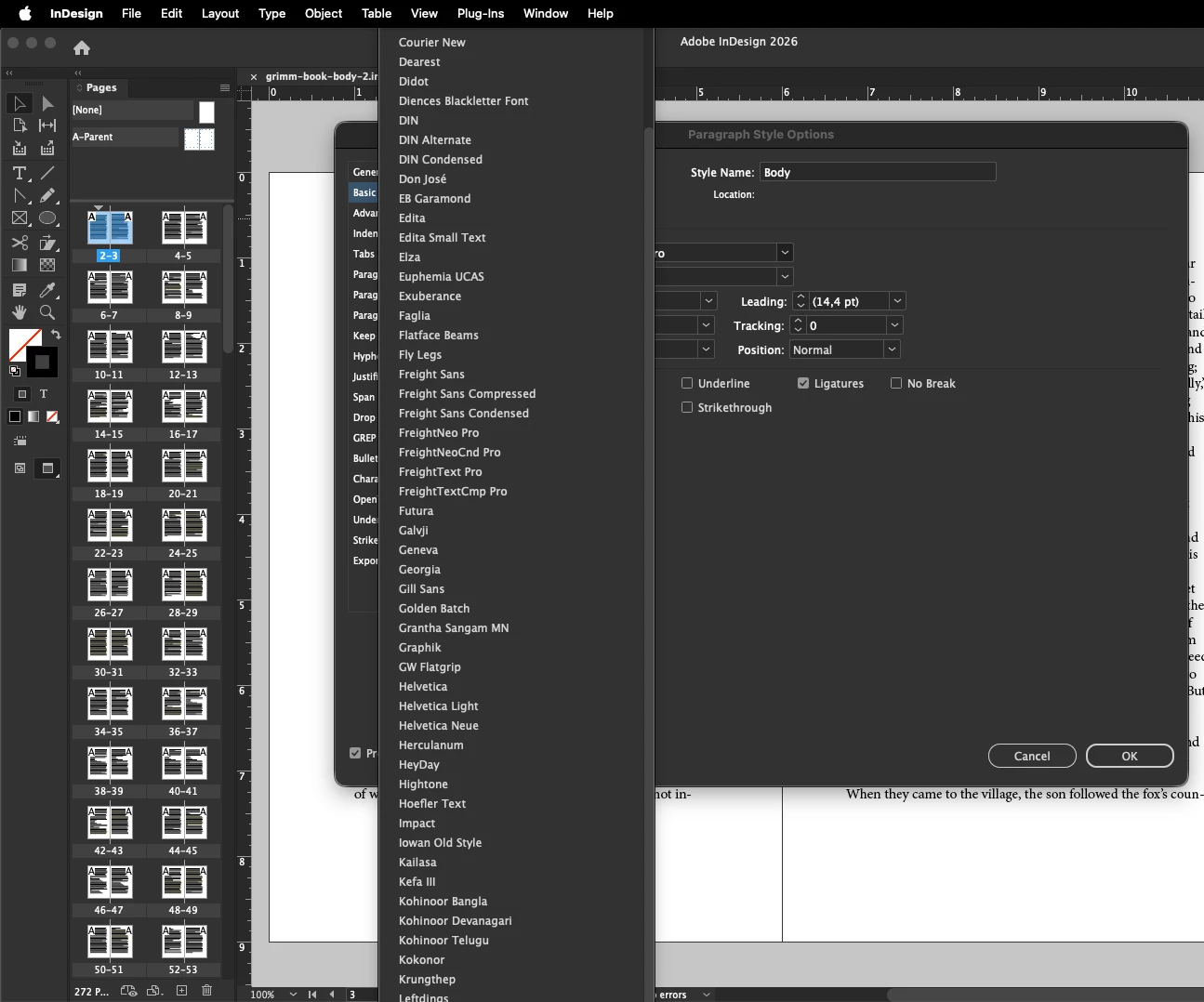
I am using InDesign 21.6 on Mac. When I open the Paragraph Style Options and I want to edit the Font family, the dropdown menu seems to be bigger than my actual screen, and I cannot scroll all the way to the end of the list. See screenshot below.

I am using a two screen setup: an external monitor as the main screen, and the built-in MacBook screen as a secondary, underneath the external one. However, the dropdown also does not extend to the MacBook screen. 

Is this a bug in InDesign or can I adjust some settings to fix this issue?

Thanks in advance! 


    5 replies

    Dave Creamer of IDEAS
    Community Expert
    Community Expert
    October 12, 2026

    Usually it will scroll at the bottom. I have multiple monitors and it does go across both even though I only have InDesign on a single monitor. IMO, it should stay restricted to the overall ID frame.

    As a shortcut, if you know the font name, it’s quicker to type in a few letters of the name and jump to it. 

    David Creamer: Community Expert (ACI and ACE 1995-2023)
    Abhishek Rao
    Community Manager
    Community Manager
    October 12, 2026

    Hi ​@Spirited_observer4b1b,


    Thanks for reaching out, and sorry to hear you're experiencing this issue.

    Could you please confirm whether this behavior occurs only when using multiple monitors or also when using the MacBook display by itself?

    Since your displays are currently arranged vertically, as a quick test, please go to Apple menu > System Settings > Displays > Arrange and temporarily position the MacBook display beside the external monitor instead of underneath it. Then reopen Paragraph Style Options > Basic Character Formats > Font Family and check whether the complete font list is accessible.

    If the issue persists, please disconnect the external monitor and test on the MacBook display alone. You can also try adjusting InDesign > Preferences > User Interface Scaling, if available.

    Please share the results along with your exact macOS version. 


    Thanks,
    Abhishek

    Participant
    October 12, 2026

    Hi Abishek, thanks for your quick response. 

    I tested it with the external monitor disconnected, and also with both displays arranged next to each other (instead of the macbook underneath the external). In both cases, the font dropdown displays properly. 

    Changing the User Interface Scaling unfortunately did not fix the issue.

    I could temporarily work with the parallel arrangement of the screens, however it’s not very convenient for me, as physically the Macbook is positioned underneath my external monitor, so it’s not intuitive for me to have the screens arranged in a different way in my system. So I would really be hoping for another fix. 

    My macOS version is Tahoe 26.6.2.

    Abhishek Rao
    Community Manager
    Community Manager
    October 12, 2026

    Hi ​@Spirited_observer4b1b,


    Thanks for testing the suggestions and sharing the results. I understand that arranging the monitors side by side isn't convenient when your MacBook is physically positioned underneath the external display.

    Could you please try two additional tests while keeping your preferred vertical setup?

    1. Go to Apple menu > System Settings > Displays, temporarily set the MacBook display as the Main Display, restart InDesign, and check whether the font dropdown behaves differently.

    2. If the issue persists, try changing the external monitor's resolution/scaling under System Settings > Displays, then relaunch InDesign and test again.

    If neither test helps, could you please share your external monitor model/resolution and a screenshot of your display arrangement? This will help us investigate the behavior further.


    Thanks,
    Abhishek