Thank you
I was there, but the search didn't find "LEFT_ALIGN".
Otherwise it looks good already, I'm still looking for inserting the sample page "doc.pages.add();"
I'm not English/American, I don't think in English ;-).
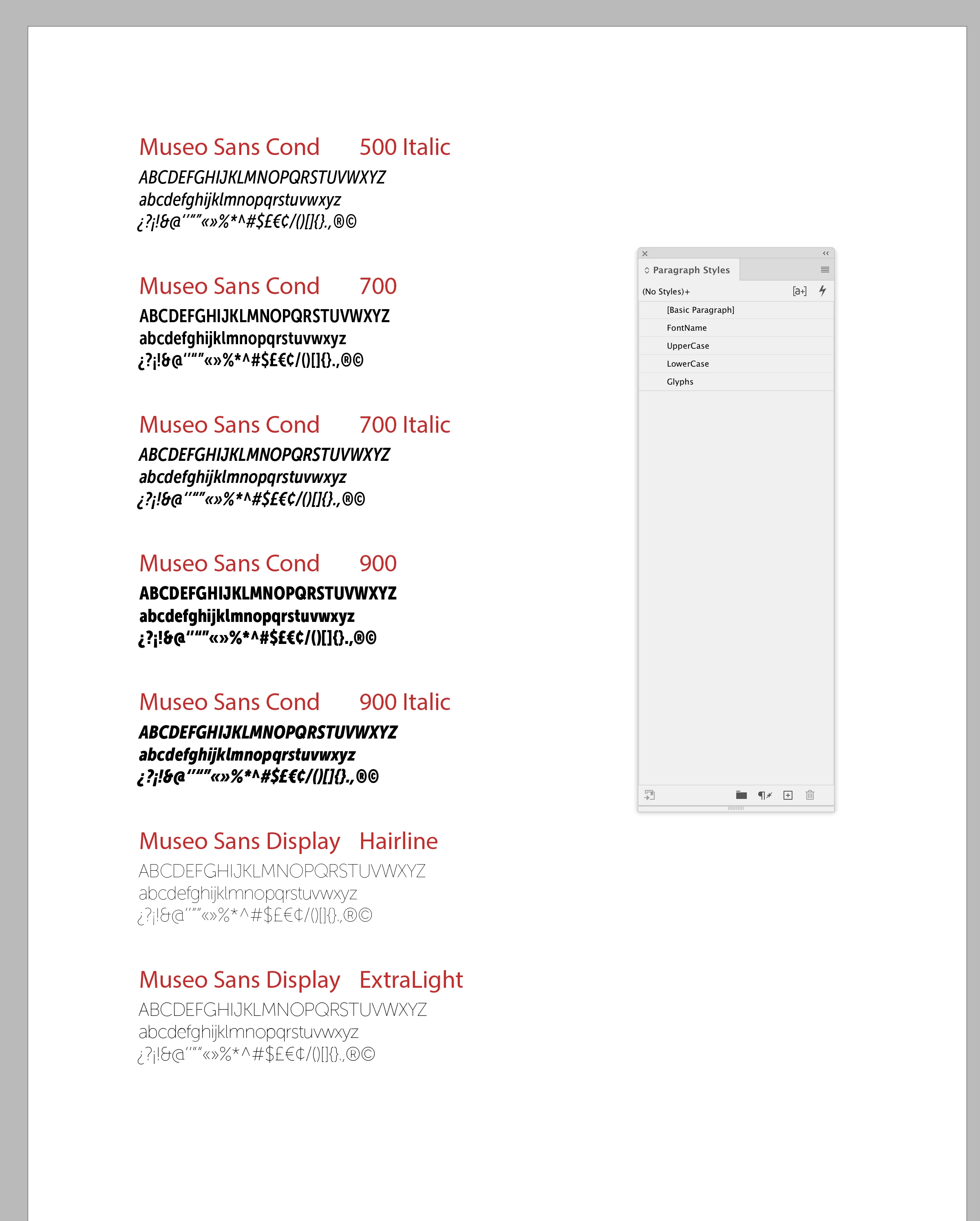
Not sure how much scripting you’ve done, but I think constucting text frames for each paragraph will be difficult. Another approach would be running text with paragraph styles applied. This gets a range of application fonts and creates styled running text :
app.scriptPreferences.measurementUnit = MeasurementUnits.POINTS;

//new document preset non facing pages with primary frames
var dp = makeDocPreset("Temp");
dp.properties = {facingPages:false, pageHeight:11, pageWidth:8.5, pageOrientation:PageOrientation.PORTRAIT, top:72, bottom:110, left:72, right:72, startPageNumber:1, createPrimaryTextFrame:true}

//make the font document
var doc = app.documents.add(true, dp);
//set the text flow preferences so the font text auto flows
doc.textPreferences.properties = {smartTextReflow:true, smartTextReflowSync:true, limitToMasterTextFrames:true, deleteEmptyPages:true};
dp.remove();

//make a swatch color for the head
var hc = makeSwatch(doc, "GGS");
hc.properties = {space:ColorSpace.LAB, colorValue:[45,60,40]}

//paragraph styles for the text
var fn = makeParaStyle(doc, "FontName");
fn.properties = {appliedFont:"Myriad Pro	Book", fillColor:hc, pointSize:16, spaceAfter:4, justification:Justification.LEFT_ALIGN, keepWithPrevious:false, keepWithNext:3};
var uc = makeParaStyle(doc, "UpperCase");
uc.properties = {pointSize:12, justification:Justification.LEFT_ALIGN, keepWithPrevious:true, keepWithNext:2};
var lc = makeParaStyle(doc, "LowerCase");
lc.properties = {pointSize:12,justification:Justification.LEFT_ALIGN, keepWithPrevious:true, keepWithNext:1};
var gl = makeParaStyle(doc, "Glyphs");
gl.properties = {pointSize:12, spaceAfter:24, justification:Justification.LEFT_ALIGN, keepWithPrevious:true, keepWithNext:0};
var sList = [fn, uc, lc, gl];

//list of fonts to get
var aList = app.fonts.itemByRange(500,700).getElements();

//set the text contents
var c = "";
for (var i = 0; i < aList.length; i++){
    c += aList[i].name + "\r" + "ABCDEFGHIJKLMNOPQRSTUVWXYZ"+"\r"+"abcdefghijklmnopqrstuvwxyz"+"\r"+"¿?¡!&@‘’“”«»%*^#$£€¢/()[]{}.,®©"+"\r"
};

//add the text
var ptf = doc.pages[0].textFrames[0].parentStory;
ptf.contents = c;

//apply paragraph styles
var sp = ptf.paragraphs;
var sc = 0;
var fc = -1;
var af;
for (var j = 0; j < sp.length; j++){
    if (getFirst(j)) {
        sc = 0;
        fc++;
        sp[j].appliedParagraphStyle = sList[sc];
        //sp[j].appliedFont = aList[fc];
    }
    sp[j].appliedParagraphStyle = sList[sc++];
    //$.writeln(sc + "   " + sp[j].appliedParagraphStyle.name)


    if (sc > 1) {
        sp[j].appliedFont = aList[fc];
    }
};


/**
* Makes a new document preset
* @ param preset name name
* @ return the new preset
*/

function makeDocPreset(n){
    if (app.documentPresets.itemByName(n).isValid) {
        return app.documentPresets.itemByName(n);
    } else {
        return app.documentPresets.add({name:n});
    }
}


/**
* Makes a new named ParagraphStyle
* @ param the document to add the style to
* @ param style name
* @ return the new paragraph style
*/

function makeParaStyle(d, n){
    if (d.paragraphStyles.itemByName(n).isValid) {
        return d.paragraphStyles.itemByName(n);
    } else {
        return d.paragraphStyles.add({name:n});
    }
}


/**
* Check for first line
* @ param the number to check
* @ return true for multiples of 4
*
*/
function getFirst(n){
    if (n%4 == 0) {
        return true
    } else {
        return false
    }
}


/**
* Makes a new named Swatch
* @ param the document to add the color to
* @ param color name
* @ return the new swatch
*/

function makeSwatch(d, n){
    if (d.colors.itemByName(n).isValid) {
        return d.colors.itemByName(n);
    } else {
        return d.colors.add({name:n});
    }
}
Sample output:

 AdChoices