
GIS Analyst 1
Participant
March 19, 2025
Answered

Font missing even after reinstalling

  • March 19, 2025
  • 4 replies
  • 702 views

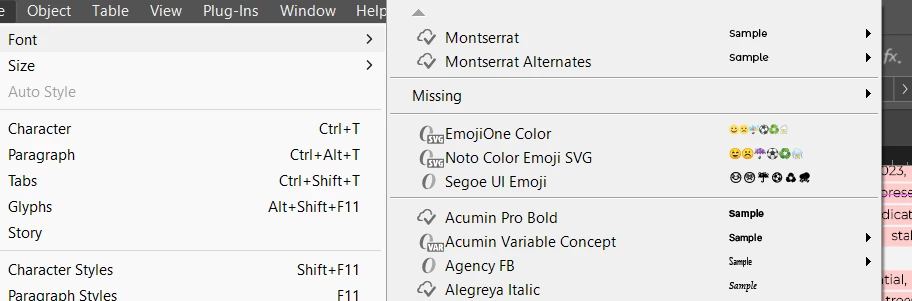
I am unsing a custom font in my InDesign projects (Monteserrat) but for somereason the font is highlighted pink as if uninstalled, even though I see it in my document (and at the top of my font list with the cloud and check mark). Please help! 


Correct answer Peter Spier

OMG THAT WORKED!!!!!


Do I need to repeat this for every project though? 


Hopefully not, but I suspect this means that you have that font installed in multiple locations. You should search your system for the fonts and make sure they are in only one place.

The reason this worked is that Indesign will always look first for a Document Fonts subfolder where the .indd file is located and use any fonts it finds there, Just as it looks first to the same folder, then subfolders, for missing links.

4 replies

Barb Binder
Community Expert
Community Expert
March 21, 2025

Hi @GIS Analyst 1:


Here's something else to note.


Montserrat is available with our Creative Cloud subscriptions as an OpenType font. Based on your first screen shot, it looks like you have licensed it (the cloud with a checkmark icon next to the name).


However,  the document shows that you are using a TrueType (TT) version. So maybe the file is looking for the TT version and you only have the OTF version?


You might try this: save a copy of the file and click on Monserrat Regular (TT) and Replace it with Font Family Monserrat Regular in the dialog box shown below. Does the pink highlighting go away for the regular style?


~Barb


~Barb at Rocky Mountain Training
Peter Spier
Community Expert
Community Expert
March 21, 2025

@Barb Binder it seems unlikely this is the problem since a copy of the font works in the Document Fonts folder...

Abhishek Rao
Community Manager
Community Manager
March 20, 2025

Hi @GIS Analyst 1,


As Dave and Barb suggested, check if the font is set to an unavailable style in Character Styles. Also, could you share a screenshot of Type > Find/Replace Font?

Please share the version of InDesign are you using? If the font shows a cloud checkmark, try deactivating and reactivating it in Creative Cloud Desktop > Fonts. If that doesn’t help, clear the font cache: Troubleshoot font issues

Let me know how it goes!


^

Abhishek

GIS Analyst 1
Participant
March 20, 2025

I uninstalled and reinstalled, when I reopened ID this is what I see: 


Im using 20.2 version of ID. 


Peter Spier
Community Expert
Community Expert
March 20, 2025

Try creating a Document Fonts (case sensitive) folder in the same folder as the .indd file and copy the fonts there.

Barb Binder
Community Expert
Community Expert
March 20, 2025

Hi @GIS Analyst 1:


Can you please grab a screen shot of Type > Find/Replace Font and post it in your reply?


~Barb

~Barb at Rocky Mountain Training
GIS Analyst 1
Participant
March 20, 2025

Thank you for your response. Screenshot below:

It says theyre all missing but if you can see in the back of my document the pink highlighted text is actually the font that it says is missing!!! so weird! 

Dave Creamer of IDEAS
Community Expert
Community Expert
March 19, 2025

Check your style format, espeically character styles. Perhaps it's set to a style that isn't available. (semi-bold, etc.)


David Creamer: Community Expert (ACI and ACE 1995-2023)