
Participant
January 29, 2020
Question

Font outline issue

  • January 29, 2020
  • 6 replies
  • 2804 views

Hi i have problem outlining fonts in Indesign. 

This is how font should look like :

This is how font looks like when i use InDesign’s transparency flattener method:
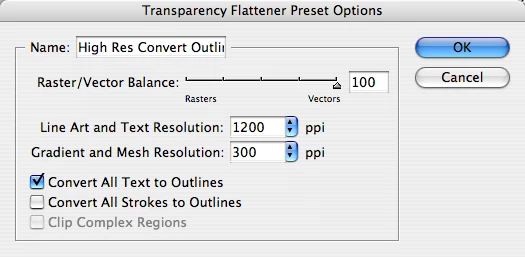
 

This is what happens:
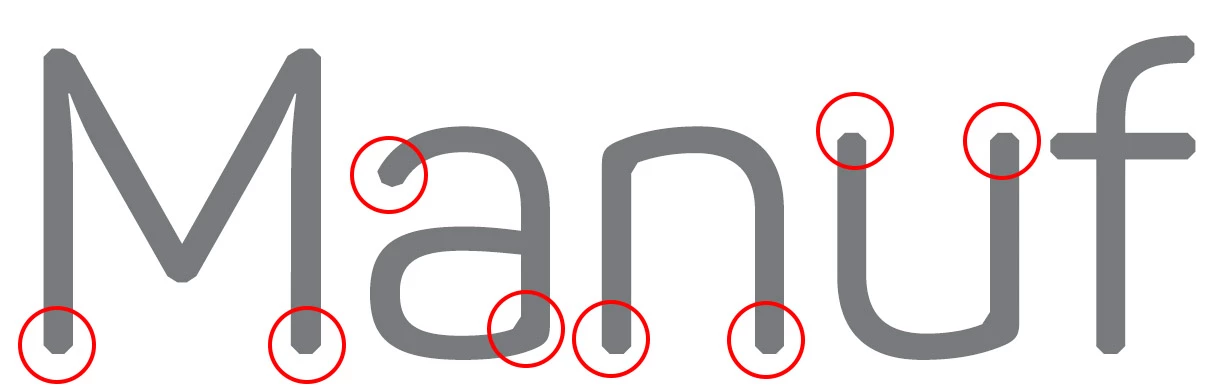
If you can see the rounded parts of the font are now sharpened and cropped. 

My question is why is that happening?


I cant use outline method by CTRL+SHIFT+O, because i have 40 pages document so i cant outline every page by one.


Thank you

This topic has been closed for replies.

6 replies

Community Expert
January 29, 2020

Don't outline fonts through InDesign.


Outline the fonts in the PDF using the PDF Preflight Tools


Kamil 123Author
Participant
January 30, 2020

Thank you sir, this finally helped

rob day
Community Expert
Community Expert
January 30, 2020

I think it’s worth keeping the outlining "requirement" in perspective. It’s a hangover from pre-PDF (1990s) workflows where missing fonts in a packaged job created huge headaches and costs—many printers have never updated their guides. I would be surprised if your PDF gets rejected if it contains embedded fonts. If there's no proof before going to press, then maybe you would not want to risk some unknown problem with embedded fonts, but then outlining could also produce some unexpected result.

Legend
January 29, 2020

Despite how it seems, transparency flattener is NOT a tool for converting text to outlines. Choosing "Convert all text to outlines" is not a way of converting all text to outlines. Only text that needs to be converted to make transparency flattening work will be converted. 

rob day
Community Expert
Community Expert
January 29, 2020

When you convert text to outlines you loose the font’s builtin hinting which is used for display or printing at low resolutions.


https://en.wikipedia.org/wiki/Font_hinting

Frans v.d. Geest
Community Expert
Community Expert
January 29, 2020

But WHY are you doing this anyway?? There is no need, and if so, do it in Acrobat Pro. But again, why? I can't think of any reason to outline 40 pages, or even 1...!

Kamil 123Author
Participant
January 29, 2020

We are sending it to China for printing, its manual for products we ship here so they need it outlined, its required.

Also when i outline it in Acrobat it makes the same issue.

Thank you

rob day
Community Expert
Community Expert
January 29, 2020

But will they actually reject the job? As long as the font doesn’t have a copyright restriction it will be embedded with the PDF. You can doublecheck the font embedding via Document Properties>Fonts

BobLevine
Community Expert
Community Expert
January 29, 2020

Why are you doing this? There is no legitimate reason for it beyond doing so for simple artistic effects. A 40 page document? Never!

Kamil 123Author
Participant
January 29, 2020

I need to export PDF for print with outlined fonts, thats why.

BobLevine
Community Expert
Community Expert
January 29, 2020

No...you need to find a new printer!

Eric Dumas
Community Expert
Community Expert
January 29, 2020

Hi,

Can you confirm the version of the software you use and the operating system you are running?

Also, can you include a screenshot of the Strokes panel with all options visible? it looks like some corner 'effect' is applied.

Kamil 123Author
Participant
January 29, 2020

Its font so there is not any strokes options applied. This is how it looks in my Indesign i havent changed anything since.

I have Windows 10 Pro and Indesign version 15.0,1, 64 bit