
francescoroto
Participating Frequently
January 8, 2018
Answered

Font size resized

  • January 8, 2018
  • 3 replies
  • 6133 views

Hi Guys

When I resized a box with some text inside the point of the font decrease, but in the field remains the original point size values (outside the brackets) as you can see in the attachment
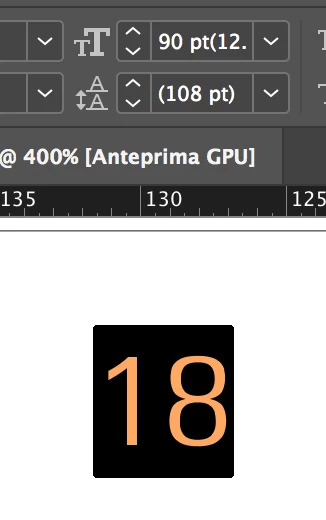
Similar problem it comes for the stroke size.... How can I reset the values?

Thanks

Francesco

    This topic has been closed for replies.
    Correct answer SJRiegel

    There is an unmarked menu in the upper right of the tool bar (three bars, under the gear). Within that menu, you can choose Reset Scaling to 100% to fix the current issue. To prevent its recurrence, make a change in your preferences under General: 

    When Scaling > Apply to Content.

    3 replies

    Community Expert
    August 11, 2020

    Hi FilamentComm,

    hm, I don't think so, because "Reset Scaling to 100%" is a feature of the Transform panel and is not related to selected text. It is a feature of frames like text frames or other objects.


    Regards,
    Uwe Laubender

    ( ACP )

    Participating Frequently
    September 15, 2020

    It does work for text.

    Make sure the selection tool is active (not sure if u have to select the text box) and hit "Redefine scaling as 100%" as described.

    If the text tool is active, the option ti redefine does not show in the menu.

    FilamentComm
    Participant
    July 23, 2020

    This would be a nice feature to have in the character panel menu...

    SJRiegelCorrect answer
    Legend
    January 8, 2018

    There is an unmarked menu in the upper right of the tool bar (three bars, under the gear). Within that menu, you can choose Reset Scaling to 100% to fix the current issue. To prevent its recurrence, make a change in your preferences under General: 

    When Scaling > Apply to Content.