Cool. So we've got some more info to work with here.
1) Since you're on a Windows system, and it sounds like the same Windows system, you've likely got those fonts on your system. So confirming you do have the fonts should be easy:
- Open File Explorer
- Navigate your way to [System Drive]:\Windows\Fonts
- Use the Search Fonts edit box in the upper right to confirm you actually have the fonts available
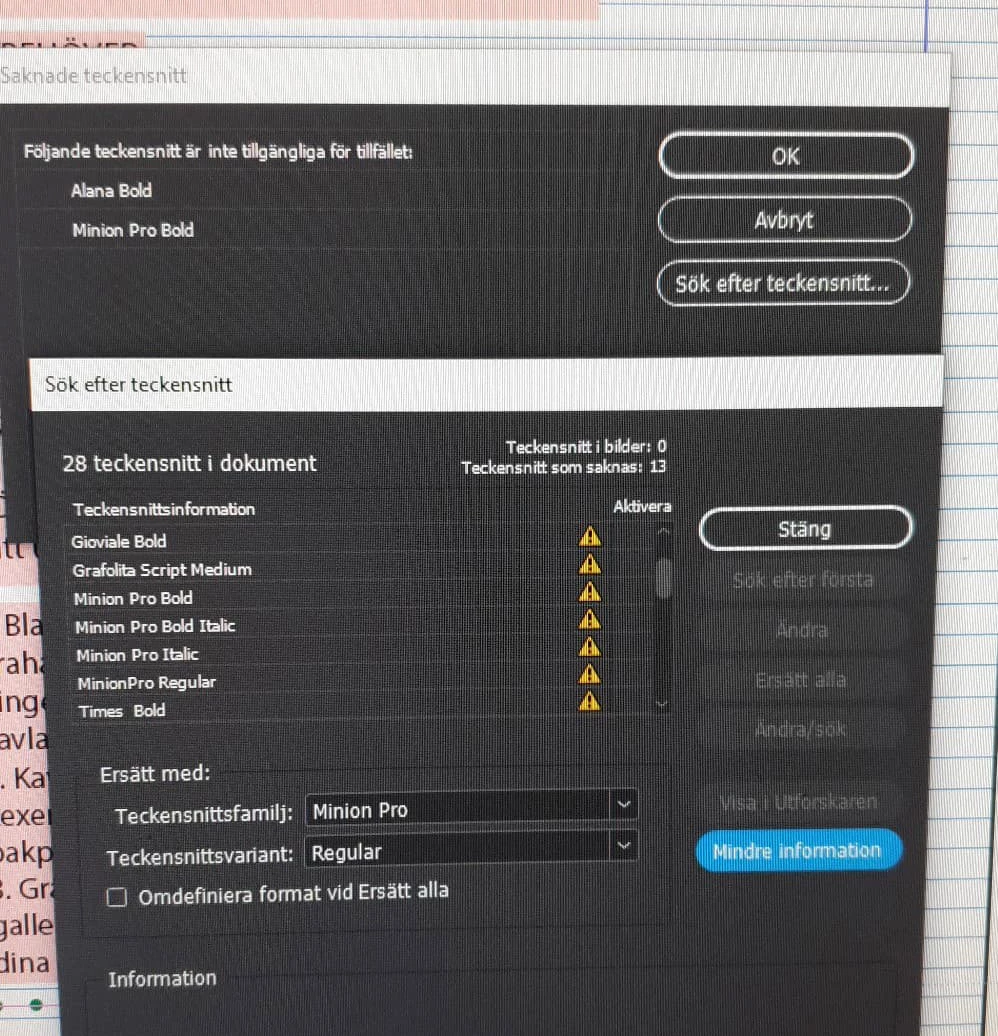
2) Once you've confirmed you have all those fonts, just match up and update the problem alerts in your Sök efter teckensnitt panel:
- Select the alerted lines in the Teckensnittsinformation options box one by one, then
- In each instance, find and match the listed font in the Teckensnittsfamilj: options box and select the corresponding weight in the Teckensnittsvariant: options box. After the correct association is selected, click the Ersätt alla button to replace all incidence of the selected font in the file(s)
- Repeat the process until all the yellow alert icons are gone
3) Once you get rid of all the alert icons, click the Stäng button, then select the File>Save menu command for each file.
This should get you past the issue.
Good luck,
Randy

 AdChoices