
Known Participant
December 2, 2024
Answered

fontStyle script

  • December 2, 2024
  • 1 reply
  • 874 views

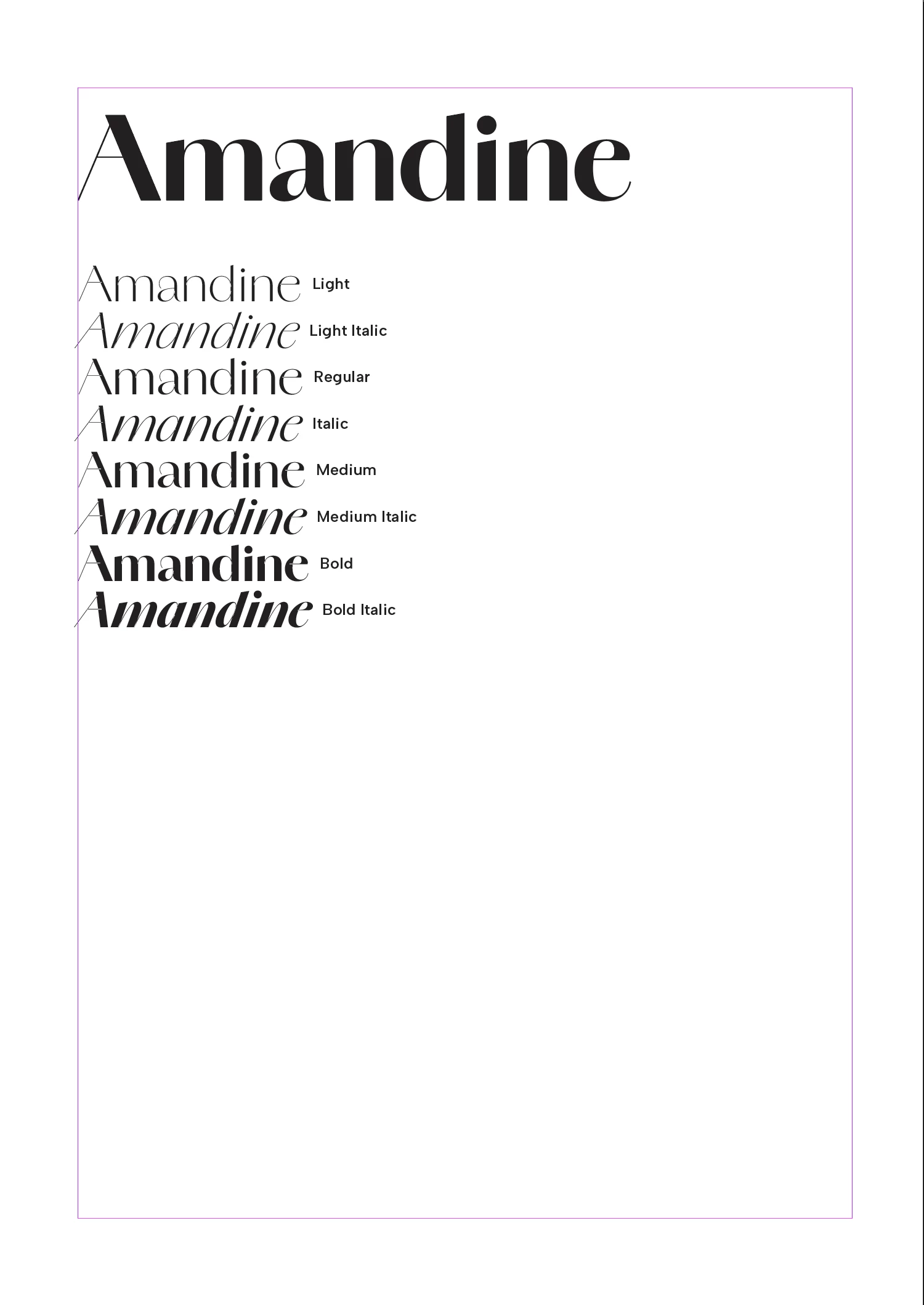
I want a  script that automatically shows every kind of styles a font has.

Here is the script I have written, but it is stuck at the first fontStyle.

Please help me with how to modify it to show all styles.

I want to make it like the attached image.


var doc = app.activeDocument;
var fontname = app.fonts.item("Amandine").name;
var fontStyles = app.fonts.item("Amandine").fontStyleName;
var fontStylelist = [];

var title = doc.textFrames.add();
var styKind = doc.textFrames.add();

title.properties = {
    contents : fontname.split("\t")[0],
    geometricBounds : [15,15,60,195],
    parentStory : {
        pointSize : 72,
        appliedFont : fontname,
        fillColor : "Black",
        fontStyle : "Bold"
    }
}   

styKind.properties = {
    geometricBounds : [60,15,150,195],
    parentStory : {
        pointSize : 30,
        appliedFont : fontname,
        fillColor : "Black",
    }    
  }

for (var i = 0; i < fontStyles.length; i++){
    fontStylelist.push(fontStyles[i].name);
    styKind.contents = fontname.split("\t")[0] + '\t' + fontStylelist[i];
    fontStylelist[i].fontStyle = "fontStyles[i]";
}

This topic has been closed for replies.
Correct answer John D Herzog
var allfonts = app.fonts.everyItem().getElements();
var fontname = app.fonts.item("Amandine").fontFamily;
...
for (var i = 0; i < allfonts.length; i++){
    if(allfonts[i].fontFamily == fontname){
        styKind.contents = allfonts[i].fontFamily +'\t' + allfonts[i].fontStyleName + '\n' ;
     }   
}

I'm a newbie to Script. It's so hard to write sentences one by one.

This works, but the other sentences in the text frame seem to be overwritten, and only the last sentence remains.  I think I don't understand the for loop properly.

How can I make all the sentences appear one by one and style each sentence?


Start the styKind.contents outside the loop with a styKind.contents = "";.

Inside the loop change the = to a += and you should get each iteration.

It is the difference between a replace and an append.

1 reply

John D Herzog
Inspiring
December 2, 2024

Your fontStyles is a string and not an array. you will need to run through all of the fonts in that font family to pull all of the fontStyleNames.

raldraldAuthor
Known Participant
December 3, 2024

Thank you!


I check the fontFamily.length is 8. 


alert(app.fonts.item("Amandine").fontFamily.length);


I've tried


var fontfamily = app.fonts.item("Amandine").fontFamily;
for (var i = 0; i < fontfamily.length; i++){
styKind.contents =     

}


But I don't know how to get each enumerator.


raldraldAuthor
Known Participant
December 3, 2024
var allfonts = app.fonts.everyItem().getElements();
var fontname = app.fonts.item("Amandine").fontFamily;
...
for (var i = 0; i < allfonts.length; i++){
    if(allfonts[i].fontFamily == fontname){
        styKind.contents = allfonts[i].fontFamily +'\t' + allfonts[i].fontStyleName + '\n' ;
     }   
}

I'm a newbie to Script. It's so hard to write sentences one by one.

This works, but the other sentences in the text frame seem to be overwritten, and only the last sentence remains.  I think I don't understand the for loop properly.

How can I make all the sentences appear one by one and style each sentence?