
Inspiring
April 19, 2021
Question

Footnote marker not styled

  • April 19, 2021
  • 1 reply
  • 482 views

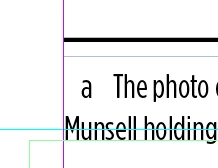
I am using lower case letters as footnote markers. They are automatically appearing as superscripts in the text, but not in the footnote itself - see screen shot. I'd like that lower case "a" to be superscript. I can't find how to change this in Type>Document Footnote Options. Can you please help me?
 

This topic has been closed for replies.

1 reply

Community Expert
April 19, 2021

Hi Marie,

you could solve that with a GREP style in the paragraph style you apply to the footnote text.

The GREP pattern would fetch a footnote marker, a special character, the applied character style would format the footnote special character. Just like that ( from my German InDesign 2021 on Windows 10 ) :


Regards,
Uwe Laubender

( ACP )