

jmendesign
Inspiring
December 28, 2024
Answered

footnote reference number in text

  • December 28, 2024
  • 2 replies
  • 1050 views

Hi all.

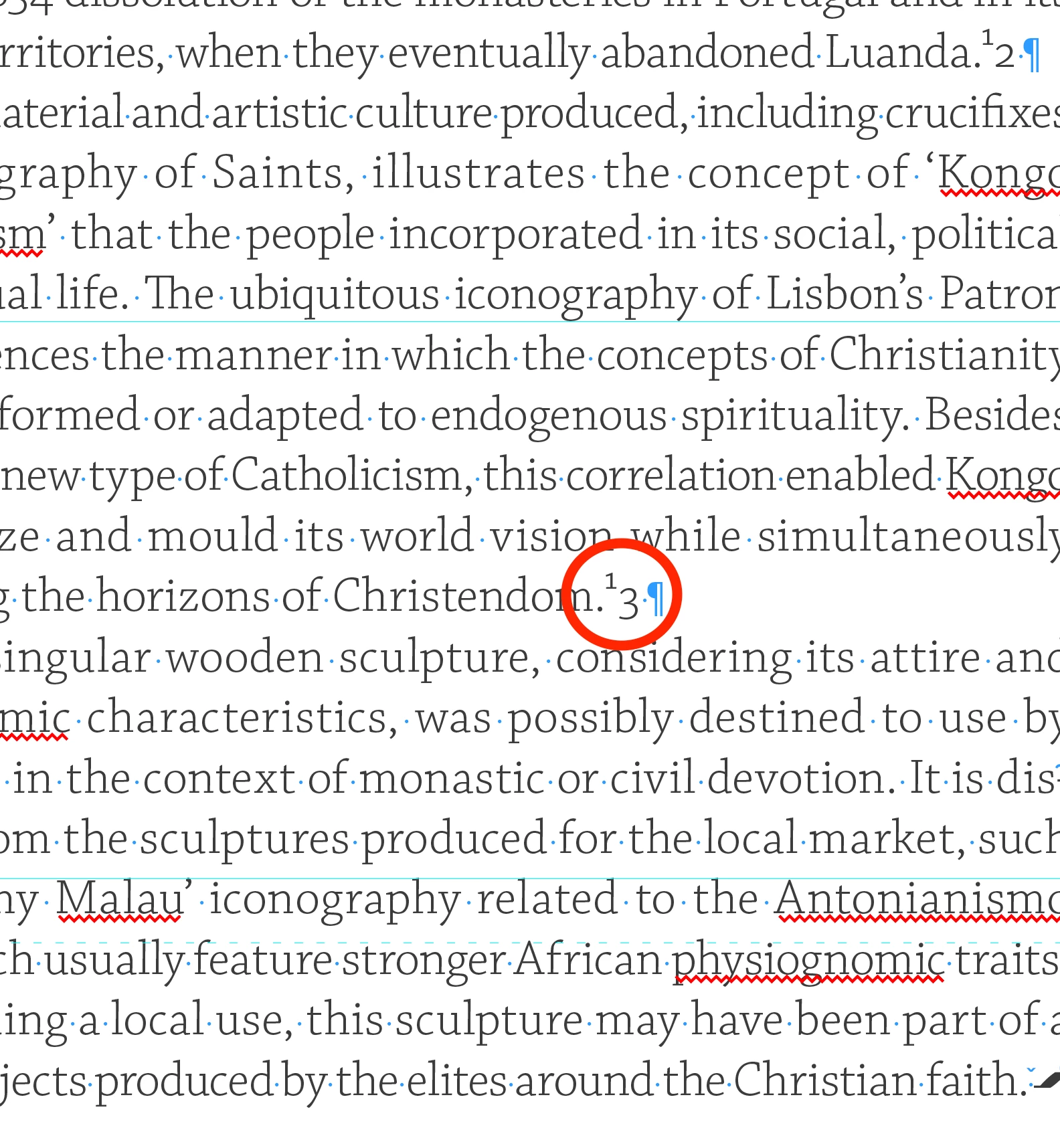
When I insert a note in the text if it has two digits (i.e. 10, 11,…), the second digit does not assume the superscript position (see image9. I've already tried checking the footnote, paragraph and character style preferences and... nothing. Does anyone have any ideas to resolve this issue—it's not the first time I've had two-digit superscripts, but this has never happened before.

Thanks.
This topic has been closed for replies.
Correct answer FRIdNGE

Right! Change the Para Style Justification to: "Adobe Paragraph Composer" or "Adobe Single-line Composer" to fix it.


(^/)

2 replies

FRIdNGE
FRIdNGECorrect answer
December 28, 2024

Right! Change the Para Style Justification to: "Adobe Paragraph Composer" or "Adobe Single-line Composer" to fix it.


(^/)

jmendesign
Inspiring
December 28, 2024

Thanks to @FRIdNGE , @Robert at ID-Tasker and also to @barbara_a7746676 . The solution is change to “Adobe Paragraph Composer”. 

barbara_a7746676
Community Expert
Community Expert
December 28, 2024

Take a look at Type > Document Footnote Options. The default should look like this:

If you are using a Character Style for the footnote, make sure it includes Superscript.

It is possible that the document is corrupt. If that is the case, select all the text and paste it into a new document. 

jmendesign
Inspiring
December 28, 2024

Hi @barbara_a7746676 
I have all the settings as you mentioned. Try the corrupted document issue... that's not the case either.

FRIdNGE
December 28, 2024

Could you post an .idml sample file?


(^/)  The Jedi