Dominique_R2
Known Participant
August 9, 2026
Answered

Footnotes in two-column layout

  • August 9, 2026
  • 4 replies
  • 56 views

Hello all,

Today I have two questions to which I haven’t found an answer by myself:

1. My usual layout has one text frame filling the whole page, but divided in two columns.

When I insert a footnote, say in the left-hand column, I want its text to remain in that same column, and not spill over under the right-and column as if I had given a Span command.

I have seen in questions already asked in this forum that some users have their footnotes behave natively just like I would want mine to behave, but I haven’t so far found a way to achieve that result.

I attach a screen capture, as a picture speaks a thousand words, or so they say...

2. is it possible to widen the space between the short separating line above the footnote, and that footnote itself? I have tried Space Before in the Footnote Paragraph Style I have created, but it doesn’t seem to work.

Many thanks to you all for your help.

Dominique

    Correct answer graphics_4075

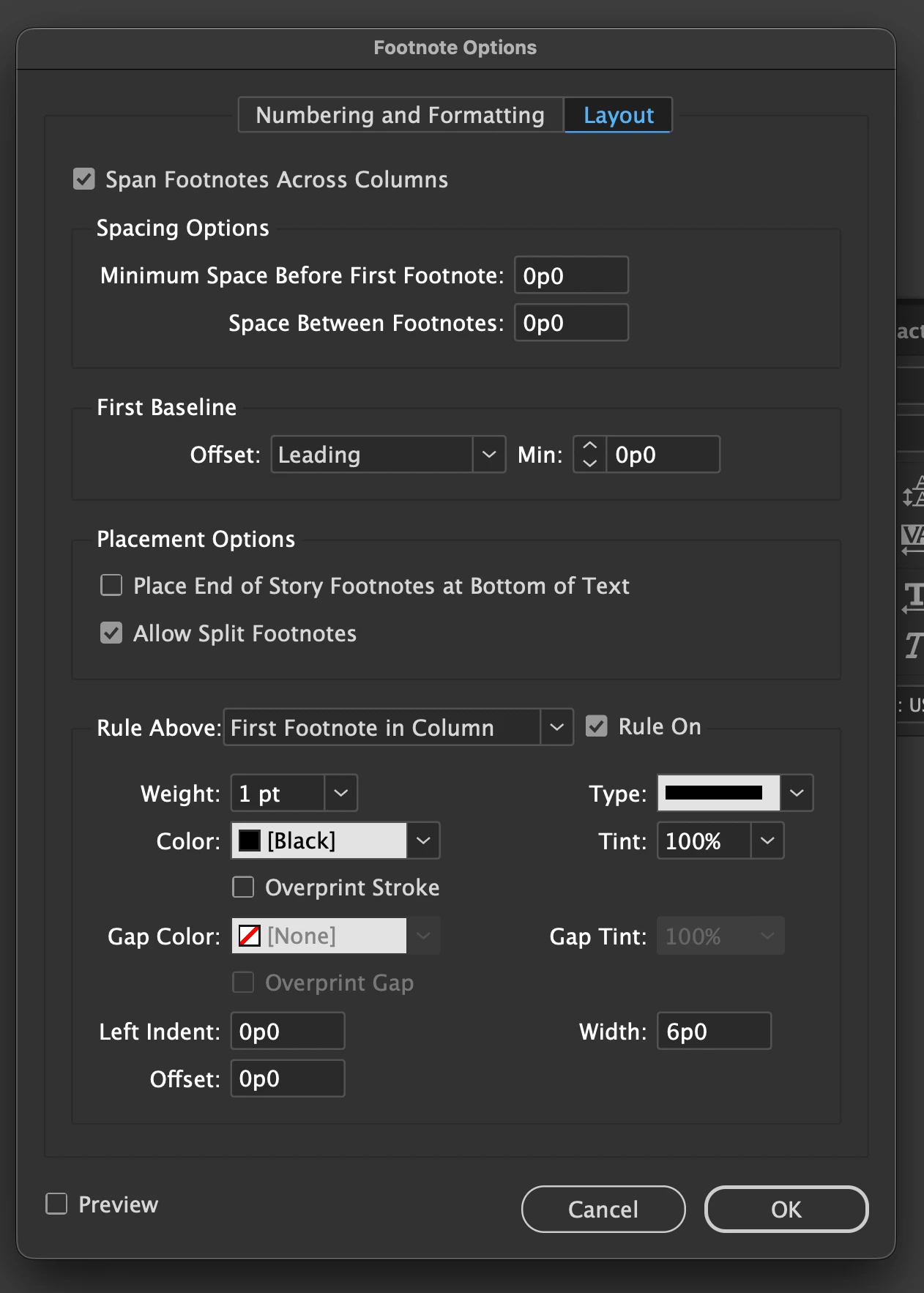
    I reread your questions and would imagine it possible you’re unaware of the footnote options panel. This should be able to solve both your issues spanning footnotes across columns and customization for space before the rule (offset)


    Found under Type->Document Footnote Options

    4 replies

    graphics_4075
    Inspiring
    August 10, 2026

    Do you have one textbox spread across the entire page? I feel like this issue could be solved if you had a 2 linked textboxes, 1 in each column instead. That way each columns footers are bound to their bounding box. Unless I am misunderstanding something this should help 

    Cheers
    graphics_4075
    graphics_4075Correct answer
    Inspiring
    August 10, 2026

    I reread your questions and would imagine it possible you’re unaware of the footnote options panel. This should be able to solve both your issues spanning footnotes across columns and customization for space before the rule (offset)


    Found under Type->Document Footnote Options

    Cheers
    Dominique_R2
    Known Participant
    August 10, 2026

    That panel definitely did the trick! It has all the settings I could dream of, and it was very easy to use. One really has to comb the menus very, very carefully as they are so loaded with useful stuff… Thanks a lot for pointing it out to me!