
Participant
May 7, 2024
Answered

footnotes - LTR/RTL multilingual text

  • May 7, 2024
  • 4 replies
  • 567 views

In formatting footnotes for a document that has dual languages, one English (left to right = LTR) and the other Arabic (right to left = RTL). The foonotes can only be formatted one way for the "rule above" for  the first footnote on a page.

The formatting for the footnotes is found in the layout tab. 


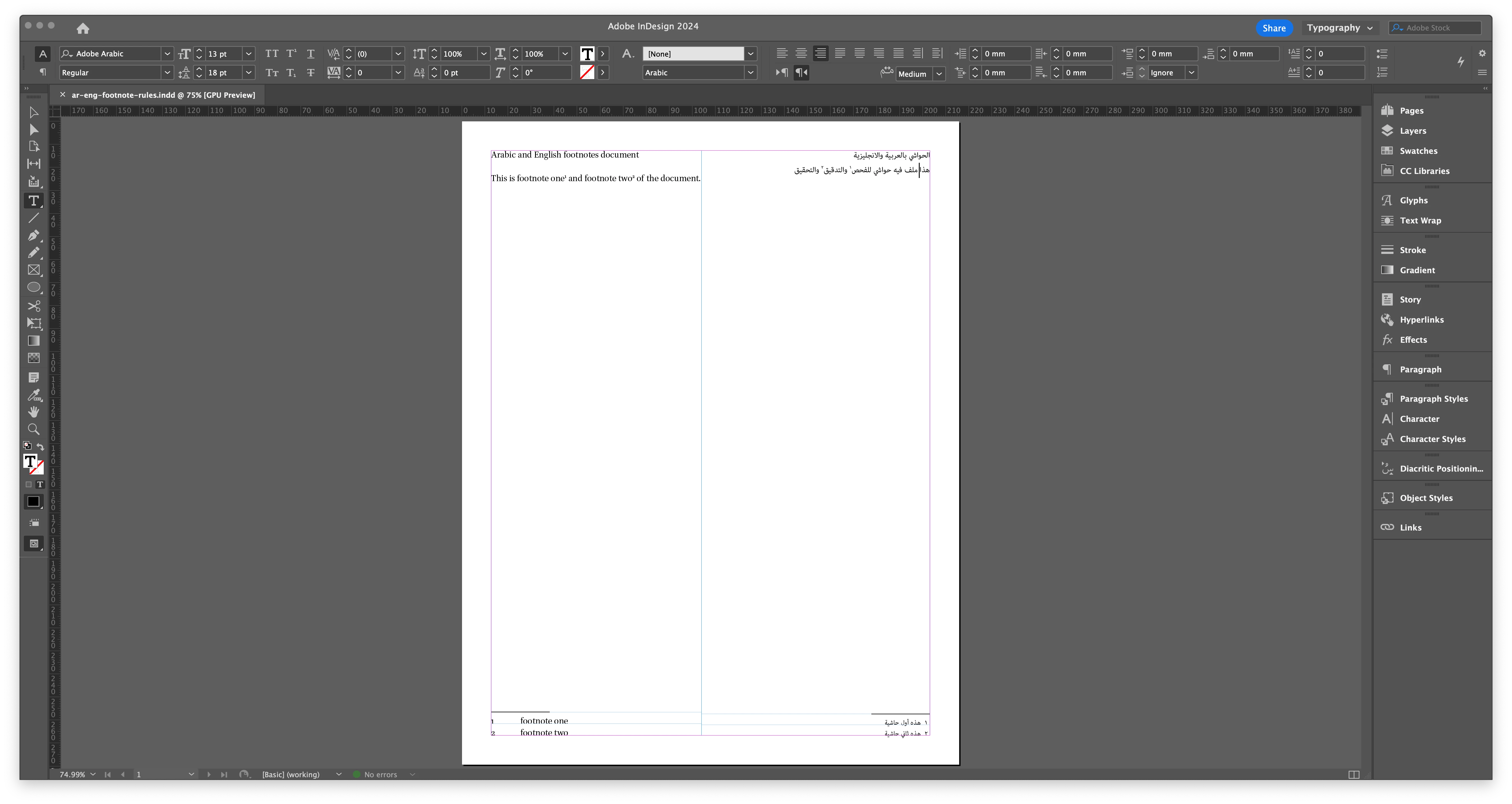
What I am trying to achieve is for the Arabic text frame to have it's footnotes have a "rule above" go from right to left and for the the English text frame to have it's footnotes have a "rule above" go from left to right.


Is there way to specify that based on either a style or a text frame? I see that there are some footnote options/ settings that are based on the text frame leve and that is not one of available options.   
 

This topic has been closed for replies.
Correct answer Muhammad23104693e70n

Thank you all for who replied. It turns out that indesign has this feature built into the system. One would have to select the correct type of text frame. Namely the text frame for the Arabic text has be ME text frame for the rule lines to go from right to left. Conversly the English language text to be in its own text frame non ME text frame for the rule lines to go from left to right. See screenshot.

4 replies

Muhammad23104693e70nAuthorCorrect answer
Participant
May 15, 2024

Thank you all for who replied. It turns out that indesign has this feature built into the system. One would have to select the correct type of text frame. Namely the text frame for the Arabic text has be ME text frame for the rule lines to go from right to left. Conversly the English language text to be in its own text frame non ME text frame for the rule lines to go from left to right. See screenshot.

Willi Adelberger
Community Expert
Community Expert
May 8, 2024

If you have not inuse both footnotes and endnotes, you can use endniotes for the sexcond language and andnotes can be places like foootnotes and have their own paragraph settings.

James Gifford—NitroPress
Legend
May 8, 2024

Create two separate documents, each with the content and formatting it needs.


Then create a third document with separate flows on each page, and place each component INDD file in opposing page flows (English on recto/right pages, Arabic on verso/left pages, I would assume works best). That would, I think, preserve the per-document settings of footnotes etc., while combining them into one combined document for flow adjustment and output.

Robert at ID-Tasker
Legend
May 8, 2024

Footnotes options are global for the document.